.svg)
.svg)
Performance Appraisal in Microsoft Teams – Your Employees Will Love It!

Updated on:
May 22, 2026

Prefer Teamflect as your HR source on Google
.svg)

Why should performance appraisals live in Microsoft Teams? According to Gallup, only 14% of employees strongly agree that their performance reviews inspire them to improve, which tells you just how broken the traditional appraisal process feels for most of the workforce.
Having this process fully embedded into your main communication and collaboration platform means connecting it to all of your development, performance management, and day-to-day conversations. In this article, we will be walking you through just how and why performance reviews and Microsoft Teams should be connected.
Performance appraisal — also called performance evaluation or performance review — is a structured process where an employee's work contributions, skills, and progress are formally assessed over a set period.
While the definition is straightforward, the process itself has many layers. A typical appraisal cycle looks like this: a quarterly check-in to align on short-term goals, a mid-year review to course-correct, and an annual appraisal that ties into compensation, promotions, or development plans.
Common formats include:
Companies use performance appraisals to measure individual contributions, identify skill gaps, reward high performers, and ultimately track whether the organization as a whole is moving in the right direction.
The traditional way of conducting evaluations is broken, often leading to low engagement and administrative headaches. Transitioning your performance appraisal in Microsoft Teams completely flips the script by embedding the review process directly into your team's daily workspace.
According to a core HR tech study reported by SHRM, a staggering 68% of employees rarely log into standalone Human Resource Information Systems (HRIS). This lack of everyday tool adoption is exactly why manual tracking fails and data slips through the cracks.
When you shift away from isolated portals and begin running your performance appraisal in Microsoft Teams, you unlock several distinct operational advantages:
By meeting your workforce where they already are, you remove the friction that typically makes evaluation cycles so painful.
Performance appraisals are a powerful tool and motivator for both employees and organizations. Here is what the data and practice actually show:
Structured feedback drives growth. Appraisals give employees a clear picture of where they stand. According to Gallup, employees who receive regular meaningful feedback are 3.6 times more likely to be engaged at work compared to those who receive little to none.
They support long-term career development. Beyond present performance, appraisals open conversations about career goals, skill-building, and future roles. This empowers employees to take ownership of their professional trajectory rather than waiting for direction.
They align individuals with organizational goals. Regular reviews create a direct line between daily work and company-wide objectives. When employees understand how their role fits the bigger picture, accountability and motivation both increase.
They inform better decisions. Appraisal data helps managers identify high performers worth investing in, address underperformance early, and allocate resources where they matter most.
They build a culture of continuous improvement. Organizations that normalize feedback cycles — rather than treating reviews as annual formalities — tend to see stronger retention, faster skill development, and higher employee engagement over time.

It’s not always easy to set a perfect performance appraisal system. Like everything has its own flaws, so do employee performance appraisals. But this time, the reasons are more defined and certain than other things.
If your performance appraisal system doesn’t succeed or give you what you need, there might be some points that you may have missed or overlooked:
Now, let’s talk a bit more about the last point. Which applications can performance management systems be integrated into? Here are some of them: Microsoft Outlook, Slack, Microsoft Teams, Gmail, Asana, Cisco Webex Teams, etc.
The most highlighted and preferred application among the mentioned ones above would be Microsoft Teams as it has more than 270 million monthly users, according to Microsoft.
📚 Recommended Reading: Learn How to Conduct 360 Performance Reviews Step-by-Step
Microsoft Teams is a huge and beneficial platform that has different purposes of use. It is considered a hub for teamwork where you can share documents, organize meetings, connect your calendar, etc. Here are some benefits of using performance appraisal software integrated into Microsoft Teams:
%2520(1).avif)
As we just checked the benefits of using an online performance review platform integrated into Microsoft Teams, now we can check some applications that you can use for performance appraisal which are also integrated with Microsoft Teams.
Teamflect is an all-in-one performance appraisal software – exclusively built for Microsoft Teams. With Teamflect, you can create goals/OKRs, organize 1-on-1 meetings, manage tasks, conduct performance reviews, and share feedback and recognitions. Teamflect is integrated into Microsoft Teams and it allows you to easily access both applications with a single username and password.
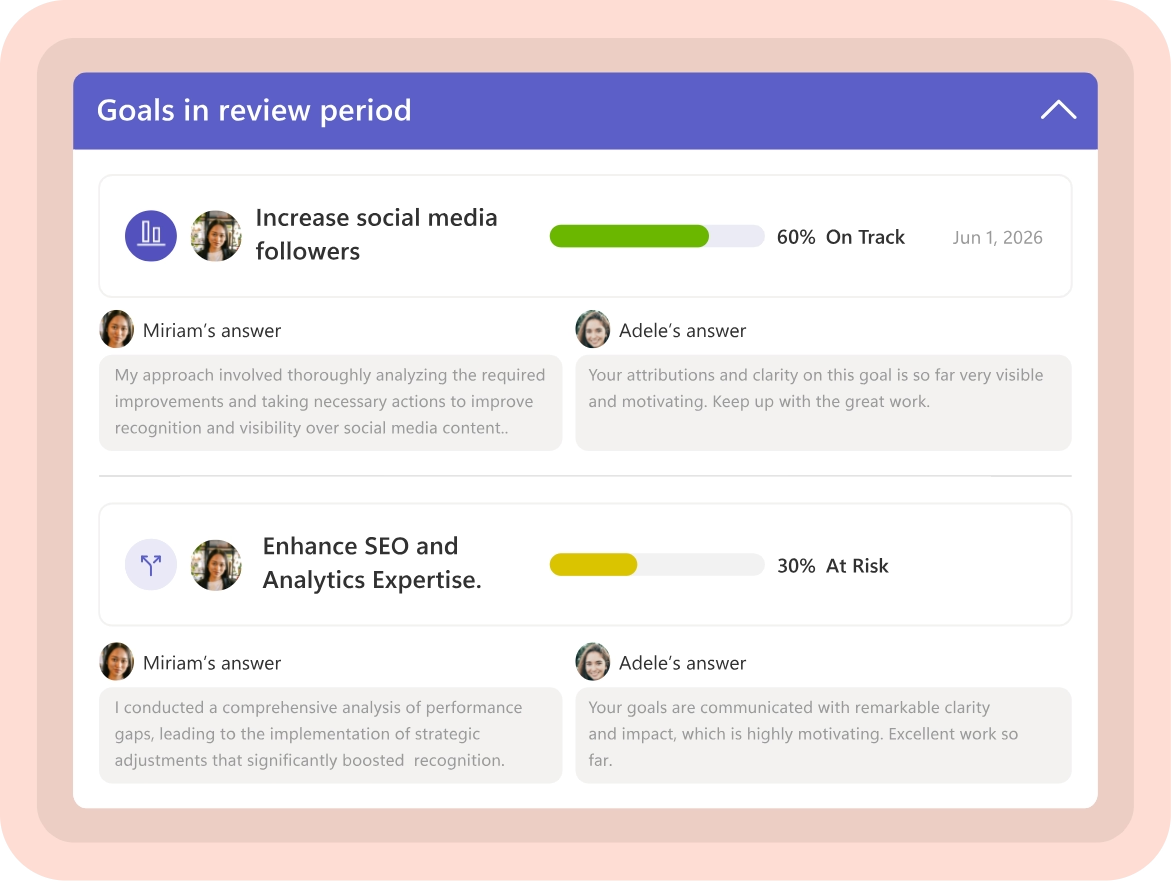
The tasks, 1-on-1 meetings, goals, recognitions, and feedback you create in Teamflect can be tracked through Microsoft Teams. In addition, with Teamflect’s Review module, you can select the review templates, reviewers, reviewees and start the cycle.
You can make your performance review process more intuitive with this tool and your employees will love it. The performance appraisal templates Teamflect offers have a self-review function that allows employees to review their own performance.
Christina Thissen
"Teamflect solved our core challenges around storing performance review notes, ensuring team members have access to them, and helping everyone track their goals."
Quantum Workplace is a software that helps managers or leaders to create a connection between the engagement and performance of their employees with user-friendly tools. Quantum Workplace’s integration provides a solution to deliver notifications of employee surveys, setting and tracking goals, real-time feedback and peer-to-peer recognition, one-on-one meetings and business impact analysis. However, this software doesn’t support single sign-on; you can only interact with bots and you can’t open the app inside the Teams application.

WorkDove is a performance management solution which has the full package of features. This solution helps to build greater teams for more effective results with recognition. You can connect your existing account in WorkDove with Microsoft Teams and you can react to the messages.

Culture Amp is also a solution which you may use but keep in mind that it doesn’t support single sign-on and you can only open it as a bot. You can’t use the application’s features if you open it on Teams as a single tab.

Microsoft Teams was built for distributed work, which makes it a natural home for remote-friendly appraisal cycles. But running fair, effective reviews across hybrid teams requires a few intentional adjustments.
Standardize the process regardless of location. In-office employees should not have a different review experience than remote ones. Use the same templates, deadlines, and scoring criteria across the board. Inconsistency breeds resentment and undermines trust in the process.
Lean into asynchronous feedback. Not every team member works in the same time zone or on the same schedule. Build your appraisal cycle to accommodate async participation — allow employees to submit self-reviews, read manager comments, and respond to feedback on their own time rather than scheduling a live review meeting as the only option.
Document performance signals year-round. Remote work makes it harder to observe contributions organically. Managers should maintain a running log of notable achievements, project outcomes, and behaviors throughout the year — not just in the weeks before appraisal season. Tools like Teamflect allow ongoing feedback and recognition to be recorded inside Teams so nothing is lost.
Watch for proximity bias. Research consistently shows that remote employees are at risk of being rated lower than in-office peers, not because of actual performance differences, but because of reduced visibility. Counter this by anchoring reviews to measurable outputs and documented goals rather than general impressions.
Use video for the review conversation — but not as a requirement. Where possible, conduct the appraisal debrief over video rather than text chat alone. Non-verbal cues matter when delivering constructive feedback. However, keep a written record of key outcomes and agreed next steps inside Teams, so both parties have a shared reference point.
Microsoft Teams, with the right additions, can function perfectly as a performance appraisal tool. With all the third-party performance appraisal tools available in the Microsoft Teams ecosystem, Microsoft Teams performance management has never been easier.
While there are many incredible performance appraisal tools available to users, the single best performance appraisal tool for Microsoft Teams is Teamflect. Making the wrong choice when going through performance appraisal tools is one of the top answers when people ask “Why do performance reviews fail?”.
Performance appraisals are quite important, but let’s face it, the applications to track performance appraisals are also as important as these evaluations themselves. Yes, you need to make regular performance appraisals in order to see the outcomes of your work or the impact of your business growth, but if you don’t use a software solution while creating and making these appraisals, it might cause irregularities.
Using digital solutions and integrations would make your job easier and quicker, providing you with a faster solution. Are you using or planning to use Microsoft Teams in your performance appraisal processes?


.svg)
.avif)

Create high-performing and engaged teams - even when people are remote - with our easy-to-use toolkit built for Microsoft Teams