.svg)
.svg)
5 Best Employee Recognition Tools for Microsoft Teams

Updated on:
January 6, 2026

Prefer Teamflect as your HR source on Google
.svg)

Working in the office has its perks such as getting recognition for your work in real-time. But there are certain things you can do to engage your workforce such as appreciating your employees via employee engagement software.
In other words, to replicate that feeling of appreciation and ensure that your employees are motivated you can use an employee recognition tool.
But, before we get into the detail, let’s talk a bit about why employee engagement is important and why an engaged employee is essential for a company.
Millions of companies worldwide are running themselves into the ground simply because their owners can’t dissipate the negative mentality making its way around the workplace.
If you want to ensure that this doesn’t happen in your workplace, employee engagement is essential.
Everyone needs involvement and appreciation to know that they are on the right track.
This appreciation promotes the perspective that a good work ethic is vital in your business and improves employee morale.
Your employees are adults, but they still have the same natural tendencies that we used to have as children. If a person pours their time into something, they are expecting some recognition in return.
By complimenting good work wherever you see it in your workplace, you’re promoting an environment of healthy competition where everyone knows that good work is appreciated.
Once your employees see enough encouragement being passed on, they will eventually want in on the action.
Therefore, your workforce will start functioning productively and working even harder to make sure that the next pat on the back is heading their way.
This will help you to improve employee engagement.
What is the difference between a good and a bad manager? Both managers run a company, and their primary mission is to ensure that their business stays afloat, but what is the critical mistake that a lousy manager makes? The answer is easy: not offering credit where credit is due.
Even though communication skills are important, business leaders have a highly effective role in preserving employee engagement and motivation.
Individuals that lead their employees mostly own an “I’m paying their salary” mentality to get the work done.
However, the amount of effort an employee will put into their work is nothing compared to what they will do for an employer they admire.
By offering different ways to engage, managers solidify their official position as a “good guy” who gives appreciation where it is deserved.
Yes, business owners are indeed paying their salaries, and managers are responsible for getting things done. But occasional ‘good work’ and frequent ‘thank you’ go a long way.
There is no denying that employees that are happy tend to stick around longer. Think of it from a different perspective:
Every employee is an asset, and you must try your best to ensure that this asset sticks around.
On average, a new hire costs around $4,129 USD in hiring and training costs and will make you lose 42 hours because of reduced productivity annually.
If your company must keep swapping old employees for new ones, that’s not good news. To clarify the importance of employee engagement, most employees in the United States indicated that they leave their jobs due to a lack of respect.
So, if you want to save all the money that a new hire will cost, one of the simplest and easiest ways would be to offer your workers rewards, employee engagement activities, and employee recognition for the effort they put in.
The long-term impact of appreciation on your bottom line is staggering. Gallup data from 2022 to 2024 reveals that employees who receive consistent, high-quality recognition are 45% less likely to leave the organization after a two-year period.
Before starting “measuring” employee engagement within the company, you need a proper definition of this concept.
Employee satisfaction is not something you can decide and plan by yourself. Instead, you will need some key indicators to dive deep into the concept and understand the levels of employee engagement.
All organizations are unique. So, you need to understand that each company requires a different employee engagement strategy. Start building your plan by asking these questions:
The second step would be finding the triggers: What are the pain points to increasing employee engagement in your company? What triggers employees’ performance?
You can simply run an engagement survey to understand their expectations — teamwork, mobility, career opportunities, or recognition? This survey may give you a more straightforward path on what your employees want and how they want it.
These employee surveys should be conducted very carefully. Quality is over quantity here, so try NOT to run basic pulse surveys frequently. Instead, find the main pain points and ask the necessary questions only.
When it comes to strategy, consistency is key. Since your company is built on a “social wheel” surrounded by many diverse individuals, answers to your questions may change in time, which forms your approach.
That is why you always need to be ahead of your time to track and update your engagement action plans to fulfill job satisfaction.
Engaging your employees is the hardest these days.
Only one day of working from home was a dream benefit for any employee two years ago, but now, most employees don’t want to go back to the office at all. So, what will you do now to keep your team engaged?
To set up a proper plan, you can start developing a recognition program within your company. Such as:
Now that you are slightly more informed on why employee recognition is important, let’s discuss how you can achieve it in a remote workplace.
Your company is probably working on Slack, Asana, Microsoft Teams, or other productivity applications during COVID-19.
To turn these apps into platforms that encourage recognition, you need the extra help of an employee recognition program.
Employee recognition is a vital part of any company’s culture. If you’re using or considering Microsoft Teams to improve collaboration and communication among your team members, an employee rewards software can help boost the value that your organization derives from this investment even more significantly.
Here are some tips on how to use a Microsoft employee recognition program:
There are countless advantages to providing regular feedback and appreciation for your workers: from heightened productivity levels to greater job satisfaction.
If you are asking yourself what are employee recognition programs, here are a few of the best employee recognition software you can use to offer appreciation and recognition in a remote workplace!
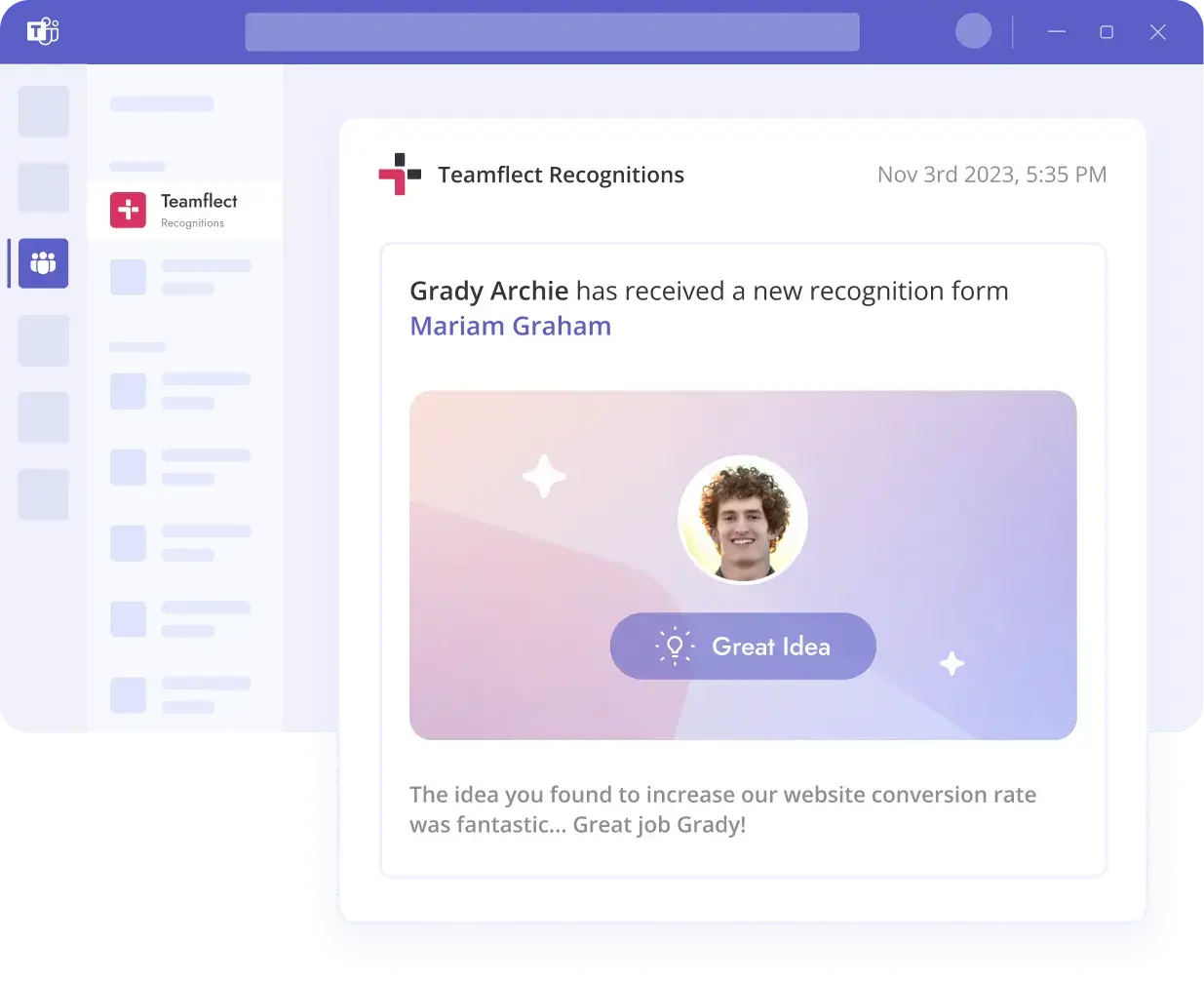
Teamflect ranks first for organizations built on Microsoft 365, especially those that operate day-to-day inside Microsoft Teams. While many recognition platforms treat Teams as an add-on, Teamflect runs entirely within the Microsoft ecosystem.

Key Features:

Stacy Ybarra
“Teamflect gave us a way to recognize people with digital badges, kudos, and even simple things like birthdays. It’s a holistic, all-in-one tool compared to the limited systems we used before”
Pros:
Cons:
Bonusly is a peer-to-peer employee recognition and rewards platform built to help companies create a more consistent culture of appreciation. Instead of recognition flowing only from managers, Bonusly enables employees to recognize each other publicly, often through a points-based system that can be redeemed for rewards.
It’s commonly used by small to mid-sized organizations that want to improve engagement, reinforce company values, and encourage more frequent recognition—especially across remote or distributed teams.
Key Features:
Pros:
“Bonusly is a cool platform because it emphasizes the power of recognition and rewards in the workplace. One of the things I like best about it is how it promotes a culture of appreciation.” — G2 Review
Cons:
“Usually frustrations are addressed quickly and professional by a Bonusly Team member but I've had struggles lately getting answers and solutions I need." — G2 Review
Bonusly believes that it’s not the job of just employers to do the appreciation. Sometimes, the most important words of endearment can come from your peers.
Bonusly opens up the rewarding culture to the employees and allows them to celebrate the work of remarkable individuals who are putting in the efforts worth recognizing.
Peers can appreciate one another and continue the good vibes in a workplace using this employee recognition tool.
Empuls Incentives is part of Xoxoday Empuls, an employee engagement and rewards platform that helps organizations run goal-based incentive programs tied to performance, participation, and behavior change. The platform also emphasizes its global rewards marketplace, which is a major part of its value proposition.
Key Features:
Pros:
“I find Xoxoday very intuitive and easy to navigate. I really appreciate the wide range of gift cards and experiences available, which offers a great variety.” — G2 Review
Here are the pros that consistently show up in user reviews:
Cons:
“I think the platform needs more customizable reporting and better ways to connect with internal systems as an admin.” — G2 Review
And here are the most common limitations reported by users across review sources:
Achievers is often positioned as an “employee experience” platform rather than a simple shoutout tool. In addition to recognition and rewards, the platform emphasizes integrations that bring recognition into day-to-day workflows.
Key Features:
Pros:
"From an application perspective, the system is user-friendly and a great tool to assist with employee engagement and productivity." — G2 Review
These are the strengths that show up most consistently in real user reviews:
Cons:
"Not all functionality is at your fingertips. You have to work towards learning how to maximize all the features available to you as a user" — G2 Review
These are the most common drawbacks mentioned across review platforms:
Kudos is an employee recognition tool that promotes building positive work relationships between actively disengaged employees. It offers a fantastic amount of support for communication, feedback on tasks, and, most importantly, recognition.
Key Features:
Pros:
“I appreciate being able to leave positive messages for my coworkers to discover throughout their week. It is easy to use and navigate.” — G2 Review
Cons:
“I wish the UI was better. It is kinda outdated” — G2 Review

Organizations use a variety of strategies to attract and retain their employees, including workplace flexibility, longer breaks, and competitive compensation.
But, employee recognition can be overlooked as a strategy to drive employee engagement. Employee recognition will not only increase engagement but also result in the following:
When you implement employee recognition you will shape the internal dynamics of your organization in a way that creates a positive work environment.
Appreciating employees for their contributions will not only serve as a motivator but also increase job satisfaction.
Furthermore, employee recognition will bring intrinsic motivation and higher morale while positively influencing your employees to excel in their positions.
When employees feel valued, they will be more likely to stay in your organization which will reduce turnover and the potential costs of recruitment.
To finish off, employee recognition is not just for being nice but it’s essential for motivating and increasing productivity to contribute to your organizational growth.
There are plenty of different avenues for employee recognition. So what makes Microsoft Teams the best medium for you to exchange recognition in your organization?
Exchanging recognition in Microsoft Teams brings with it the unique benefit of integrating employee recognition into the place where your team communicates and collaborates. So here is why you should recognize employees inside Microsoft Teams!
Employee recognition for Microsoft Teams is inherently powerful due to its seamless integration within the platform.
Recognition is at its most powerful when it takes place in a timely manner. Having your employee recognition tool integrated into Microsoft Teams allows praise to occur in real time and in the flow of work.
Whether you want to deliver a shoutout to someone during a Teams meeting or recognize someone through chat, having a recognition tool for Microsoft Teams can let you do just that.
This allows the recognition in Microsoft Teams to be instant, meaningful, and easy to deliver, as opposed to switching to an external recognition software.
When employee recognition takes place inside Microsoft Teams, you have the option to make it visible to whomever you choose. This visibility of employee praise brings with it not only a culture of transparency but also a culture of recognition organization-wide.
When successes and milestones are celebrated publicly, the individual being recognized is more likely to feel empowered and driven.
There are multiple different ways of recognizing employees in Microsoft Teams publicly. For example:
Teamflect, the best employee recognition tool for Microsoft Teams, lets users:
After all, employee recognition is not just about acknowledging success; it’s about sharing it with peers, and this can be a significant morale booster and motivator.
Everyone on your team will respond to different recognition types in a different manner. Beyond just wanting to get the best possible reactions, the aim of recognition should also be to feel genuine and sincere.
If everyone receives the same default recognition badge with the same default message, it will grossly devalue the recognition sent in Microsoft Teams.
The best Microsoft Teams recognition platforms allow for the customization of recognition practices.
Teamflect for example is a Microsoft Teams employee recognition platform where you can tailor your recognition program to fit your company’s culture and values, whether through custom badges, personalized messages, or unique recognition channels.
This particular flexibility ensures that the recognition feels sincere every single time and remains closely aligned with what your organization stands for.
So, you understand precisely why employee engagement and strategic alignment in a workplace are essential. But, if you have failed to create this employee lifecycle in your company till now, don’t worry. It’s better late than never!
You can conveniently use any employee recognition tool mentioned above to promote a positive culture within your workplace.
These platforms provide all the tools you need at your disposal to change the way your company functions.
And, if you’re looking for the best employee recognition tool among all the above, give Teamflect a shot! We’re an industry leader in the world of employee productivity tools and will be an absolute game-changer in your workspace that you didn’t know was previously possible.
Teamflect delivers recognition directly inside Microsoft Teams, allowing badges and rewards to be shared within existing workflows. Kudos operates as a separate recognition platform that integrates with Teams, meaning recognition typically happens outside the core collaboration experience.

.svg)
.avif)

Create high-performing and engaged teams - even when people are remote - with our easy-to-use toolkit built for Microsoft Teams