.svg)
.svg)
What is a Company Intranet? Examples + Best Practices + Use Cases
.svg)
0
min. read

Updated on:
June 10, 2026

Prefer Teamflect as your HR source on Google
.svg)

Keeping employees connected, informed, and engaged has never been more challenging. With remote and hybrid work reshaping the modern workplace, organizations need a central hub where teams can share knowledge, collaborate seamlessly, and stay aligned with company goals.
This is where we shift the discussion to using an intranet as your employee communication hub.
A quick disclaimer before we start: We know that when you hear the word "intranet," you probably picture an outdated, clunky system that nobody actually uses.
The reality? An employee intranet system has to be nothing like that.
Today’s intranets are intuitive, AI-powered, and deeply integrated into everyday workflows. They help businesses build stronger, more connected teams by making internal communication effortless, document management seamless, and collaboration frictionless.
So, what exactly is a company intranet, and how can it transform the way your business operates?
In this guide, we’ll explore:
Let’s dive in.
As companies invest in their digital work environments, the term "intranet" often surfaces in discussions about internal communication and collaboration. But what exactly does it mean?
An intranet is a private network exclusive to an organization, designed to facilitate secure information sharing, communication, and collaboration among employees.
An intranet platform utilizes the same IP technologies as the public internet but operates within a confined and secure environment, ensuring that sensitive company information remains protected.
One of the most common questions HR and IT leaders ask when evaluating an intranet is: Don't we already have this? We have Teams. We have SharePoint. We have Slack.
It's a fair question — and the confusion is understandable. Here's how each tool differs in purpose:
The key distinction: Slack and Microsoft Teams are built for real-time, peer-to-peer communication. SharePoint is built for file management. An intranet is built for organizational experience — the persistent, structured layer where culture lives, knowledge is stored, and employees connect with the company they work for.
Think of it this way: Teams is where you have a conversation. SharePoint is where you store the file. The intranet is where you understand the company — its news, its people, its values, and its opportunities.
The most effective digital workplaces don't choose between these tools. They integrate them. A modern intranet that lives natively inside Microsoft Teams — like Teamflect — combines the organizational experience layer with the real-time communication environment employees already live in, eliminating the need to switch contexts entirely.
The evolution of intranets is a testament to the rapid advancement of workplace technologies:
Early 1990s: With the rise of the internet, organizations began seeking ways to apply similar technologies for internal use, leading to the conceptualization of intranets.
1994: The term "intranet" was coined by Steven Telleen while at Amdahl Corporation, referring to internal networks that utilized internet protocols to enhance internal communication and information sharing.
Mid to Late 1990s: Intranets gained popularity as businesses recognized their potential to improve internal communications, streamline processes, and reduce operational costs.
2000s: The integration of advanced features such as document management systems, employee directories, and collaborative tools became standard, transforming intranets into comprehensive platforms for organizational operations.
2010s to Present: Modern intranets have evolved into dynamic, user-centric platforms incorporating social features, mobile accessibility, and seamless integration with other enterprise applications, aligning with the needs of a digital and often remote workforce.
Sources: Telleen, Steven. "Corporate Intranets: A Strategic Framework." Amdahl Corporation White Paper, 1994.
In our introduction, we mentioned that modern intranets are AI-powered. But what does that actually look like in practice? AI transforms an intranet from a passive document storage system into an active, intelligent work assistant.
The business impact of this shift is real, but only when AI is built into daily work. Many companies now use AI in some form, yet few see a measurable impact on results. The gains show up when AI is embedded into the tools people already use, not bolted on beside them. Within a modern intranet platform, that intelligence translates directly to a better employee experience:

As we can see from the timeline above, an intranet isn’t just a dumping ground for company policies and outdated memos. Not anymore. So, what exactly are the use cases for an intranet? What are the different ways in which organizations can use their internal communication hub?
Here are some intranet use-case examples:
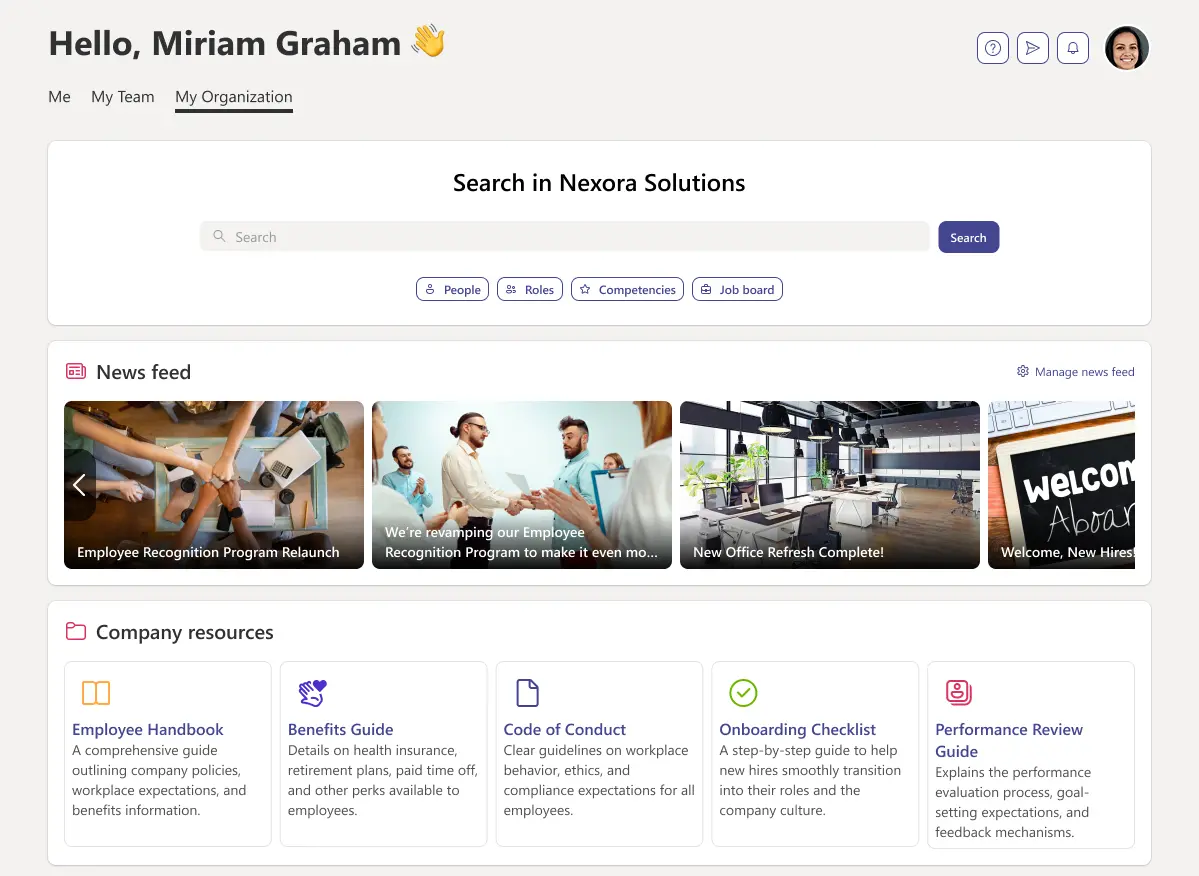
Your company intranet, first and foremost, is your organization’s central hub for internal communication.
Important news about the company, updates, and announcements can be made from a single destination, keeping everyone in the loop and aligned. A built-in company newsfeed ensures these announcements are interactive and engaging.
There is a wide array of documents your employees need access to. Some they will need under their hands day in and day out while others should be readily available and easily accessible when needed.
These documents include but aren’t limited to:
Having your intranet integrated into your current document ecosystem, such as Microsoft 365 or Google Drive, ensures that data stays synchronized without manual duplication.

Ask yourself the following question: Are you taking full advantage of your existing talent pool?
Filling openings with internal candidates is far more advantageous for your organization than going through an entire external recruitment and onboarding process.
Another key benefit is that working in an environment where the opportunity for internal mobility is proven will keep your employees engaged and invested.
There is no place better to promote internal mobility than your company intranet.
A modern intranet should come with an internal talent marketplace, letting organizations list job openings and allowing employees to apply internally.
If your intranet is fully integrated with your talent management and HRIS systems, this feature gets taken up a notch.
For example:
In the case of Teamflect, the highest-rated intranet and talent management solution in the Microsoft Teams App Store, organizations can:

Contrary to popular belief, a modern intranet is NOT a one-way internal communication tool for companies to address their employees in bulk.
Internal communication is at its most effective when it is a two-way street.
Modern intranet solutions provide employees with an easy, direct line to their organization so they can voice their concerns, suggestions, feedback, and most importantly, their complaints.
This is more than a complaints hotline. Organizations need to provide the exceptional support they offer their customers, to their employees as well.
This includes hearing their concerns and addressing them.
This process can take different shapes and forms. While surveys and feedback forms are perfectly adequate, they are a tad static.
So the best way an intranet can give a voice to your employees is through an: Anonymous Message Box.
A chat box where your employees can:
Let the company know of any complaints they might have.
While remaining anonymous if they choose to. The chat format makes sure the employees know they are being heard instead of throwing their concerns out into a void.
Not all company announcements in your newsfeed need to be actual news or updates. Your intranet is a great place to celebrate your employees.
There are multiple different ways recognitions can be integrated into an intranet in order to improve employee engagement such as:
Employee engagement and recognition programs are at their most effective when they are built to fit an organization’s culture.
Leaderboards can be a great fit for some organizations while others may choose to opt out of them.
If you have a modern intranet solution that you can customize to fit your culture, then you can simply include aspects that will work well for your organization.
A major pitfall of legacy intranets was that they only served information workers sitting at desks with corporate laptops. For retail, manufacturing, healthcare, or field service organizations, frontline workers were completely cut off from corporate culture.
According to Deloitte, an estimated 2.8 billion people make up the global frontline workforce, yet 80% of frontline employees report that their company provides few connection opportunities at work, exposing a massive inequity in the digital workplace experience.
Modern intranets solve this by removing the corporate desk requirement. By deploying a mobile-first intranet app that doesn't require a clunky VPN or a premium corporate email license to access, businesses can bridge this communication gap. This is crucial because frontline workers feel invisible to their leadership teams, creating a dangerous emotional and operational disconnect from corporate strategy.
When frontline employees can see company news feeds, acknowledge safety policies, and receive recognition right from their mobile devices, turnover drops and alignment scales uniformly across the entire footprint. This investment yields direct retention benefits: Gallup research highlights that 42% of voluntary employee turnover is entirely preventable, with a major portion of exiting workers stating that increased communication, listening, and organizational issue-solving from leadership could have kept them from leaving. By replacing fragmented legacy systems with accessible mobile tech, organizations transform invisible workers into connected, aligned, and highly motivated teams.

If everything we listed above sounds too good to be true, they shouldn’t! Because if you can access all of the above and so much more through:
Teamflect - The highest-rated employee intranet, talent management, and performance management solution for Microsoft Teams & Outlook.
When it comes to an intranet, user adoption and engagement are key. The best way to achieve that high adoption is through native integration into the tools your team uses every day.
As an Official Microsoft Partner, Teamflect offers native Microsoft Teams and Outlook integration, becoming a natural part of your main communication and collaboration platforms.
While offering key features built into the intranet such as:
Alongside extensive talent management and employee engagement capabilities such as:
And so much more! If you want to learn more, you can try Teamflect for absolutely free or learn more by scheduling a free demo where an expert will guide you through your needs and how our services can meet them!
It is downright baffling that in an era where every single organization wants to increase employee engagement, improve communication, and promote cross-functional collaboration, there is still hesitancy toward investing in a company intranet.
That hesitancy often traces back to bad experiences with the clunky, over-priced systems of the past. But the data tells a very different story about what modern intranets actually deliver.
The Productivity Cost of Doing Nothing
Before you can understand the ROI of an intranet, or start building the business case for the software, you need to understand the cost of not having one.
Framed differently: businesses effectively hire five employees, but only four show up to do productive work. The fifth spends the entire workweek hunting for files, chasing down colleagues, and navigating disconnected systems.
For a 500-person organization with an average salary of $60,000, that lost time translates to over $13 million in annual productivity drain — before accounting for the frustration, attrition risk, and missed decisions that compound the loss.
A well-structured intranet directly eliminates this waste. McKinsey research further shows that organizations with strong knowledge management systems can reduce information search time by up to 35% and boost overall organizational productivity by 20–25%.
What Early Research Found — And Why It's Even More True Today
This isn't a new finding. In a landmark analysis of intranet ROI cases across multiple industries, researcher Gerry McGovern examined how organizations were using their intranets to reduce operational costs. In the case of Nestlé Scandinavia, he found that the savings from reduced internal query calls alone were substantially greater than the investment in the intranet platform.
McGovern's broader conclusion: intranets produce more loyal, committed staff — because employees feel informed — and they create organizations more capable of adapting quickly to change.
Since McGovern published that analysis, the quality of intranet platforms has improved dramatically. The same benefits he documented now happen faster, at scale, and with measurably higher returns.
The math is simple: the cost of fragmented communication, lost documents, and disconnected employees adds up daily. The cost of a modern intranet does not.
Source: McGovern, Gerry. "The ROI of an Intranet." Gerry McGovern, 18 Nov. 2002.
Not all intranets are created equal. Some are too complex, others lack engagement features, and some may be just right but simply not right for you.
So how do you choose an intranet that actually works for your business?
The path to finding the right software solution for your team members is actually relatively universal, regardless of the tool. Whether you are looking for talent management software, a succession planning tool, or an internal communication platform, you need to ask yourself the right questions.
So here are the questions you need to answer in order to find the right company intranet for your organization:
Before selecting an intranet, ask:
1. What problems are we solving? (Communication gaps, document management, employee engagement?)
2. Who will use it the most? (HR, IT, managers, frontline workers?)
3. What integrations do we need? (Microsoft Teams, Outlook, HR software?)
As we will explore in the upcoming section, user adoption can make or break any software used in the workplace. It doesn’t matter how many impressive features your company intranet has if your employees aren’t going to use them. So the next set of traits you need to look for should be:
Engaging: Is the system an environment your employees will want to spend time in? Fun isn’t a factor that is considered much when selecting workplace software but when it comes to your internal communication platform, being engaging is a key variable in user adoption.
The last thing your employees need is another app they need to periodically go out of their way to check on. A good intranet doesn’t replace your existing tools or divert traffic away from them. It enhances them.
Microsoft 365 & Google Drive: You need to make sure that your intranet can sync with your document ecosystem.
Microsoft Teams & Slack: Your company intranet should live in the same ecosystem as your main communication platform. Where your employees chat, is where they should be able to access the intranet.
HR & Performance Management Software: Having your HR solutions and intranet connected doesn’t just save your team the pain of drowning in software. It also allows useful features such as individual development plans, career paths, rewards and recognition to be connected to your intranet.
The reason integration is non-negotiable comes down to behavior: employees won't voluntarily add another tab to their day. Research on digital workplace adoption consistently shows that tools not embedded in existing workflows are ignored within weeks of launch — regardless of how many features they offer. This is exactly why native integration into platforms like Microsoft Teams or Slack isn't a nice-to-have; it's the primary driver of long-term intranet success.
For HR leaders and IT decision-makers, security isn't just an IT checkbox — it's a business risk question. Your intranet will house sensitive employee data, internal communications, HR policies, and potentially payroll-adjacent information. A misconfigured or under-secured platform creates real liability.
Here's what to verify before signing any intranet contract:
Authentication & Access Control
Data Protection
Compliance Certifications: Look for vendors that hold independent, third-party certifications, not just self-reported claims:
Even the best intranets can fail if they aren’t implemented correctly. Here are the biggest challenges companies face when implementing an intranet and how to fix them.
The problem: Employees ignore the intranet because it’s clunky, irrelevant, or hard to use.
The fix:
Choose an intuitive intranet with personalized dashboards.
Ensure executive buy-in, so leadership sets an example.
Integrate it into daily workflows (Check out: Teamflect Microsoft Teams integration).
Research by Nielsen Norman Group — the gold standard for intranet usability research — consistently finds that intranet adoption collapses when platforms aren't integrated into employees' daily workflow.
The problem: Employees see the intranet as a one-way communication tool, not a collaboration space.
The fix:
Add social features (likes, comments, recognition tools).
Create employee communities & discussion forums.
Gamify engagement with leaderboards & incentives.
According to McKinsey, engaged employees are 20–25% more productive than their disengaged counterparts — and social, collaborative intranet features are among the highest-leverage tools for driving that engagement at scale.
The problem: Employees feel overwhelmed by too many updates and notifications.
The fix:
Personalize feeds to show only relevant updates.
Use push notifications sparingly to avoid fatigue. s
Implement smart filters to organize information better.
65% of employees feel overwhelmed by too much workplace communication.” — Harvard Business Review
Choosing the right software is only half the battle; launching it successfully is where the real work begins. To ensure your organization beats the odds and drops straight into the successful minority, you cannot treat deployment as a simple IT installation. McKinsey research reveals that companies are more likely to succeed in digital workplace transformations when they use active piloting, structured prototyping, and clear phase modeling.
In fact, foundational empirical research published in the Journal of Systems and Software demonstrates that long-term user adoption relies on a balanced ecosystem, proving that true platform success requires aligning four critical frameworks: Technology, Organization, Management, and the Top Manager–User dynamic.
To structure your launch for maximum engagement, follow this four-phase deployment roadmap.
Before building anything, you must establish a clear strategic foundation. This initial phase focuses on aligning your stakeholders and aggressively cleaning up your data.
With a clean slate, you can begin structuring the digital workspace. This phase focuses entirely on user experience, findability, and data security.
A beautiful system is completely useless without a compelling reason to visit. This phase focuses on driving community engagement and establishing distributed ownership before the platform officially goes live.
The initial launch is not the finish line—it is the beginning of an ongoing optimization process to keep the platform valuable. McKinsey’s research underscores this, finding that transformation success rates increase 3.5-fold when companies continually communicate outcomes and track progress post-launch.
Companies are more than amorphous corporate entities. They are living, breathing, ecosystems with a complex nature that keeps getting more intricate every single day.
Single departments can span continents, given how spread out their employees are. Not to mention that departments regularly remain isolated anymore with cross-functional teams becoming more of a necessity than a luxury.
All these changes are absolutely positive. The modern workplace and the fact that it breaks every old-fashioned corporate mold is fascinating.
That being said, in these circumstances, keeping your employees connected and implementing a sense of community among them is now more important than it ever was before.
The company intranet is an indispensable tool in that regard. As we have explored in this article, the existing research into the use of intranets prove just how valuable of a tool they can be in improving employee engagement and boosting productivity, if they are applied and implemented correctly.
We hope this ultimate guide that covered everything from the definition of a company intranet, all the way to what a modern intranet solution should include and how you can find the right intranet application for you was helpful.
If your organization is in the Microsoft App Ecosystem, then we have to reiterate that the best option, beyond the shadow of a doubt, is Teamflect! We would love to jump on a quick call and walk you through it!

.svg)
.avif)

Create high-performing and engaged teams - even when people are remote - with our easy-to-use toolkit built for Microsoft Teams