.svg)
.svg)
10 Best Gusto Alternatives in 2026: Features & Reviews

Updated on:
January 30, 2026

Prefer Teamflect as your HR source on Google
.svg)

Gusto serves small to mid-sized businesses with reliable payroll processing and HR management. While Gusto has recently expanded its offerings, teams are still often driven to look beyond Gusto for solutions that address other specific limitations.
These limitations include basic performance management features, lack of native integration with collaboration platforms like Microsoft Teams, or if they experience technical problems or bugs related to the recent update.
This guide examines the top 10 Gusto alternatives, comparing features, pricing, and use cases to help you find the right payroll and HR solution. Whether you need global hiring capabilities, comprehensive employee engagement tools, or native Microsoft 365 integration, these alternatives address the gaps that drive teams to look beyond Gusto.
For organizations using Microsoft 365, Teamflect offers complete HR and performance management capabilities within Teams, eliminating the workflow disruption that standalone platforms like Gusto create when managing modern workforce needs.
While Gusto is a powerhouse for domestic payroll, the shifting landscape of work in 2026 has pushed many organizations to look for more specialized or integrated solutions. According to Gartner, organizations that successfully embed their desired culture into daily work—rather than treating it as a separate administrative task—see a performance boost of up to 34%. This drive for deeper integration is a primary reason teams are outgrowing standalone payroll tools.
Teams generally seek Gusto alternatives for the following reasons:
| Product | Starting Price | Free Trial | Best For |
|---|---|---|---|
| Teamflect | Free (up to 10 users) | Yes | Microsoft 365 teams |
| Deel | $10/user/month | Yes | Global payroll and compliance |
| Playroll | Custom pricing | Yes | Global payroll & distributed workforces |
| Rippling | $8/user/month | Yes | HR, IT, and finance integration |
| RUN Powered by ADP | Custom pricing | Yes (90 days) | Multi-jurisdiction tax filing |
| BambooHR | $10/user/month | Yes | Small to mid-sized businesses |
| RemoFirst | $199/user/month | Yes | Budget-conscious remote teams |
| Multiplier | $40/user/month | Yes | Minimizing payroll complexity |
| Namely | Custom pricing | Yes | Customizable HR with analytics |
| Patriot Software | $8.50/user/month (for 3 months) | Yes | Affordable payroll for small businesses |
| Paychex | Custom pricing | Yes | Comprehensive payroll and HR |
Gusto is a cloud-based payroll and HR platform designed for small to mid-sized businesses in the United States. The platform combines payroll processing with benefits administration, time tracking, and basic HR functions in a single interface.
Key Features:
Pros: "The wide range of features it offers, along with its ability to integrate with other applications, has made our HR, benefits, and payroll processes much more efficient." - G2 Review
Cons: "Not excellent support for late payroll (limited to no options), classing labor is not a very effective tool for timesheets yet, other documentation is overly simple." - Capterra Review
Organizations look for Gusto alternatives due to several limitations that become apparent as businesses grow or require specialized capabilities:
Gusto focuses exclusively on U.S.-based payroll, creating challenges for companies hiring international contractors or employees. Teams with remote workers in multiple countries need platforms that handle global compliance, multi-currency payments, and local tax requirements.
While Gusto includes basic HR functions, organizations needing comprehensive performance tracking, continuous feedback systems, or structured goal management find the capabilities insufficient. The platform works well for payroll but lacks depth in talent development and employee engagement.
Companies invested in Microsoft 365 or other collaboration ecosystems find Gusto's standalone approach creates workflow friction. The constant app-switching between payroll systems and daily communication tools reduces efficiency and makes performance management feel disconnected from regular work.
As companies grow beyond 100 employees, Gusto's feature set may not scale with increasing complexity. Organizations requiring advanced reporting, custom workflows, or sophisticated talent management often outgrow what Gusto provides.
Gusto excels at payroll but functions more as a payroll processor with HR features rather than a complete talent management platform. Companies needing robust applicant tracking, learning management, or comprehensive analytics typically supplement Gusto with additional tools, increasing both cost and administrative burden.
Businesses expanding globally hit immediate roadblocks with Gusto's U.S.-only focus. Managing international payroll, understanding different types of HRIS systems for global operations, and handling compliance across multiple jurisdictions requires platforms built for worldwide workforce management.
.webp)
Teamflect is a comprehensive performance management and HR platform built specifically for organizations using Microsoft 365. Unlike Gusto's standalone payroll approach, Teamflect operates natively within Microsoft Teams and Outlook, creating a unified workflow for performance reviews, employee engagement, and talent management.
Organizations switching from Gusto to Teamflect cite the native Teams integrationas the primary driver. Teams already working in Microsoft 365 benefit from managing performance reviews, conducting surveys, and tracking goals without leaving their collaboration workspace.
Key Features:
Why Teams Switch from Gusto to Teamflect:
Pros:
"The best part is that it integrates Goals, Meetings, Surveys, and Feedback all on one page, making it very convenient and efficient to use."
Cons:
Pricing:
Talk to a product expert to find the right plan for your organization. Receive a tailored quote based on your company size and needs: 👇
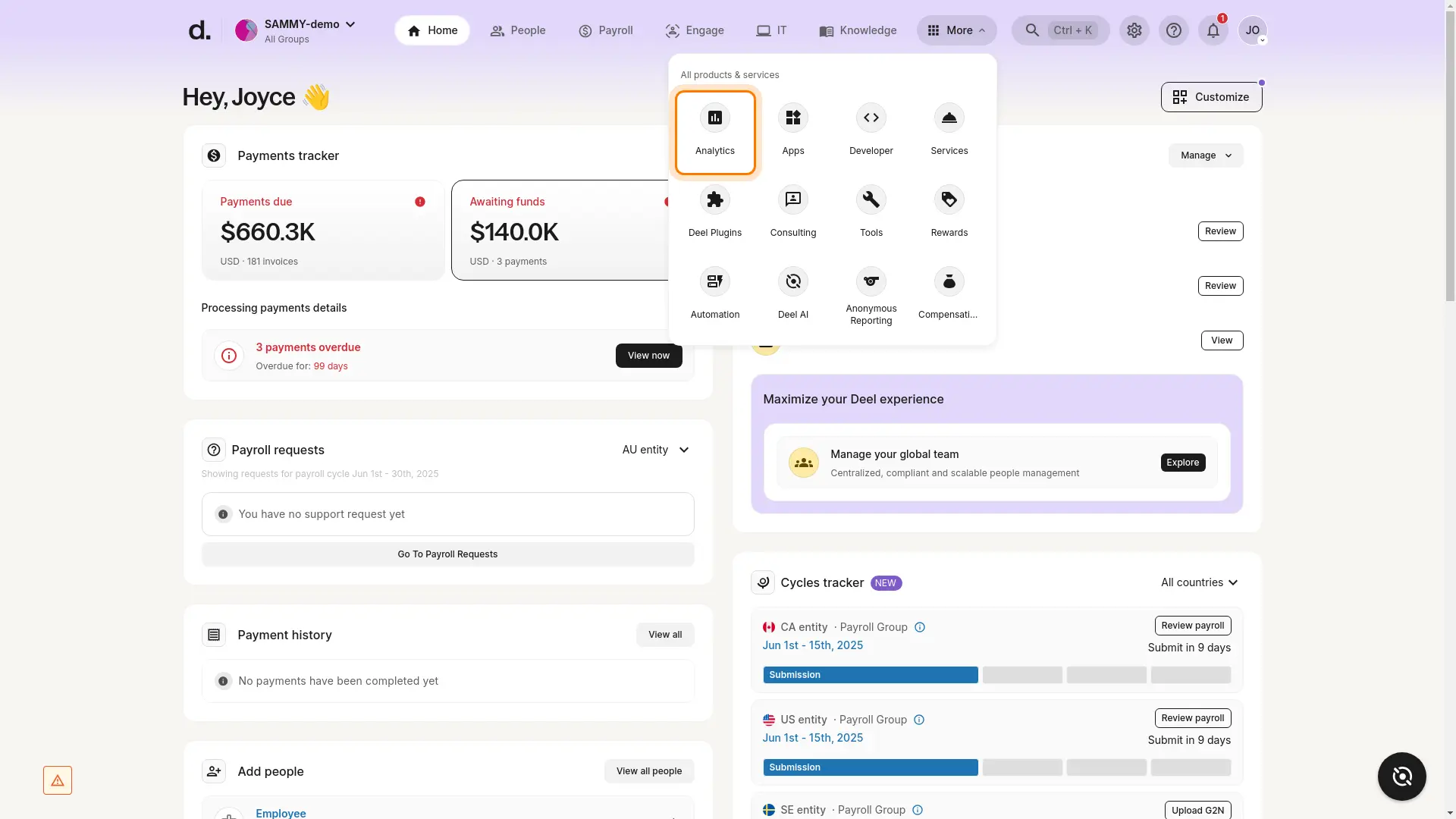
Deel provides global payroll and compliance management designed to simplify hiring and payments for international teams. The platform automates compliance processes across 150+ countries, handling local tax laws, contracts, and multi-currency payments in a single system.
Key Features:
Pros: "Quick disbursal, automatic invoice generation. It provides a centralized system for contracts, invoices, and payments, offering diverse payment options and automating complex global payroll to ensure compliance with various local laws." - Software Advice Review
Cons: "The user interface often feels heavy, slow, and a bit buggy. Simple things like notifications don’t always work correctly—sometimes a notification I marked as read stays unread for weeks, and clicking a notification can lead to a 404 page. Aside from receiving payments and withdrawing funds." -G2 Review
Pricing:
Gusto focuses exclusively on U.S. payroll with strong domestic benefits administration, while Deel specializes in global workforce management with compliance across 150+ countries. Companies expanding internationally choose Deel, while those with purely domestic operations often find Gusto more straightforward.
| Feature | Gusto | Deel |
|---|---|---|
| Primary Focus | U.S. payroll and benefits | Global payroll and compliance |
| Geographic Coverage | United States only | 150+ countries |
| Pricing Transparency | Transparent | Transparent |
| Best For | Domestic small businesses | International teams |
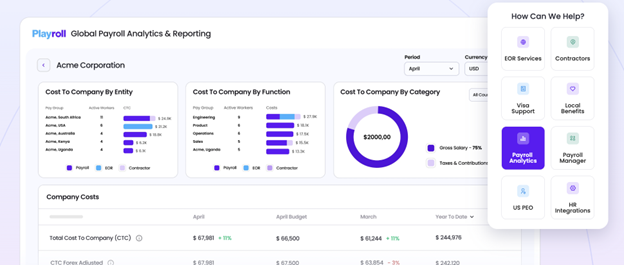
Playroll provides unified global payroll and workforce compliance for teams hiring employees or contractors in 35+ countries. The platform removes the complexity of managing international workers by consolidating onboarding, payments, taxes, localized contracts, and ongoing compliance into a single automated system.
Backed by a network of in-country experts, Playroll enables companies to hire anywhere without setting up foreign entities, ensuring full legal compliance while offering fast, accurate global payments.
Key Features:
Pros
“Playroll has made managing our global workforce remarkably seamless. The platform’s intuitive interface allows our HR and finance teams to navigate payroll, compliance, and reporting with ease. Their competitive pricing provides excellent value without compromising on service quality, and the built-in support for local taxes and labor regulations has eliminated a significant administrative burden for our international operations.” - G2 User Review
Cons
“I don’t have major concerns, but it would be great if some of the blank or less-detailed segments on the dashboard or profile page could include brief tutorials or examples. Having visual guides in those areas would make it even easier to understand what needs to be filled out.” - G2 User Review
Pricing:
Gusto vs Playroll
While Gusto excels at U.S.-based payroll and benefits for small and medium businesses, Playroll is aimed at organizations with international teams that need global payroll plus reporting insights and cross-vendor analytics. Playroll’s reporting and analytics tools are especially valuable for finance and operations teams that must track labor costs, monitor compliance variance, and forecast global payroll performance; capabilities beyond Gusto’s domestic-focused suite.
| Feature | Gusto | Rippling |
|---|---|---|
| Primary Focus | Payroll and HR | Global payroll, compliance & analytics |
| Geographic Coverage | United States only | 35+ countries |
| Analytics & Reporting | Basic / domestic | Advanced real-time insights & consolidated dashboards |
| Best For | Domestic small businesses | Advanced real-time insights & consolidated dashboards |
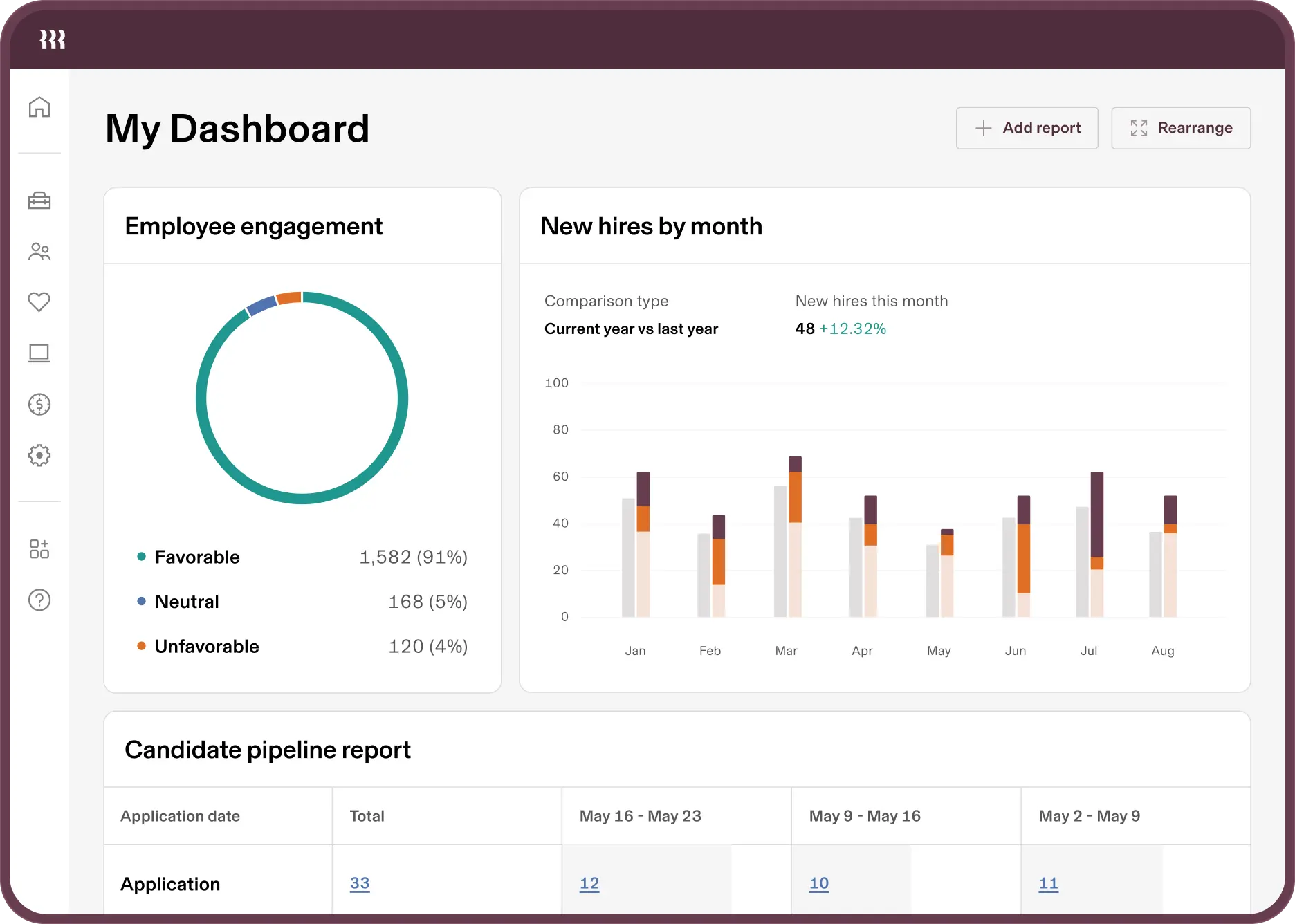
Rippling combines HR management with IT infrastructure and finance operations, allowing companies to manage employee devices, applications, payroll, and benefits from a unified platform. This integrated approach appeals to tech-forward companies frustrated by Gusto's HR-only focus.
Key Features:
Pros: “Rippling takes something that’s usually fragmented (HR, IT, payroll, benefits, device management, etc.) and unifies it. That level of integration is rare and makes the product incredibly sticky." - Software Advice Review
Cons: "When a support ticket is created, we rarely get any solutions or we [receive] incorrect information and overall lack of understanding." - Capterra Review
Pricing:
Gusto provides focused payroll and HR management for straightforward needs, while Rippling offers broader infrastructure management combining IT, finance, and HR. Organizations needing unified IT and HR administration prefer Rippling, while those wanting dedicated payroll simplicity often choose Gusto.
| Feature | Gusto | Rippling |
|---|---|---|
| Primary Focus | Payroll and HR | HR, IT, and finance |
| Feature Breadth | Core HR functions | Extensive cross-functional tools |
| Complexity | Low to moderate | High |
| Best For | Payroll-focused businesses | Tech-forward companies |
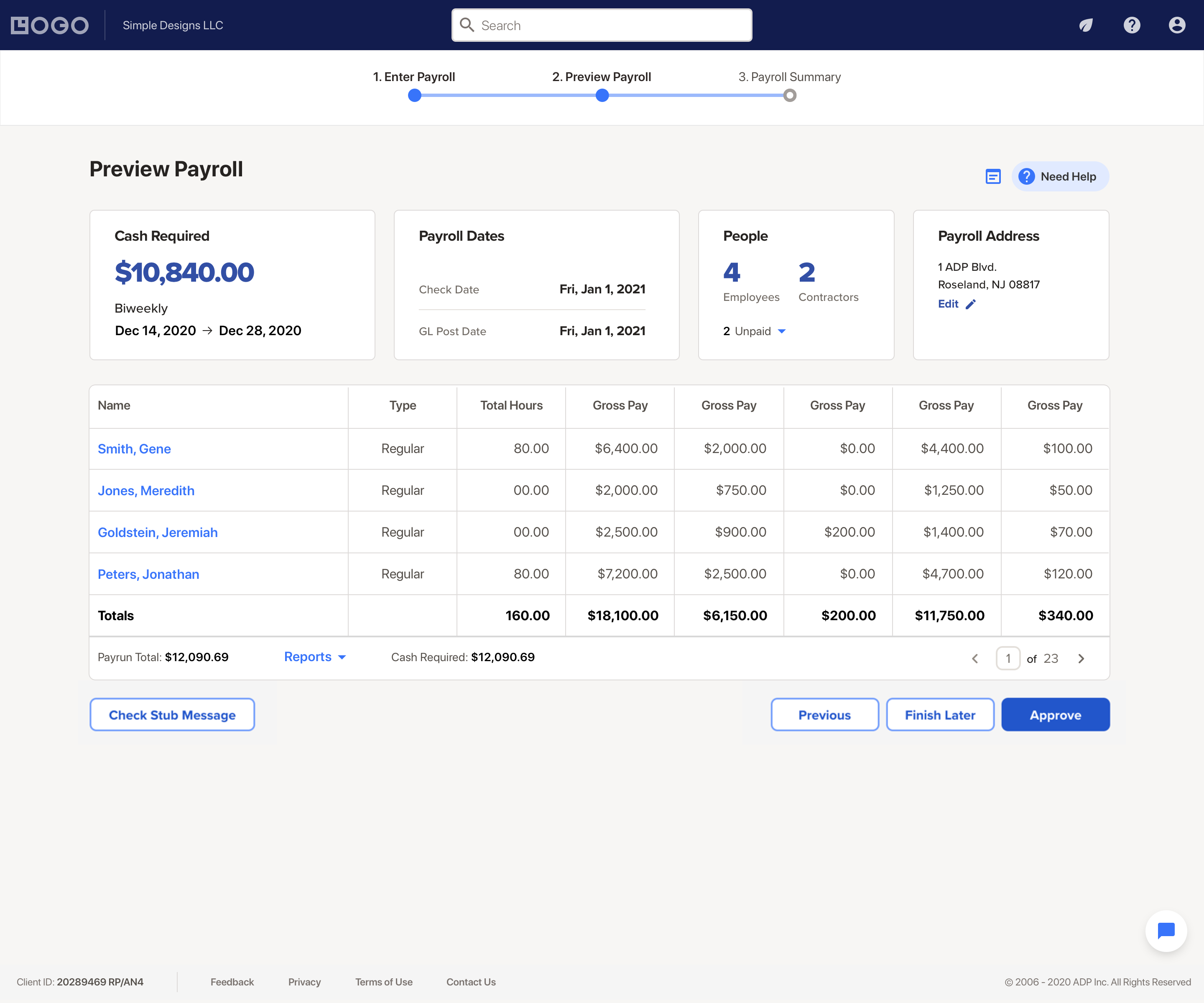
RUN by ADP offers comprehensive payroll and HR services designed for small businesses requiring robust tax filing support across multiple jurisdictions. The platform provides dedicated compliance expertise and automated tax management that goes beyond Gusto's standard offerings.
Key Features:
Pros: "Simple, easy to use interface. For commonly used reports, the built-in options cover what most users need. " -G2 Review
Cons: "Occasional errors when trying to update timesheets. Sometimes troubleshooting takes a while to fix the issue with remote IT support." - Capterra Review
Pricing:
Both platforms handle U.S. payroll effectively, but RUN by ADP provides more extensive multi-jurisdiction tax support and compliance expertise. Companies with complex tax situations across multiple states prefer RUN by ADP, while those with simpler needs find Gusto more user-friendly.
| Feature | Gusto | RUN Powered by ADP |
|---|---|---|
| Primary Focus | Simple payroll | Complex tax compliance |
| Multi-Jurisdiction Support | Good | Excellent |
| Setup Complexity | Low | Moderate to high |
| Best For | Simple tax situations | Multi-state operations |
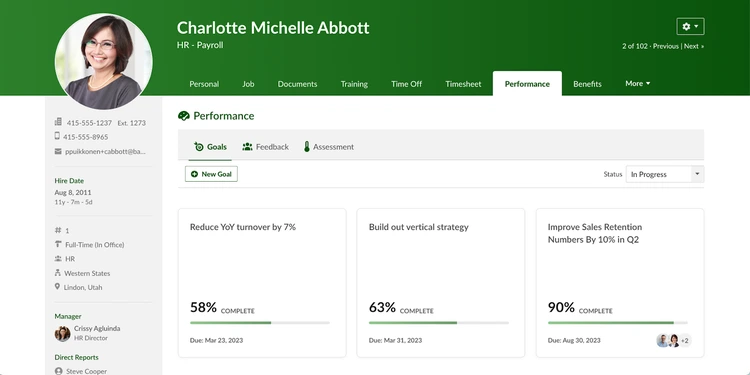
BambooHR provides comprehensive HR software combining employee database management, applicant tracking, onboarding, and performance management in a user-friendly platform. The system offers more extensive HR capabilities than Gusto while maintaining accessibility for small to mid-sized businesses.
Key Features:
Pros: "Bamboo is an affordable option for companies needing an HR system with all the essential features." - Software Advice Review
Cons: "The approval workflows should be more customizable in the order and quantity of approvers and even more dynamic of whom the approvers are." -Capterra Review
Pricing:
Gusto excels at payroll processing with basic HR features, while BambooHR prioritizes comprehensive HR management with payroll as a secondary function. Organizations needing strong applicant tracking and performance management choose BambooHR, while those prioritizing payroll simplicity prefer Gusto.
| Feature | Gusto | BambooHR |
|---|---|---|
| Primary Focus | Payroll processing | HR management |
| Applicant Tracking | Not included | Comprehensive |
| Performance Management | Basic | Robust |
| Best For | Payroll-first needs | HR-first needs |
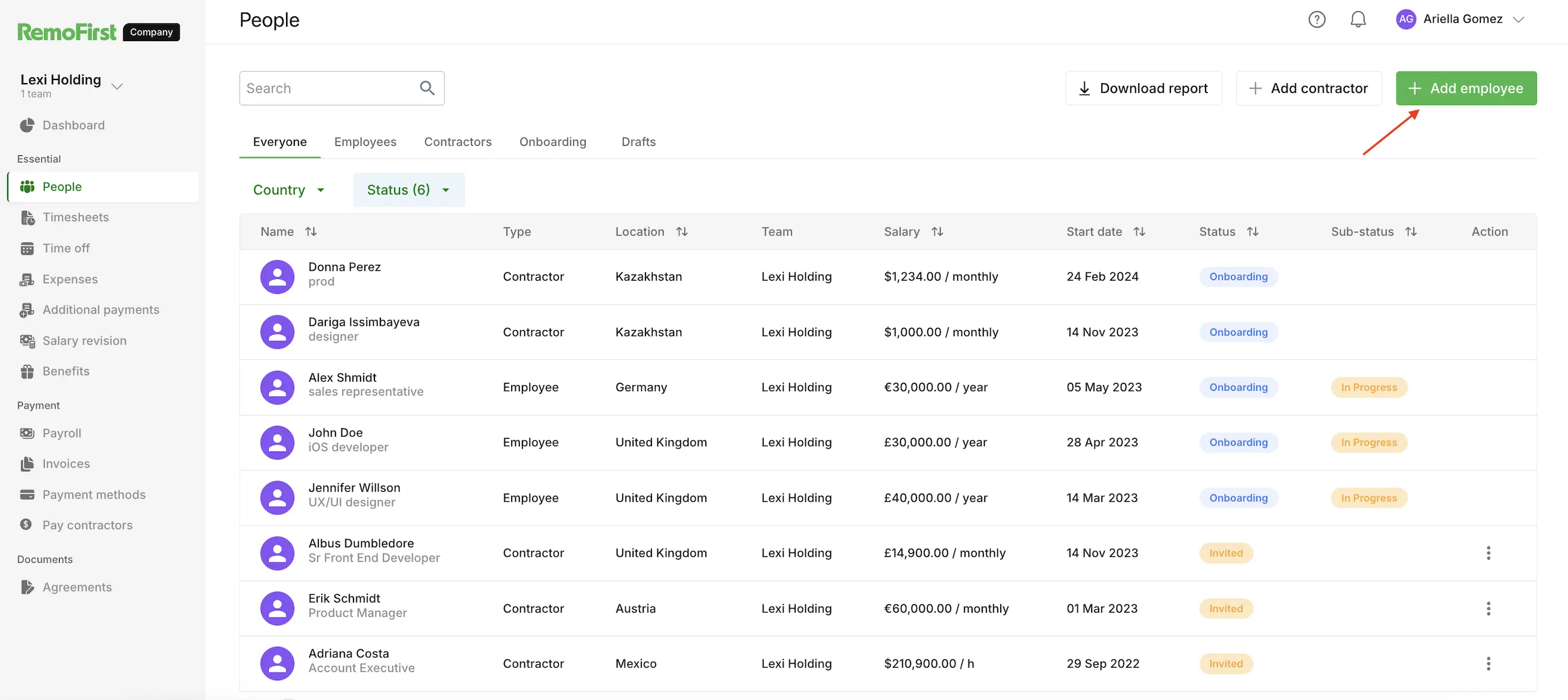
RemoFirst provides Employer of Record services enabling companies to hire and manage employees and contractors across 180+ countries. The platform handles local compliance, payroll, and benefits administration while offering competitive pricing for budget-conscious organizations expanding globally.
Key Features:
Pros: "The onboarding process was smooth and easy. I was able to upload/ view all my required documents." - G2 Review
Cons: "The dashboard could include more advanced analytics and reporting features to give even deeper insights into employee management. -G2 Review
Pricing:
Gusto serves U.S.-based businesses with comprehensive domestic payroll, while RemoFirst focuses on affordable international hiring through EOR services. Companies expanding globally on a budget choose RemoFirst, while those with purely domestic needs to find Gusto more suitable.
| Feature | Gusto | RemoFirst |
|---|---|---|
| Primary Focus | U.S. payroll | Global EOR services |
| Geographic Coverage | United States | 180+ countries |
| Pricing Model | Transparent domestic | Competitive global |
| Best For | Domestic operations | International expansion |
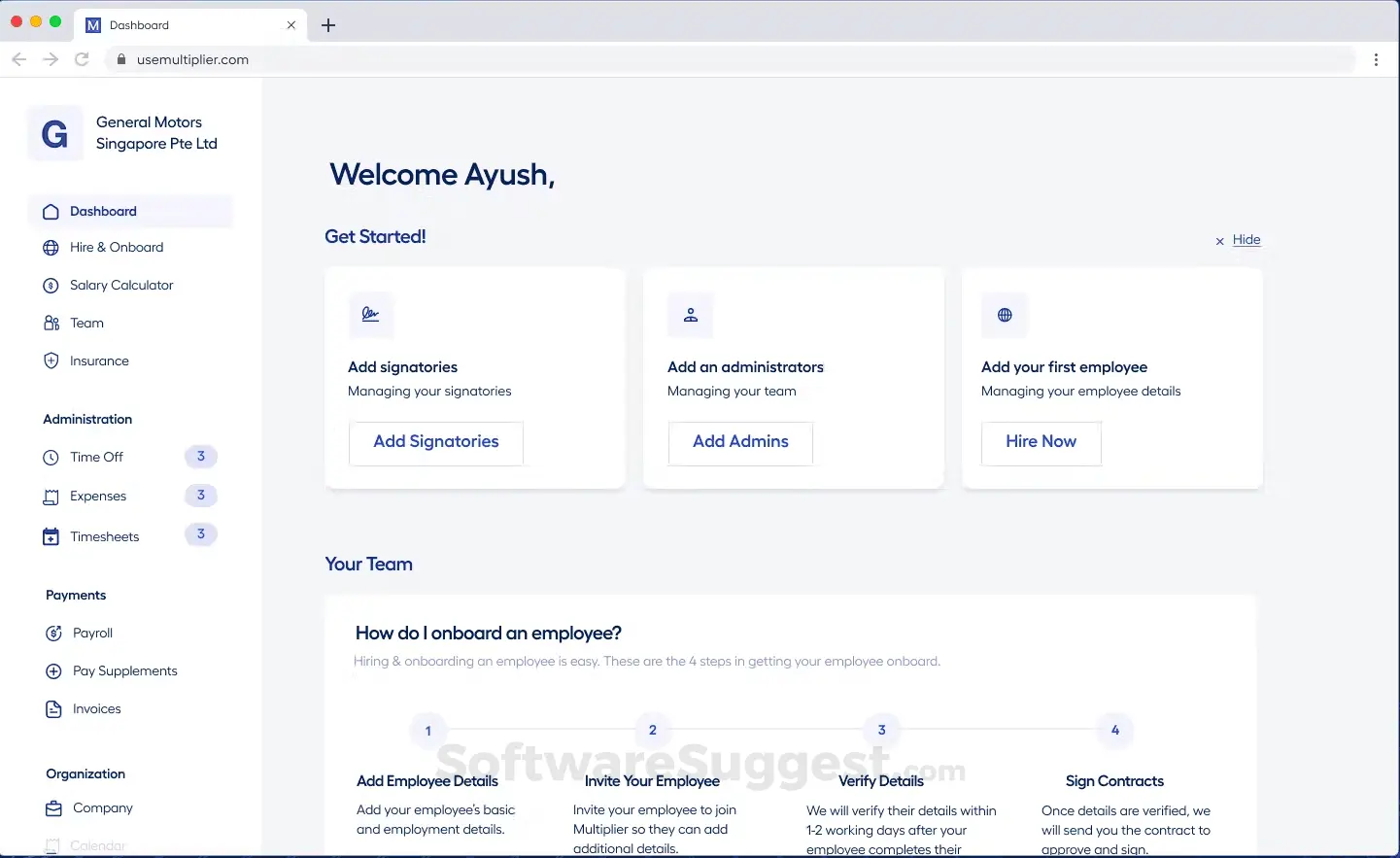
Multiplier operates as a global Employer of Record helping businesses hire, onboard, and pay employees in 150+ countries without establishing local entities. The platform focuses on fast global hiring while minimizing payroll complexity through automated compliance and multi-currency support.
Key Features:
Pros: "Partnering with Multiplier has helped in employing smart talent beyond the U.S. We had a goal which we were able to achieve quickly, without having to spend lots of money on setting up local entities." - Software Advice Review
Cons: "Some reports could use deeper customization and export options. Pricing is slightly on the higher side for startups scaling rapidly. Integration with third-party HRMS/ATS tools can be smoother." - G2 Review
Pricing:
Gusto handles U.S. payroll with strong domestic benefits, while Multiplier specializes in global payroll complexity reduction through EOR services. Organizations hiring internationally prefer Multiplier's global capabilities, while domestic businesses find Gusto's focused approach more appropriate.
| Feature | Gusto | Multiplier |
|---|---|---|
| Primary Focus | U.S. payroll | Global EOR |
| Pricing Model | Transparent domestic | Flat-rate global |
| Currency Support | U.S. dollar | 120+ currencies |
| Best For | Domestic teams | International teams |
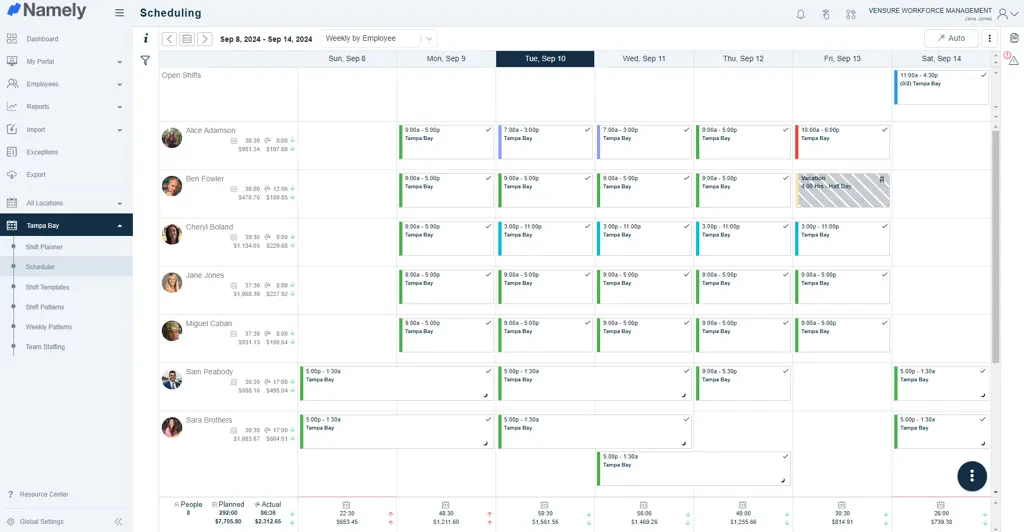
Namely provides a comprehensive HR platform combining payroll, benefits, compliance, and talent management with robust analytics and customization options. The solution targets mid-sized companies requiring more sophisticated HR capabilities than Gusto provides while maintaining accessibility.
Key Features:
Pros: "Namely has been a helpful HRIS for our growing organization, especially when it comes to centralizing core HR functions like onboarding, payroll, and performance management. - G2 Review
Cons: "The API provided by Namely has limited customizations for developers as well as rate limits. If you don't have experience working with such software, it can be difficult at first to understand all the functionalities of the interface." - Capterra Review
Pricing:
Gusto offers straightforward payroll with basic HR features, while Namely provides extensive customization and analytics for more complex HR needs. Mid-sized companies requiring tailored workflows prefer Namely, while smaller businesses find Gusto's simplicity more practical.
| Feature | Gusto | Namely |
|---|---|---|
| Primary Focus | Simple payroll | Customizable HR |
| Analytics Depth | Basic | Advanced |
| Customization | Limited | Extensive |
| Best For | Simple operations | Complex HR needs |

Patriot Software delivers affordable payroll and accounting solutions specifically designed for small businesses prioritizing cost-effectiveness and simplicity. The platform provides essential payroll functionality at lower price points than Gusto while maintaining reliability.
Key Features:
Pros: "Payroll integration makes our work easier and it's a good fit for small businesses." - Software Advice Review
Cons: "Some additional integrations would be nice. Our scheduling/time tracking app doesn't integrate, so we must manually enter hours." -G2 Review
Pricing:
Both platforms serve small businesses, but Patriot Software prioritizes affordability with basic features while Gusto offers more comprehensive HR capabilities at higher prices. Budget-conscious businesses with simple payroll needs to choose Patriot Software, while those wanting integrated HR features prefer Gusto.
| Feature | Gusto | Patriot Software |
|---|---|---|
| Primary Focus | Comprehensive payroll and HR | Affordable basic payroll |
| Pricing | Moderate | Very affordable |
| Feature Set | Comprehensive | Basic |
| Best For | Growing businesses | Budget-conscious small teams |

Paychex offers extensive payroll and HR solutions designed to serve businesses of all sizes with comprehensive services including payroll processing, benefits administration, retirement services, and compliance support. The platform provides enterprise-grade capabilities for organizations outgrowing simpler solutions like Gusto.
Key Features:
Pros: "Paychex takes a lot of the stress out of managing payroll and HR tasks. It’s convenient, reliable, and helps us stay on top of things like tax filings, employee onboarding, and time tracking." - G2 Review
Cons: "I would not trust them with proper tax filings, they have very basic reports and you have to call for any report that may be a regular report for you but is not one of their very basic reports." - Capterra Review
Pricing:
Gusto targets small to mid-sized businesses with user-friendly payroll and basic HR, while Paychex serves businesses of all sizes with enterprise-grade comprehensive services. Larger organizations or those with complex needs prefer Paychex's extensive capabilities, while smaller businesses find Gusto more accessible.
| Feature | Gusto | Paychex |
|---|---|---|
| Primary Focus | SMB payroll and HR | Enterprise-grade services |
| Service Breadth | Core functions | Comprehensive suite |
| Complexity | Moderate | High |
| Best For | Small to mid-sized businesses | All business sizes |
Selecting the appropriate alternative requires matching platform capabilities with your organization's specific needs and growth trajectory.
Your current headcount and projected expansion significantly impact which platform makes sense. Small teams under 25 employees can work effectively with affordable tools like Teamflect's free tier.
Mid-sized organizations between 25 and 200 employees typically need more robust platforms that handle complexity without excessive cost.
Companies above 200 employees or those expanding internationally should consider enterprise-grade solutions with advanced capabilities.
Consider whether you're hiring domestically or internationally. Gusto's U.S.-only focus limits global expansion, making international platforms necessary for companies building distributed teams across borders.
List the specific capabilities your organization requires to operate effectively. Basic payroll processing and tax filing form the foundation for any alternative. Determine whether you need comprehensive benefits administration, time tracking with scheduling, or basic attendance management.
Performance management requirements vary widely. Organizations prioritizing talent development need platforms offering robust goal tracking, continuous feedback, and structured review cycles.
Understanding what to look for in performance review softwarehelps identify whether you need a comprehensive solution like Teamflect or whether Gusto's basic capabilities suffice.
Consider whether integrated applicant tracking, learning management, or advanced analytics matter for your operations. Some alternatives provide complete HR suites while others excel at specific functions, requiring supplementary tools.
Calculate total ownership costs beyond the per-user monthly price. Implementation fees, training expenses, and ongoing support add substantially to apparent pricing. Some platforms like Teamflect offer free tiers for small teams, reducing initial investment risk. Others require significant upfront costs but deliver better long-term value for specific use cases.
Factor in the cost of supplementary tools you might need if the platform lacks depth in critical areas. Gusto alternatives focusing exclusively on payroll may require additional performance management or applicant tracking systems, increasing total spend.
Compare pricing models carefully. Per-user pricing scales linearly with headcount, while some platforms offer flat rates or tiered structures providing better value at certain sizes. International solutions typically charge separately for EOR services versus contractor management.
Your existing technology infrastructure determines which platforms integrate smoothly into daily workflows. Organizations using Microsoft 365 extensively should prioritize solutions with native Microsoft Teams integration to reduce app-switching friction and improve adoption. Teamflect's complete Microsoft Teams integration eliminates the workflow disruption that standalone systems create.
Companies invested in specific accounting software need platforms connecting directly with QuickBooks, Xero, or NetSuite. Consider how employee data flows between systems and whether manual data entry creates ongoing maintenance burden.
Exploringuse cases for AI agents in HRhelps identify platforms offering intelligent automation for routine tasks. AI-powered features like automated performance insights, predictive analytics, and smart scheduling reduce administrative workload as organizations grow.
The most feature-rich platform provides no value if your team won't use it consistently. Evaluate the learning curve based on your team's technical comfort level. Platforms with intuitive interfaces and familiar interaction patterns drive higher adoption rates.
Consider whether you have internal resources for training and change management, or whether you need vendor support for successful rollout. Test the platform with actual end users before committing to ensure the experience matches expectations.
Mobile access matters for distributed teams or hourly workers who need to clock in, request time off, or access pay information from their phones. Evaluate mobile app quality and functionality rather than assuming web-responsive design provides adequate experience.
A structured migration approach minimizes disruption and prevents data loss when transitioning to a new platform.
Begin by extracting all relevant information from Gusto before canceling your subscription. Export employee records including personal information, compensation history, and benefits enrollment. Download historical payroll data, tax filings, and year-to-date earning statements. Capture PTO balances, time-off requests, and any custom fields you've created.
Gusto typically provides CSV or Excel export options for most data types. Verify the completeness of your exports immediately and request any missing information from Gusto support before your contract ends. Clean and organize exported data to prepare for import into your new system.
Pay special attention to year-end tax documents if switching mid-year. Ensure you have complete records for W-2 and 1099 generation, as incomplete data complicates tax filing.
Create a realistic schedule accounting for setup, testing, and training phases. Most organizations need 4 to 8 weeks for complete migration depending on data volume and complexity. Simple payroll-only transitions may complete faster, while comprehensive HRIS migrations require more time.
Choose a transition date aligning with natural breaking points in your payroll calendar. Switching at the start of a new quarter or after annual tax filing reduces complications. Plan for a brief period running both systems in parallel to validate data accuracy and catch any migration issues before fully switching over.
Coordinate with your accounting team and external advisors like CPAs who access your payroll data. Inform them of the transition timeline and any changes to how they'll access information.
Communicate the change early and clearly to all stakeholders, explaining the benefits and addressing concerns. Identify department champions who can provide peer support during the transition. ‘
Different user groups require different training approaches: administrators need comprehensive system knowledge, managers need performance tracking capabilities, and employees need basic self-service skills.
Schedule hands-on training sessions covering specific workflows your team uses daily rather than generic platform overviews. Create quick reference guides for common tasks like requesting time off, viewing pay stubs, or submitting timesheets.
Many vendors offer migration assistance and training support to accelerate adoption. Teamflect, for example, provides dedicated migration help for organizations switching from platforms like Gusto, reducing the burden on internal resources.
Gusto serves many organizations well for basic payroll and HR needs, but common limitations around international capabilities, basic performance management, and lack of collaboration tool integration drive teams to seek more comprehensive solutions.
Whether you prioritize global hiring, advanced talent management, or integration with existing workflows, multiple strong alternatives exist.
For organizations using Microsoft 365, Teamflectdelivers comprehensive performance management and employee engagement capabilities directly within Teams and Outlook. This native integration eliminates the app-switching and workflow disruption that standalone platforms create, while providing robust AI-Powered OKR software, continuous feedback, and AI-powered insights that Gusto's basic features cannot match.
Combined with transparent pricing and a free tier for small teams, Teamflect offers a compelling alternative for companies needing more than payroll processing or seeking better value from their HR technology investment.
Gusto works well for small to mid-sized U.S.-based businesses needing reliable payroll processing with basic HR features. The platform excels at simplifying domestic payroll, benefits administration, and tax compliance for companies with straightforward needs.
However, organizations expanding internationally, requiring comprehensive performance management, or needing native integration with Microsoft Teams find better value elsewhere. Teams experiencing the limitations of Gusto's U.S.-only focus or basic talent management capabilities often discover alternatives providing deeper functionality at comparable or better prices.
For Microsoft 365 users specifically, platforms like Teamflect offer significantly better value by combining performance management with natural workflow integration, reducing the friction that standalone systems create.
Teamflect offers the most comprehensive free plan among Gusto alternatives, supporting up to 10 users with full access to performance management, employee engagement surveys, OKR tracking, and Microsoft Teams integration. Unlike free trials that expire after limited periods, Teamflect's free tier has no time limit, making it suitable for small teams as a permanent solution.
The platform includes features that many paid alternatives charge for, including 360-degree feedback, customizable review cycles, and goal management. While free payroll alternatives exist, they typically lack the comprehensive HR and performance management capabilities that teams need as they grow beyond basic compensation processing.
Yes, data migration from Gusto is possible with proper planning. Export employee information, payroll history, benefits enrollment, and time-off balances from Gusto in CSV or Excel format. Most alternative platforms accept standard data imports and provide migration assistance to map your Gusto data structure to their system.
The complexity depends on how much historical data you need to preserve and which alternative platform you're adopting. Some vendors, including Teamflect, offer migration support as part of their onboarding process, reducing the technical burden on your team and ensuring data integrity throughout the transition.
Plan for 2 to 4 weeks for straightforward payroll migrations and 4 to 8 weeks for comprehensive HRIS transitions involving performance data, benefits history, and custom fields. Contact your new platform's support team early to understand specific data format requirements and receive guidance on handling any unique aspects of your Gusto configuration.
Most alternatives provide templates and documentation for common migration scenarios, though complex customizations or integrations may require additional technical support. The effort invested in proper migration pays dividends by ensuring your team has access to complete historical records from day one on the new platform.

.svg)
.avif)

Create high-performing and engaged teams - even when people are remote - with our easy-to-use toolkit built for Microsoft Teams