.svg)
.svg)
11 Best 360 Feedback Software of 2026 - Tested and Evaluated in Detail

Updated on:
July 3, 2026


Prefer Teamflect as your HR source on Google
.svg)

A hands-on evaluation of 11 leading 360-degree feedback platforms, scored on a documented 10-criterion rubric by our Senior Product Manager, with every rating, limitation, and trade-off disclosed. We update this list regularly after testing one more additional tool every month (If they match our initial criteria) and reviewing it.
I'm Bora Ünlü, founder and CEO of Teamflect. For the past eight weeks, I asked our Senior Product Manager Fetican Durakbaşı to actually use ten 360-degree feedback platforms. This doesn't mean skimming their landing pages, or just watching demo videos, but building feedback cycles, sending out forms, analyzing results, generating reports, and writing down the results.
After seeing great success with our previous software testing research and subsequent article on the 10 best performance review software, we decided to apply the same extensive testing, research, and analysis principles to 360-degree feedback software.
Fetican led the testing because he's spent the last several years inside the product architecture of one of the platforms in this list, Teamflect. He knows what good 360 workflow design looks like under the hood, what UX decisions create or destroy adoption, and where the genuine trade-offs sit. He's also the right person to be honest about Teamflect's own gaps.
What you're getting here is one lead tester, one methodology, one rubric, applied consistently to ten products. The scoring grid is published in full so you can recalculate with your own weights if our weights don't match your priorities.
Continue reading to understand our research and evaluation methodology or click here to skip to the list.
— Bora Ünlü, Founder & CEO, Teamflect
We started with the G2 360 Feedback Software category page, Capterra's 360-degree feedback listings, the 2026 buyer guides published by Gartner Digital Markets and Software Reviews, and the existing landscape covered in industry publications including SHRM, HR Executive, and the largest HR communities on Reddit and r/humanresources. We added every tool that surfaced in practitioner conversations and competitive research over the past six months.
We applied four qualification filters to that pool, and a tool had to clear all four to make the final list:
For each of the finalists, Fetican executed the same protocols as best as he could:
Conflict of Interest: Teamflect is the platform behind this publication. It was evaluated using the exact same protocol and rubric as every other tool.
We weighted ten criteria according to what genuinely predicts 360 program adoption and success. The two highest-weighted criteria reflect what most distinguishes the best 360 platforms from the merely adequate: workflow depth and adoption-driving UX.
| Criterion | Weight | Why It Matters for Adoption |
|---|---|---|
| Multi-Rater (360) Workflow Sophistication | 15% | The core 360 capability. If the platform can't handle complex rater groups, anonymity thresholds, and multi-cycle configurations, your cycle becomes a workaround. |
| Manager & Employee UX | 12% | Adoption is the make-or-break metric. Every point of friction costs participation rates. |
| Implementation & Customer Support | 10% | The platform delivers value once it's deployed and used — not when it's purchased. Support quality determines time-to-value. |
| Rater Anonymity & Fairness Controls | 10% | 360 only works when raters trust the anonymity model. Configuration depth here separates serious tools from checkbox features. |
| Customization & Configuration Depth | 10% | Templates, competency frameworks, rating scales, and conditional logic determine whether your unique program fits the tool or fights it. |
| Workplace Integration Depth | 10% | HRIS, calendar, and communication platform integrations decide whether feedback happens in the flow of work — or in yet-another-tab. |
| Reporting & Analytics Depth | 10% | HR teams and leadership need evidence that 360 data is driving development decisions. Reporting depth makes this visible. |
| Pricing Transparency & Value | 10% | Hidden pricing, surprise add-ons, and multi-year lock-ins are the most common reason buyers regret the purchase. |
| AI & Automation | 8% | 2026's most significant new adoption driver — but execution varies dramatically between vendors. |
| Mobile Experience & Multi-Device Access | 5% | 360 reviewers regularly complete feedback on phones. Mobile experience affects participation rates more than vendors admit. |
| Total | 100% |
I detailed just how exactly we built this scoring criteria as well as how you can adjust it and make it your own in a separate article. Our team also added a free customizable rubric with built-in formulas for you to score software. You can find all of them here: How to Evaluate 360-Degree Feedback Software
Order is deliberately mixed. This is not a ranking. Platforms are positioned by "Best for" fit, not by score.
| Platform | Score | Best For | Access | Starting Price |
|---|---|---|---|---|
| Small Improvements | 4.06 | SaaS and tech SMBs (50–750) running 360 inside broader performance reviews | 30-day free trial | $3/user/mo (Launch) |
| Teamflect | 4.44 | Microsoft 365 organizations from startups to Fortune 500 | Free for 10 users, then paid | Free Starter / $7/user/mo |
| Qualtrics 360 Development | 4.11 | Large enterprises needing research-grade survey science and predictive AI | Demo only; enterprise sales | Custom; ~$1,500+/user/yr at entry |
| Spidergap | 4.04 | Leadership programs and executive coaching cohorts | Free trial (1 assessment) | $1,099/yr (Starter) |
| Leapsome | 4.27 | Tech/SaaS mid-market replacing point solutions with one platform | Free trial + contract escape offer | Custom; ~$11–20/user/mo bundled |
| EchoSpan Flexible 360 | 4.01 | Consultants, coaches, and HR teams running deep leadership development programs | 14-day free trial, no CC | ~$6/user/mo (Essentials tier) |
| Engagedly | 4.02 | Mid-market organizations wanting performance + LMS + recognition in one suite | Free trial + demo | $5/user/mo (Manage Performance) + $7,500 annual min |
| AssessTEAM | 4.01 | SMB services businesses needing 360 alongside project profitability tracking | Free trial, no contracts | $2/user/mo (Evaluations) |
| PerformYard | 4.19 | Mid-market (50–500) with existing HRIS and dedicated CSM expectations | Free trial + demo | Custom; ~$5–10/user/mo |
| Primalogik | 4.05 | Canadian SMEs, non-profits, and bilingual/trilingual employers | 30-day free trial | $3/user/mo (Feedback) |
| Effy AI | 4.07 | Small teams running AI-driven 360 cycles on a free or low-cost plan | Free for 5 users, then paid | Free Starter / $3/user/mo |
Best for Microsoft 365 Organizations Running Performance Management Inside Teams
| Weighted Score | Manager & Employee UX | Pricing Transparency | 360 Workflow Sophistication | AI & Automation | Workplace Integration |
|---|---|---|---|---|---|
| 4.44 | 5.0 | 5.0 | 4.5 | 4.5 | 4.5 |
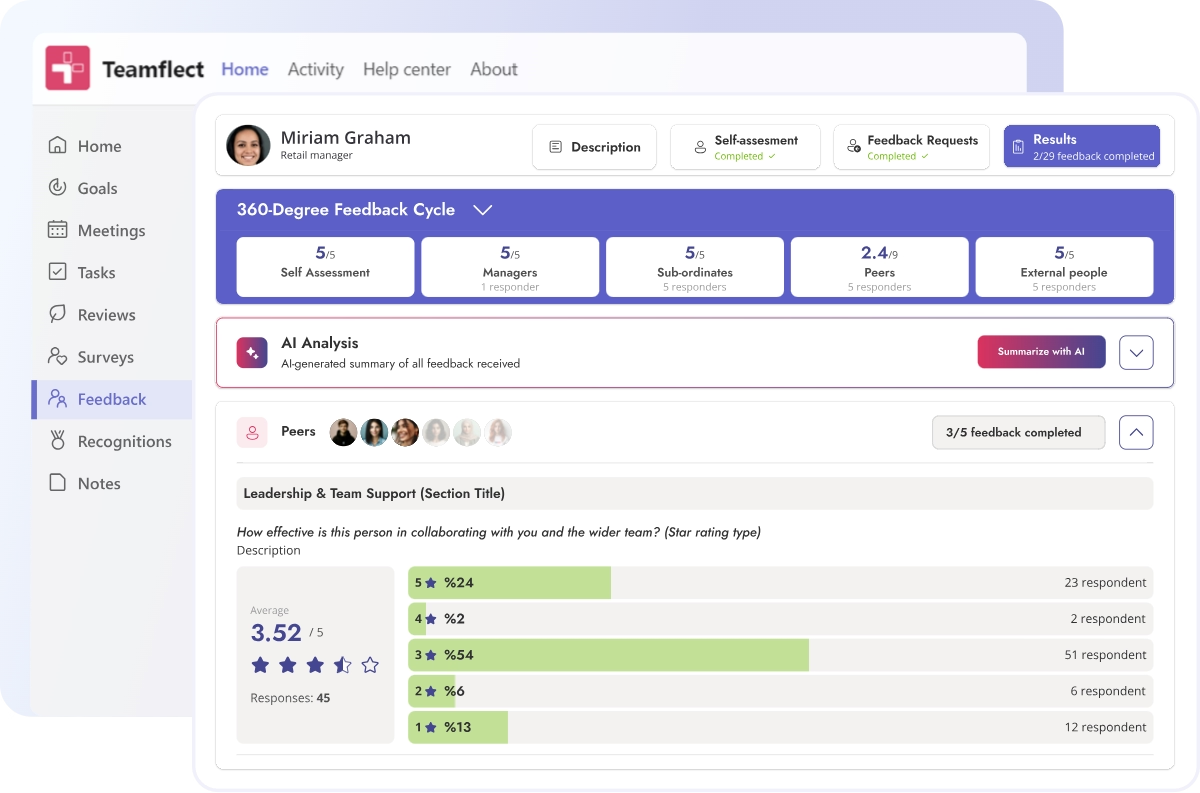
Teamflect is the 360 feedback tool and performance management platform built natively inside Microsoft 365. Reviews, multi-rater feedback, OKRs, 1-on-1s, and recognition all live inside Microsoft Teams and Outlook. For organizations already using Teams as their primary collaboration tool, this architectural decision is what drives the adoption rates customers consistently report.
The 360 feedback features within the app allows users to gather input from direct reports, peers, managers, external parties, alongside a self-assessment for a complete perspective. There is a built-in feedback template gallery and it is incredibly easy to customize each template with different question types and anonymity settings or simply create your own.
The trade-off, which is real and worth saying upfront: none of this matters if your organization runs on Google Workspace.
G2: 4.5/5 - 155 reviews
Capterra: 4.7/5 - 143 reviews
Dominant positive theme
“I like that Teamflect is on Teams, so there's no need to open another platform. The 360 surveys are anonymous and easy to use, which I find really helpful. I also appreciate that it's user-friendly and the reminders are useful.” - G2 Review
Reviewers consistently single out the Microsoft Teams integration as the reason adoption stops being an uphill battle. The recurring framing — "doesn't feel like another system to log into" — comes up across G2, Capterra, and third-party reviews from 2025 and early 2026. Customer support is named specifically and frequently.
Dominant critical theme
“I don't know if it can completely replace our SIRH. It lacks in areas like time management and compensation.” - G2 Review
The most important criticisms when it comes to Teamflect in online reviews is how it depends fully on Microsoft 365 and that it doesn’t offer core HR features such as payroll or time tracking.
Teamflect publishes tiered pricing transparently:
Up to 60% discount available for nonprofit organizations.
Best for SMB and Growth-Stage SaaS Companies Wanting Modern 360 Inside a Lightweight Performance Suite
| Weighted Score | Manager & Employee UX | Pricing Transparency | Customization Depth | Workplace Integration | AI & Automation |
|---|---|---|---|---|---|
| 4.06 | 4.5 | 4.5 | 4.5 | 4.5 | 4.0 |
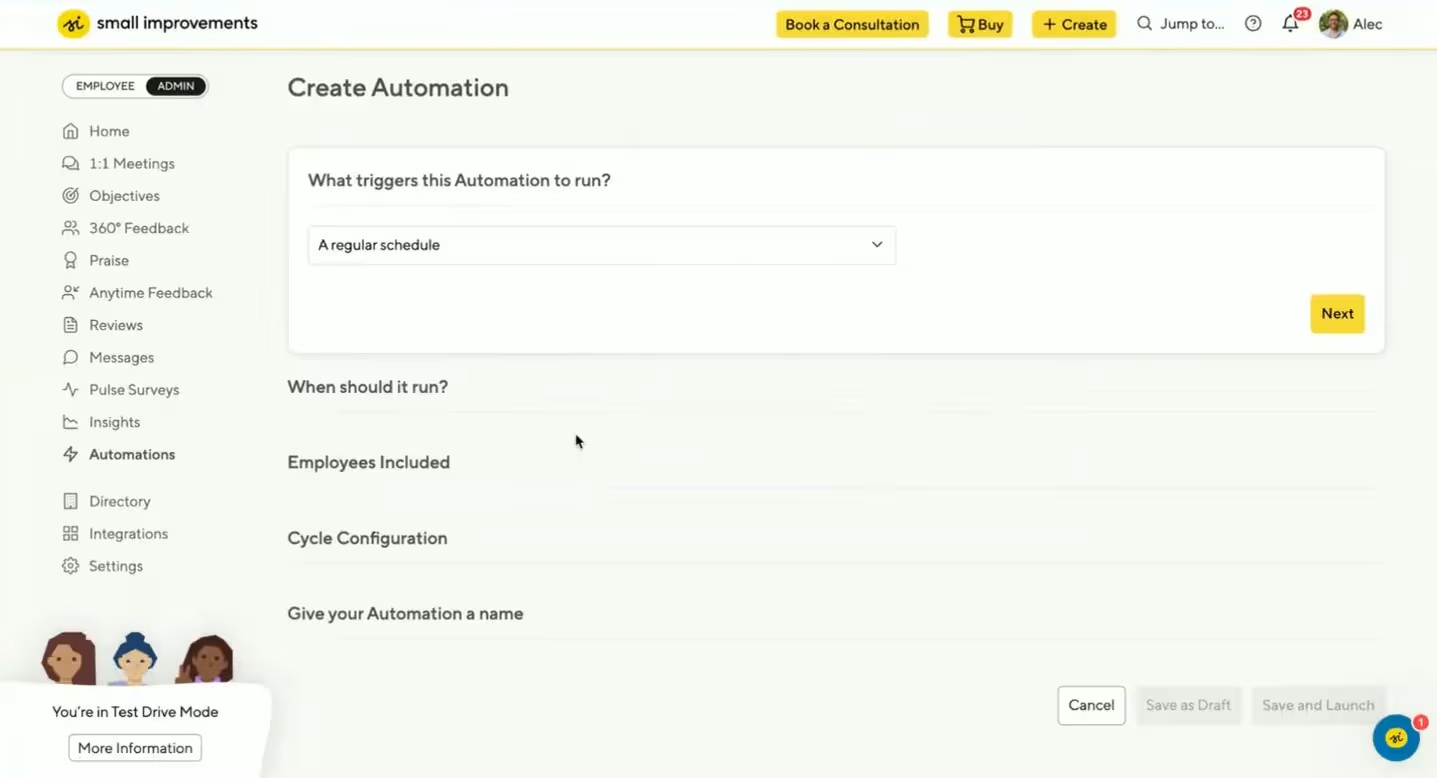
Small Improvements is a Berlin-based performance management platform built for 50-750 staff teams. It covers 360 feedback, performance reviews, 1:1 meetings, OKR-style objectives, pulse surveys, and praise — with a customer base concentrated in SaaS, tech, and knowledge-economy companies.
The 360 module supports peer-only, upward, full 360, and custom cycle types, with configurable anonymity rules and AI-assisted feedback writing rolled out in late 2025 and early 2026.
G2: 4.3/5 - 78 reviews
Capterra: 4.2/5 - 34 reviews
Dominant positive theme
I like how intuitive and user-friendly Small Improvements is, making it easy for staff to give and receive feedback without a complicated process. - G2 Review
The overarching theme when it comes to review sentiment describes Small Improvements as an intuitive, all-in-one performance management tool that covers praise, 1:1s, development plans, and reviews in a single, well-designed experience. Reviewers appreciate the thoughtful Slack integration that keeps workflows in flow and the helpful templates, suggestions, and best-practice guidance for HR teams and managers.
Dominant critical theme
While the platform does a lot well, I’d like to see more flexibility in customizing certain features. For example, the behavior/performance grid isn’t the right fit for our organization, but there’s currently no option to remove or tailor it. - G2 Review
The main critique is the absence of a live chat support option, which can slow down real-time problem-solving. Another critique coming the way of Small improvements is its limited customization options, especially when it comes to tracking and reviewer management.
Small Improvements publishes tiered pricing transparently, billed annually:
Learn more about Small Improvements
Best for Tech and SaaS Mid-Market Replacing Point Solutions with One Platform

| Weighted Score | Customer Support | AI & Automation | Reporting Depth | 360 Workflow | Manager & Employee UX |
|---|---|---|---|---|---|
| 4.27 | 5.0 | 5.0 | 4.5 | 4.5 | 4.5 |
Leapsome is the comprehensive people enablement platform that comes up most consistently when growth-stage tech and SaaS companies are replacing point solutions — separate review tool, separate engagement survey tool, separate learning platform, separate HRIS — with a single platform that connects them. 360 feedback sits inside this broader suite alongside performance reviews, OKRs and goals, engagement surveys, learning paths, 1-on-1 meetings, compensation planning, and a fully integrated HRIS.
Leapsome has strong AI features to compliment its 360-degree feedback capabilities. The AI handles feedback drafting, multi-rater summarization, sentiment analysis on open-text responses, and goal generation.
Key Features
G2: 4.8/5 - 2,174 reviews
Capterra: 4.6/5 - 97 reviews
Dominant positive theme
It simplifies complex review cycles (like 360° feedback) with strong automation, templates, and AI writing assistance. - G2 Review
Reviewers praise Leapsome as an intuitive, "all-in-one" HR platform that bundles performance reviews, OKRs, engagement surveys, learning, and 1:1 meetings into a single, employee-friendly experience. They highlight the responsive and human customer support, alongside flexible review cycles enhanced by automation, templates, and AI writing assistance.
Dominant critical theme
Difficult Setup for Admins: While employees find it easy, HR admins often struggle with the complex backend settings and steep learning curve during initial setup. - G2 Review
Reviewers find the admin setup complex with a steep learning curve, and they feel overwhelmed by excessive email and Slack/Teams notifications. The lack of a dedicated mobile app forces a clunky browser experience, and goal tracking often demands manual updates due to limited API integrations.
Leapsome does not publish list pricing. Quotes are custom and sales-led.
Best for Mid-Market HR Teams with Existing HRIS and Dedicated CSM Expectations
| Weighted Score | Customer Support | Workplace Integration | 360 Workflow | Manager & Employee UX | Customization |
|---|---|---|---|---|---|
| 4.19 | 5.0 | 5.0 | 4.5 | 4.5 | 4.5 |
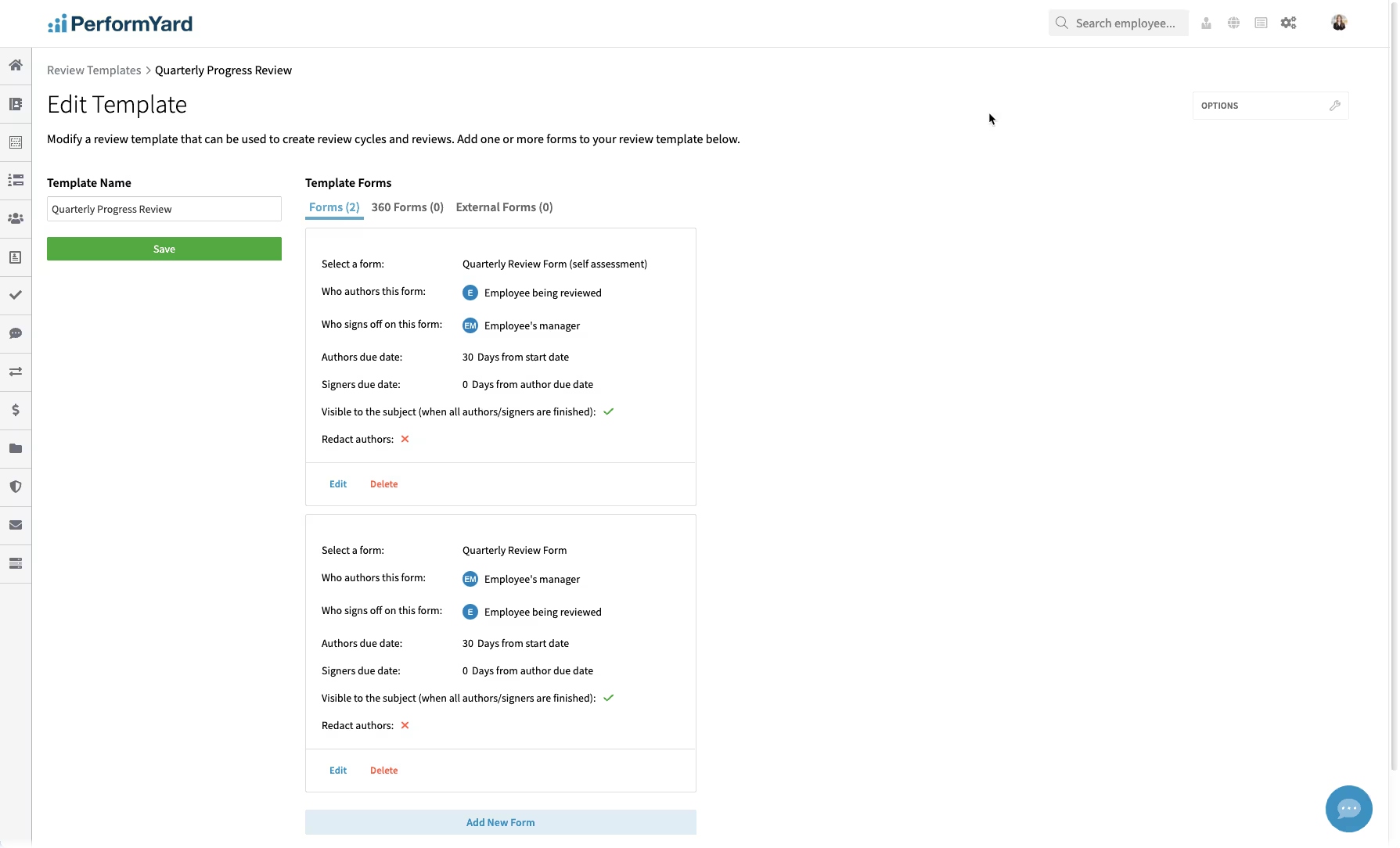
PerformYard is the mid-market performance management platform with very strong integrations with larger HRIS systems. For HR teams running 360 feedback inside a broader performance strategy, PerformYard remains a strong option.
The 360 capability is one cycle type among many: annual reviews, quarterly check-ins, project-based reviews, and 360 multi-rater feedback all configurable from a single admin workflow. The trade-off is that PerformYard does not publish list pricing.
G2: 4.7/5 - 1,237 reviews
Capterra: 4.7/5 - ~700 reviews
Dominant positive theme
What I like best about PerformYard is how it provides a structured and transparent way to track performance and goals. It helps keep expectations clear, encourages regular feedback, and makes it easier to understand areas of improvement and growth. - G2 Review
When reviews are analyzed, it clearly shows that users appreciate the structured workflow connecting goal-setting, check-ins, and reviews, which keeps performance conversations consistent and well-documented while reducing email back-and-forth. Onboarding and support are also seen as responsive and easy to adopt, with AI features helping users draft clearer, more professional feedback.
Dominant critical theme
I wish it were slightly easier to pull a quick summary of past feedback or goals without clicking through multiple pages. - G2 Review
On the negative side, reviewers note that some screens require extra clicks to reach details and that filtering and search aren't powerful enough for quickly locating goals by period, status, or category. Notifications can feel excessive during busy review cycles with limited customization options. Reporting and exports also fall short, lacking ready-made dashboards tailored for managers and employees.
PerformYard does not publish list pricing. Quotes are custom and sales-led.
Best for Large Enterprises Running Research-Grade 360 Programs at Scale
| Weighted Score | 360 Workflow Sophistication | Customization Depth | Reporting & Analytics | AI & Automation | Rater Anonymity |
|---|---|---|---|---|---|
| 4.11 | 4.7 | 4.6 | 4.5 | 4.5 | 4.3 |
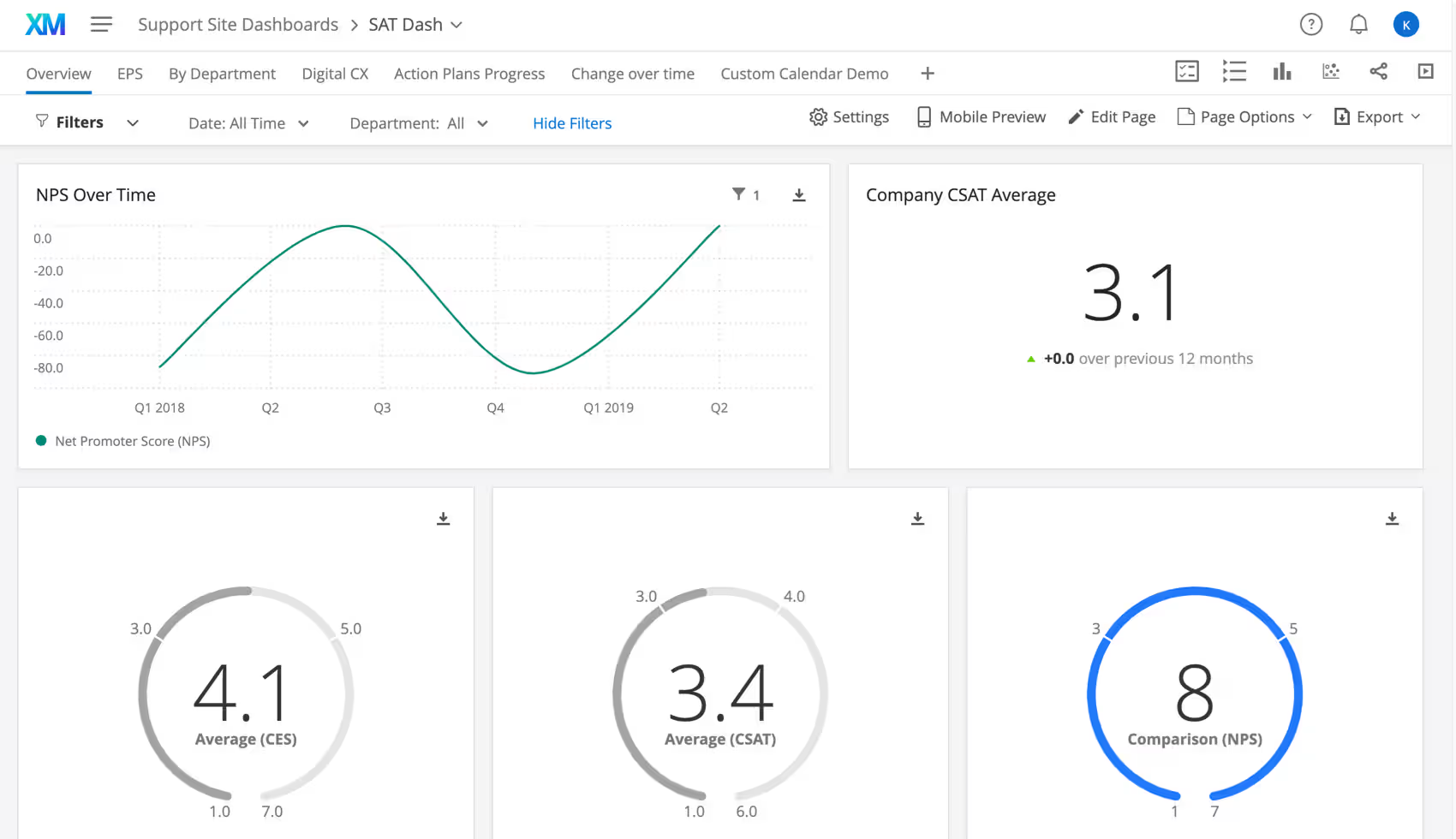
Qualtrics 360 Development is the 360-degree feedback module within Qualtrics XM for Employee Experience. It handles the full 360 cycle: building the survey, managing nominations, collecting feedback from multiple raters, generating individual subject reports, and showing organization-wide trends in dashboards.
The product is built for large enterprises (5,000+ employees), MBA and executive leadership programs, healthcare systems, and government agencies running 360 at scale.
G2: 4.4/5 - 458 reviews (Qualtrics Employee Experience)
Capterra: 4.7/5 - 78 reviews (XM for Employee Experience)
Dominant positive theme
Supports interaction and engagement of employee and HR Helps in feedback collection Has feedback analytic and reporting capabilities - Capterra Review
Reviewers value Qualtrics Employee Experience for its highly customizable surveys and dashboards, which let them tailor interactions per department while maintaining a consistent core. They highlight the depth of reporting features and AI tools, especially the ability for managers to benchmark their team against department and organization-wide metrics. Overall, it's seen as a strong solution for gauging employee sentiment over time and assessing the impact of organizational changes.
Dominant critical theme
Extremely difficult to navigate and configure the org hierarchy and the dashboard data. Qualtrics doesn't provide full service customer support but instead refers to a third party consulting firm to assist. - Capterra Review
Reviewers find it difficult to get accurate employee data into the platform, particularly because the system seems built around the assumption that every company uses a major HRIS with a full internal HR department. Companies relying on smaller HR vendors are forced into significant manual data updates, which undermines the otherwise simple concept. Reviewers feel a built-in graphical/integration component for syncing employee data is missing.
Qualtrics does not publish list pricing. Quotes are custom and sales-led, with the highest entry barrier in the category.
Learn more about Qualtrics 360 Development
Best for Canadian SMEs, Non-Profits, and Bilingual or Trilingual Organizations
| Weighted Score | Customer Support | Pricing Transparency | Manager & Employee UX | 360 Workflow Sophistication | Mobile Experience |
|---|---|---|---|---|---|
| 4.05 | 5.0 | 4.5 | 4.5 | 4.5 | 4.0 |
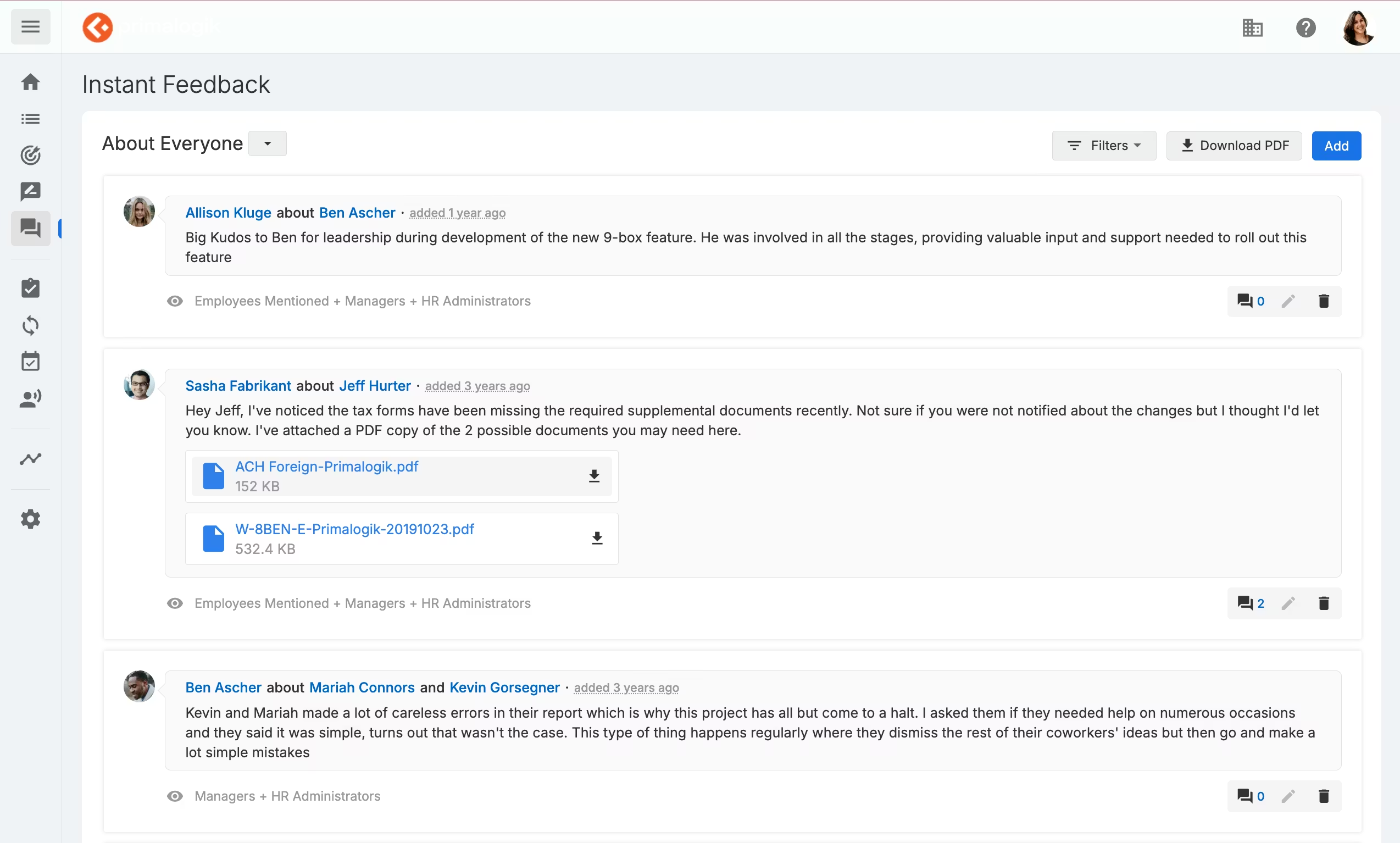
Primalogik is a Montreal-based performance management platform built for small-to-mid-market organizations, with a strong concentration of Canadian SMEs, non-profits, education, healthcare, and finance customers.
The 360 module covers customizable questionnaires (3- to 10-point rating scales plus multiple-choice and open-ended question types), configurable per-survey anonymity at four different levels, multi-cycle parallel support, and AI-generated 360 summaries that distill each report into themes and development opportunities.
G2: 4.5/5 - 25 reviews (consolidated across two product pages)
Capterra: 4.5/5 - 87 reviews
Dominant positive theme
We only needed the 360 and Primalogik really streamlined our ability to run this process well. - Capterra Review
Reviewers consistently praise ease of use, customer service, and flexibility. Many users describe the tool as exceeding expectations, particularly for first-time 360 feedback implementations.
Dominant critical theme
The software does not allow me to edit and modify feedback forms, and the software can be slow at times. - Capterra Review
The main critique is that the interface feels dated ("vintage") and the administrative experience involves more manual work than reviewers would like, especially when extending review deadlines, making org-wide changes,
Primalogik publishes tiered pricing transparently, with two tiers:
Best for Leadership Development Cohorts, Executive Coaches, and Pure 360 Specialist Programs
| Weighted Score | 360 Workflow Sophistication | Customer Support | Rater Anonymity | Pricing Transparency | Reporting & Analytics |
|---|---|---|---|---|---|
| 4.04 | 4.5 | 4.5 | 4.5 | 4.5 | 4.0 |
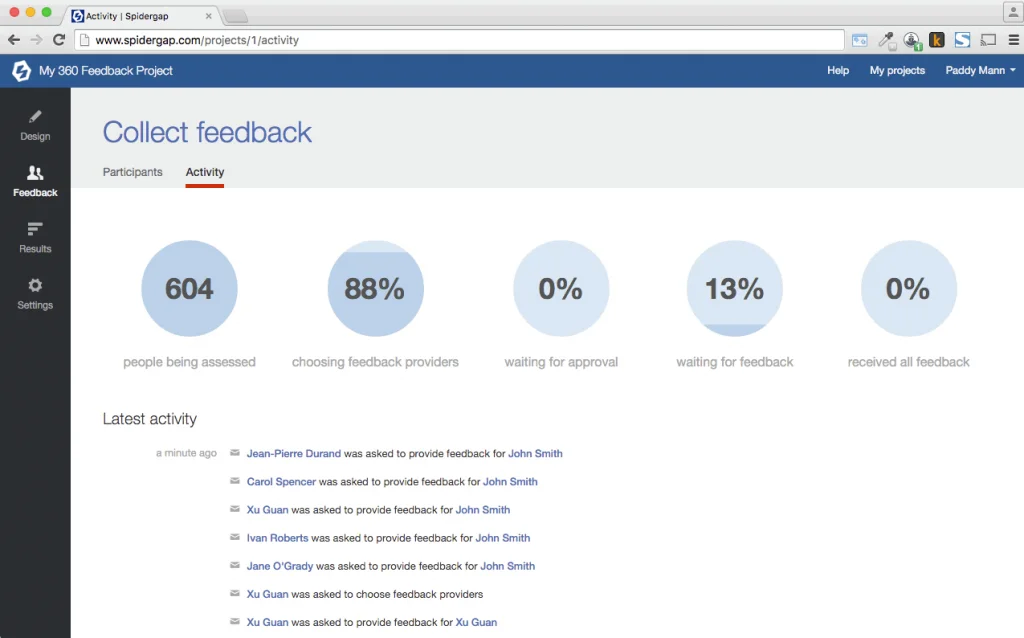
Spidergap is the pure-play 360 feedback specialist that has been quietly doing one thing well since 2010 — running 360 cycles for leadership programs, executive coaching engagements, and standalone development assessments at organizations that need depth in the 360 use case specifically rather than 360 as one feature of a broader performance management suite.
The product covers customizable questionnaires (or out-of-box best-practice templates), employee-driven rater nomination with manager approval, the signature spidergap diagram visualization, group reports for cohort analysis, pulse surveys for tracking progress between cycles, and impact surveys that measure ROI after a 360 cycle completes.
G2: 4.5/5 - 2 reviews (very limited G2 presence)
Capterra: 4.8/5 - 116+ reviews
Note: Spidergap's verified review base concentrates heavily on Capterra rather than G2. The sentiment themes below are drawn from the larger Capterra base.
Dominant positive theme
Spidergap is user-friendly and has fantastic support that is available every step of the way. It is a comprehensive, cost-effective tool with functionality that makes it easy to track progress throughout the process. - Capterra Review
The overarching theme when it comes to review sentiment describes Spidergap 360 Feedback as an exceptionally easy-to-use, highly customizable 360 platform that delivers thorough, professionally formatted feedback reports at a transparent, affordable price. Reviewers consistently praise the shallow learning curve, the speed of setup, and the quality of the aggregated individual feedback reports
Dominant critical theme
I wish there were a way to set limits on how many feedback requests one person can get; however, I realize that is tough for a system to automate. - Capterra Review
The main critique centers on a few specific automation and admin-control gaps rather than any fundamental product weakness. Reviewers want automated rater reminders on a configurable cadence, the ability to intervene during the rater-selection phase (especially for external consultants managing client 360s), and easier ways to sort and export the list of raters who haven't yet responded.
Spidergap publishes tiered annual pricing transparently with a per-recipient billing model:
This billing structure is uniquely fit for leadership development cohorts where the reviewee count is small, but the rater count is large.
Best for Mid-Market Organizations Wanting Performance, LMS, Engagement, and 360 in One AI-Driven Suite
| Weighted Score | AI & Automation | 360 Workflow Sophistication | Customer Support | Reporting & Analytics | Workplace Integration |
|---|---|---|---|---|---|
| 4.02 | 4.5 | 4.5 | 4.5 | 4.0 | 4.0 |
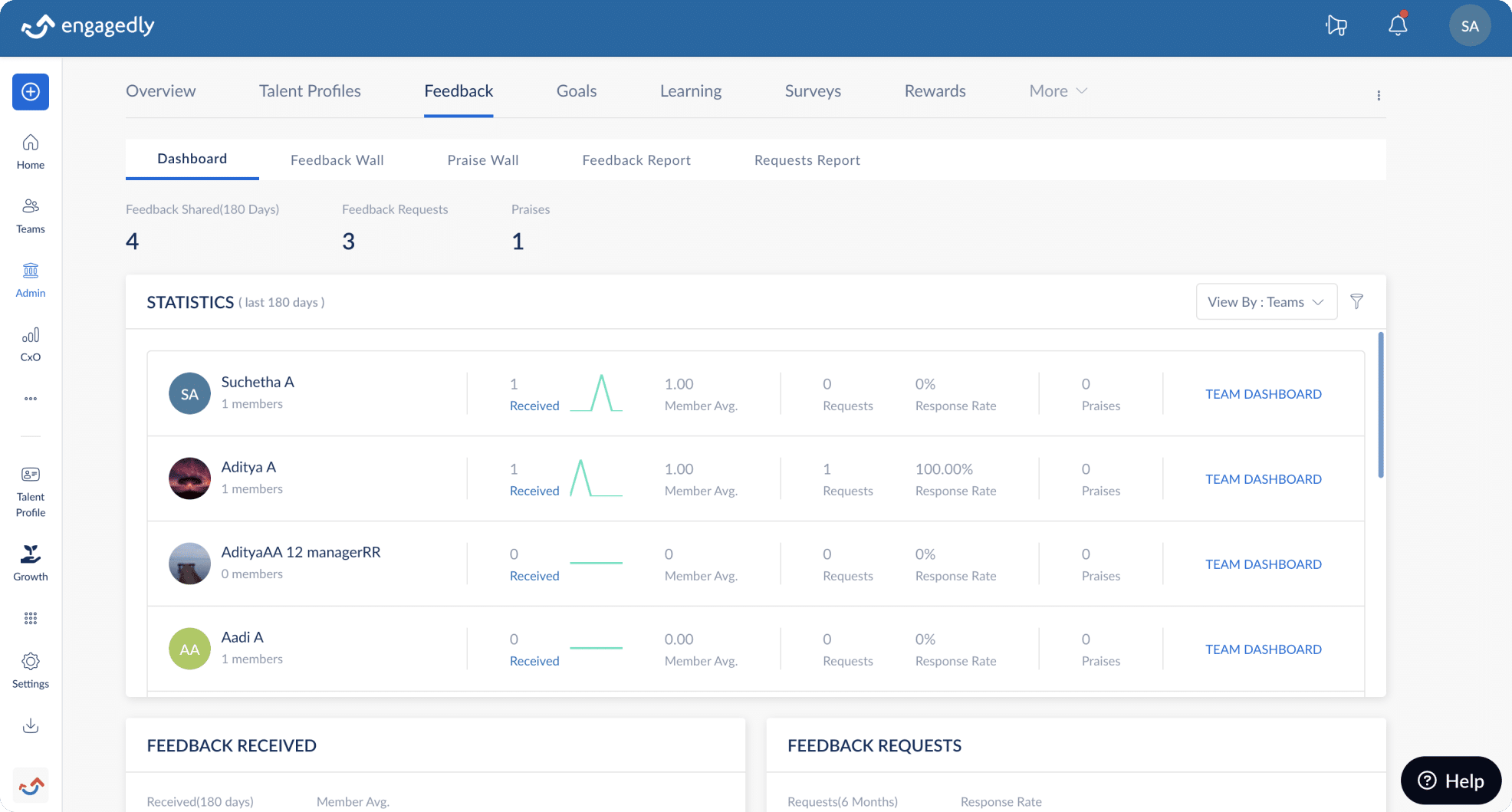
Engagedly is an AI-driven talent management platform that has been steadily building credibility in the mid-market segment since 2014. The product brings together performance management, 360 feedback, OKRs, learning management (LXP), mentoring, engagement surveys, and recognition into a unified suite.
The 360 module is one of seven core modules and integrates directly with the rest of the platform — feedback results feed into AI-recommended learning paths, mentor matching, and personalized development plans rather than living in isolation. Anchored by Marissa™ AI, a modular agentic AI framework launched in November 2025, the platform layers AI-driven automation across cycle configuration, participant selection, feedback summarization, and action planning.
G2: 4.3/5 - 538 reviews
Capterra: 4.6/5 - 77 reviews
Dominant positive theme
Reviewers consistently highlight the learning and development module — particularly its course quality, training options, and structured learning paths — as a standout feature that supports real skill growth. The social feed and recognition tools are repeatedly praised as a way to connect remote workforces, and admins value the ability to impersonate users to troubleshoot issues directly.
Dominant critical theme
The main critique centers on platform performance and polish rather than feature gaps. Multiple reviewers mention slow loading times and a mobile app that lags behind the web experience in both features and smoothness. A secondary critique highlights usability friction for new users: certain sections are described as confusing and in need of better in-product guidance.
Engagedly publishes per-module starting prices openly but uses a modular structure that requires a custom quote for actual configuration:
For 360 feedback specifically, the Manage Performance module at $5 per user per month is the practical entry point — but the $7,500 annual platform minimum is the real pricing floor for smaller deployments.
Best for SMB Services Businesses Needing 360 Alongside Project Profitability Tracking on a Tight Budget

| Weighted Score | Pricing Transparency | 360 Workflow Sophistication | Customer Support | Customization Depth | Mobile Experience |
|---|---|---|---|---|---|
| 4.01 | 4.5 | 4.5 | 4.5 | 4.5 | 4.0 |
AssessTEAM handles 30+ evaluation methodologies — traditional supervisory reviews, goal-setting and OKRs, 360-degree feedback, 30-60-90 evaluations, anniversary day evaluations, customer satisfaction evaluations, project-based performance tracking, and continuous feedback — making it one of the broader evaluation methodology libraries in our lineup. The 360 module supports multi-source feedback from managers, peers, subordinates, and external customers or clients, with AI-driven SMART KPI suggestions drawing from a library of 3,000+ pre-built indicators across job functions and industries.
G2: 4.2/5 - 179 reviews
Capterra: 4.6/5 - 139 reviews
Dominant positive theme
AssessTEAM is affordable and offers great value for money. It is versatile and flexible to cope with unique requirements. Customer service is excellent. - G2 Review
The overall review sentiment positions AssessTEAM as versatile, easy-to-adopt performance management platform that covers a broad set of evaluation metrics. Reviewers consistently call out the ease of use and the smooth transition the platform enables from printed/paper evaluations to digital workflows.
Dominant critical theme
There is a somewhat steep learning curve in terms of setting up user profiles and the various upward/peer/downward feedback levels. - G2 Review
The main critique is a clear tension around usability and polish: while many users praise ease of use, a meaningful subset describes the interface as clunky, dated, and confusing, with terminology that's difficult to learn. The most consistent specific complaint is the weak mobile app experience — multiple reviewers note it fails to support the full feature set available on the web, which is significant given how often mobile is the primary device.
AssessTEAM publishes tiered pricing openly with a uniquely flexible commercial structure:
Best for Consultants, Coaches, and HR Teams Running Deep Leadership Development Programs
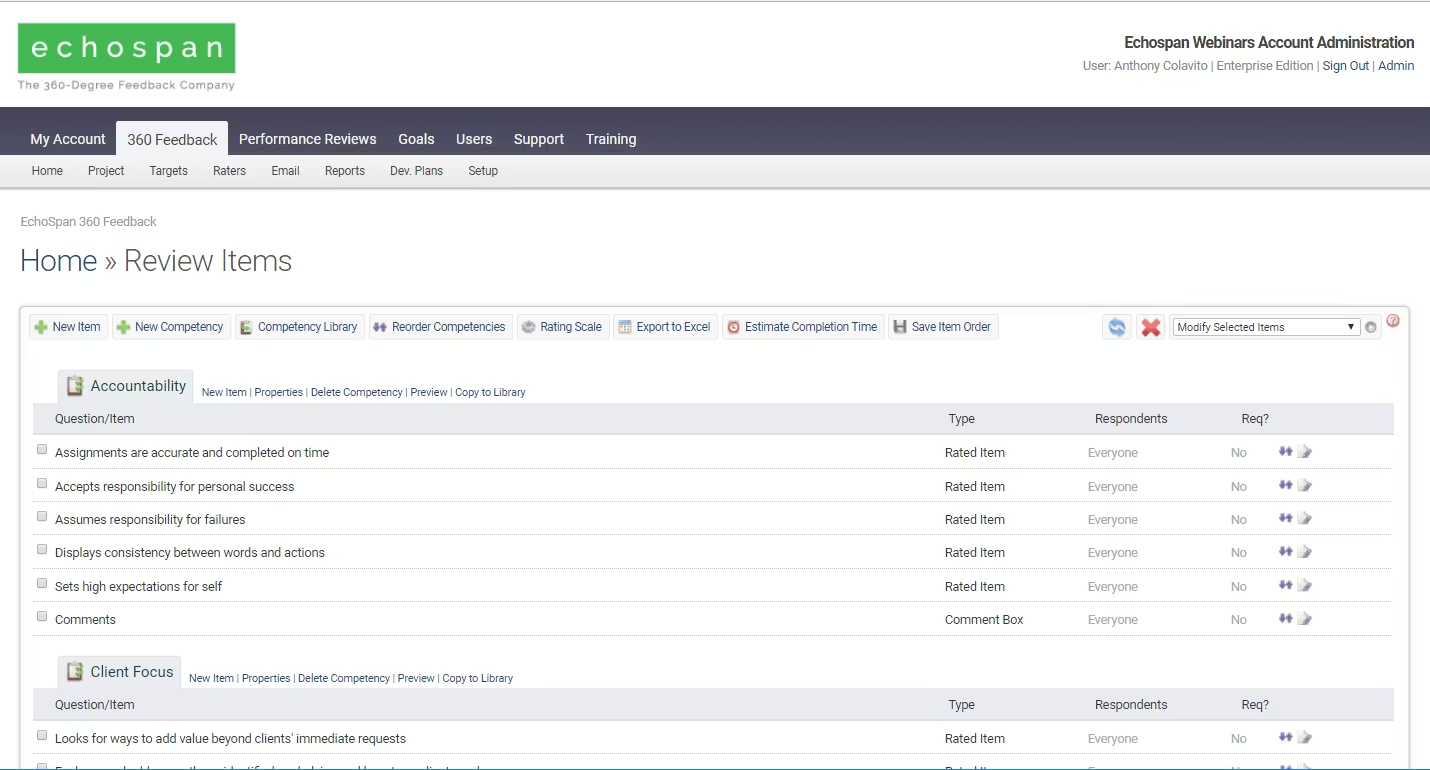
EchoSpan is the pure-play 360 feedback specialist that has been operating since around 2007. Unlike the all-in-one performance suites elsewhere in our lineup, EchoSpan focuses exclusively on 360 feedback and related multi-rater assessments, and the product depth shows.
The defining strengths are reporting depth and customization. EchoSpan's AI Insights Toolkit identifies trends, detects outliers, and composes narrative summaries from participant feedback. Reports are fully customizable down to graph styles, statistical measures (means, standard deviations, gap scores), and role-specific versions (participant vs. manager). The trade-offs are predictable for a pure-play specialist: there's no performance review, no goals, no 1:1s.
G2: Limited verified presence
Capterra: 4.9/5 - 65 to 74 reviews
Dominant positive theme
One thing I really like about the EchoSpan Flexible 360 is how easy it is to customize the feedback surveys. I can adjust the questions and reports to fit exactly what my team needs - Software Advice
The overarching theme when it comes to review sentiment describes EchoSpan Flexible 360 as a highly customizable, professional-grade 360 feedback platform that delivers exceptional value for money alongside genuinely outstanding customer support.
Dominant critical theme
While using EchoSpan Flexible 360, we found the initial setup process to be more complicated than expected. The reporting and dashboards also felt a bit limited, making it harder to quickly get the insights we wanted. - Capterra Review
The main critique is the learning curve and initial setup complexity. Several reviewers note that while the platform becomes intuitive once you're walked through it, terminology can be confusing at first and you really need a guided onboarding session before diving in.
EchoSpan's pricing is configured through a calculator on the vendor site rather than published openly. Two pricing models are available:
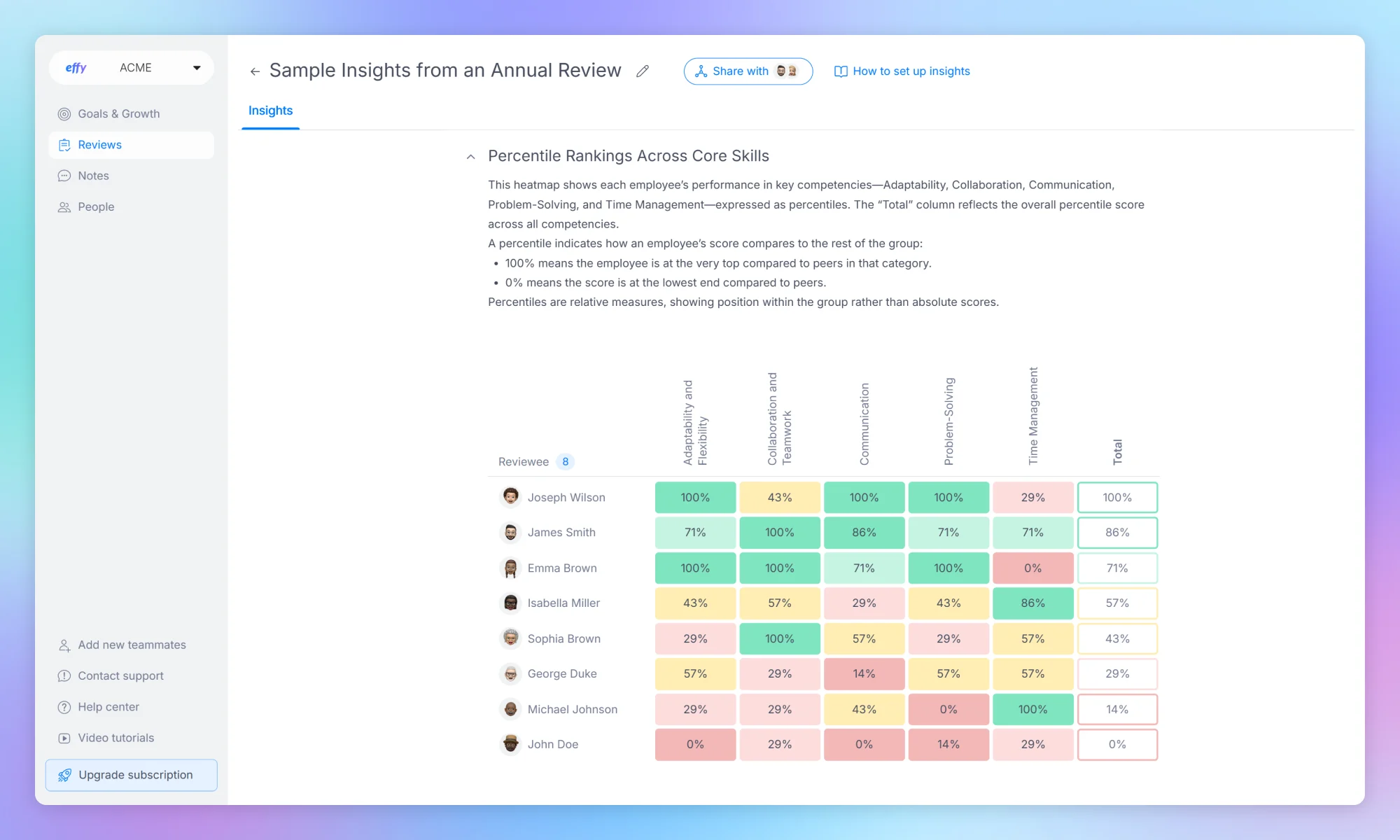
Best for Small Teams Running AI-Driven 360 Cycles on a Free or Low-Cost Plan
| Weighted Score | Customer Support | AI & Automation | Manager & Employee UX | Pricing Transparency | 360 Workflow |
|---|---|---|---|---|---|
| 4.07 | 4.7 | 4.6 | 4.6 | 4.6 | 3.8 |
Effy AI is an AI-first performance and 360 feedback platform built for small and mid-sized teams, launched in 2022 and aimed at organizations up to around 200 employees that want structured 360 cycles without the setup overhead of an enterprise suite. The product spans three modules: reviews, which cover 360 feedback and check-ins, goals, and notes for kudos and instant feedback. Its whole pitch is speed. The AI builds the questionnaire, distributes it, chases non-responders, and writes the summary, so a cycle that normally eats days of admin is designed to launch in roughly 30 minutes.
G2: 4.9/5 - 36 reviews
Dominant positive theme
"Effy AI replaced our scattered system of Excel sheets and Microsoft Forms with one centralized, easy-to-use platform." - G2 Review
Reviewers repeatedly describe Effy as fast to set up and easy for non-HR teams to run, with onboarding measured in minutes rather than days. The AI summaries draw specific praise for turning raw multi-rater feedback into clear, usable reports, and customer support is named often as responsive and hands-on. Small teams running their first structured 360 cycle are the most satisfied group.
Dominant critical theme
"It would've been valable if Effy AI was integrated into Microsoft Teams as we do not use Slack". - G2 Review
The most common criticism is that some capabilities are still maturing. Reviewers ask for deeper analytics and more flexible forms as they scale, and several note that anonymity and other controls require a paid plan. A recurring request from Microsoft-based teams is native Teams integration, which the product does not offer.
Effy AI publishes pricing transparently and is one of the few tools in this lineup with a real free plan rather than a time-limited trial.
Ten tools, ten different answers to ten different buyer problems. The tool that's right for you depends less on its score on our rubric and more on which buyer scenario you're actually in. Below are seven conditional recommendations based on the buyer profile we'd most often see for each tool. If your situation fits one of these scenarios cleanly, start your evaluation there.
If your organization runs on Microsoft 365 and you want performance management to live in the flow of work → Start with Teamflect.
Microsoft-native architecture is the structural advantage, and adoption is the metric that determines whether your 360 program actually delivers value. The free Starter plan covers teams up to ten users, which means evaluating the full platform doesn't require a sales conversation. Teamflect Agent is the agentic AI assistant built directly into Teams chat.
If you're a growth-stage SaaS or tech company replacing three or four separate tools (review platform + engagement survey + LMS + HRIS) with one unified system → Start with Leapsome.
Best-in-class G2 ratings at scale, AI bundled free across every plan, and a unified data model that connects performance, engagement, learning, and compensation in ways point solutions cannot match. The pricing complexity is a real friction point, but the consolidation typically pays back within two budget cycles for organizations ready to use four or more modules.
If you're a mid-market HR team with ADP, Workday, BambooHR, or another HRIS already in your stack, and you want a dedicated CSM partnership rather than self-serve software → Start with PerformYard.
The most comprehensive HRIS integration list in our lineup, plus a dedicated Customer Success Manager included with every plan. G2 reviewers consistently single out their CSM by name as the reason they renew. Expect 3–6 weeks of configuration time before launching your first cycle, but the depth pays off over multi-year deployments.
If you're an executive coach, leadership development consultant, or HR team running highly bespoke 360 cycles for senior leadership cohorts → Start with EchoSpan or Spidergap.
Both are pure-play 360 specialists with the configuration depth specialist programs require. EchoSpan wins on AI capabilities and conditional logic flexibility; Spidergap wins on report design and customer support response time. Per-recipient (Spidergap) or per-review (EchoSpan) billing models are uniquely fit for cohort-based and project-based engagements where seat-based pricing doesn't make sense.
If you're a small services business (consultancy, agency, professional services firm) that needs 360 alongside project profitability tracking on a tight budget → Start with AssessTEAM.
The most aggressive pricing in our entire lineup at $2 per user per month for 360 feedback, with no contracts and white-glove rollout support included. Uniquely, AssessTEAM also ties timesheets, project budgets, and labor costs to real-time margin per project — turning the tool into a dual-purpose performance and profitability platform that no other vendor in this list offers.
I'll be honest with you about what this article can and can't do.
What it can do is save you weeks of vendor demos. Fetican spent eight weeks running the same simulated review cycle through ten different platforms, completing reviews as a manager, an employee, and a peer reviewer for each one. You're getting the output of that work compressed into one document. The full scoring grid is published, the criteria are weighted on what we genuinely think predicts 360 program success rather than what vendors market, and every score traces back to specific evidence such as G2 reviewer testimony, Capterra ratings, hands-on testing notes, verified pricing data. If your priorities match how we weighted the rubric, the rankings should give you a useful starting shortlist of four or five tools to actually demo.
What it can't do is replace your own due diligence. Your existing tech stack, your team's technical sophistication, your buyer political reality, the HRIS you already have under contract, your budget cycle, your specific 360 program design — none of these are inputs we could capture in a single rubric. If your weights would put Integrations at 20% instead of our 10%, the rankings reorder.
The scoring grid is published, the criteria are documented, and if your weights differ from ours, recalculate. The tools that surface near the top of your version should be the ones you actually take to demo. If you have questions about the methodology, or pushback on a specific score, reach out. We'll keep this evaluation current as the category continues to evolve, particularly as AI capabilities continue to differentiate the leaders from the rest of the field through 2026.
Note: Just as we rigorously evaluated the leading 360 feedback platforms, we've applied the same hands-on research methodology to the OKR software market. If you're building a complete performance management stack, that's the next guide to read.
📚 Recommended Reading: Our Research and Testing on the Top OKR Software
.avif)

Create high-performing and engaged teams - even when people are remote - with our easy-to-use toolkit built for Microsoft Teams
.svg)