Free templates are practical, customizable, and ideal for managing onboarding tasks without a mistake. If you’re here, your priority is clear: finding an onboarding list you can actually use. That’s why we’ve compiled 10 onboarding checklist templates you can easily access and download.
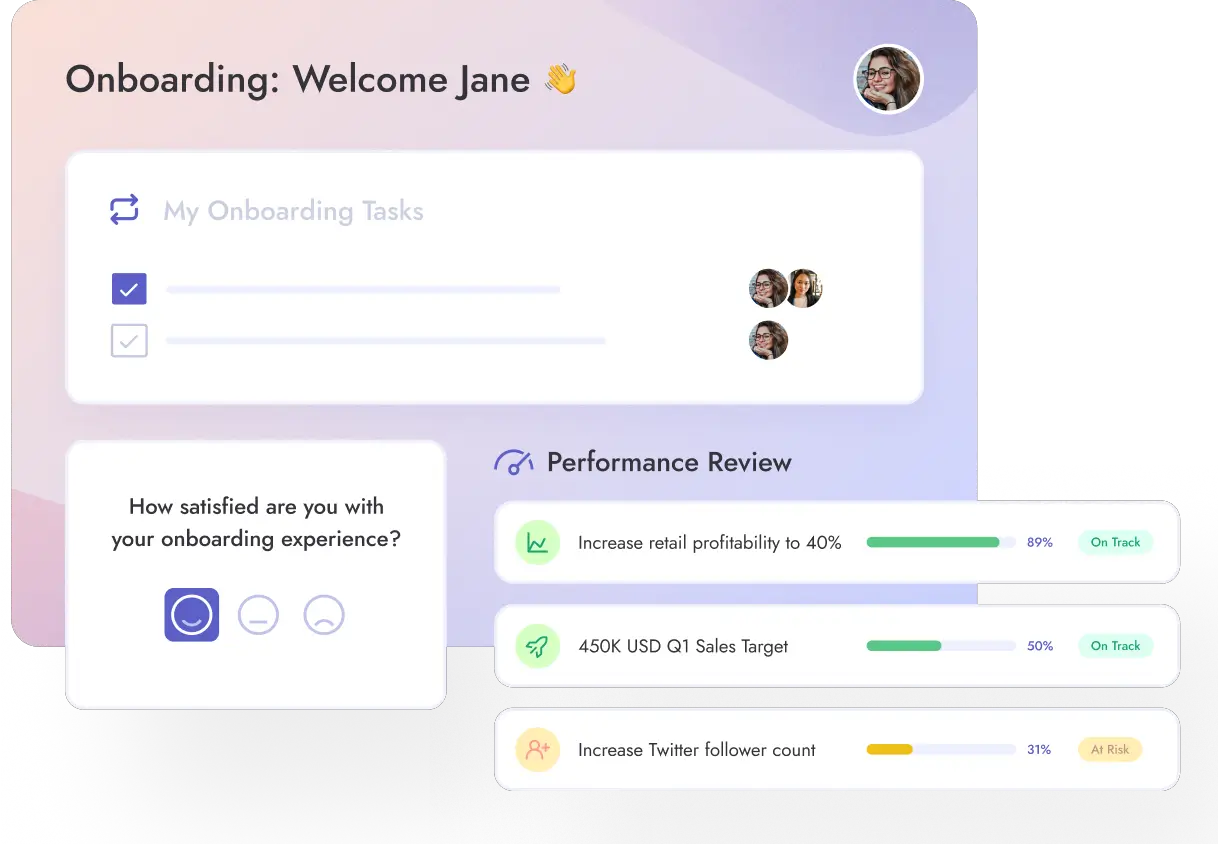
And if you want to take things further, Teamflect is the best employee onboarding software available in Microsoft Teams and Outlook. With Teamflect, you can create mentor-buddy programs, use 30-60-90-day review templates, collect onboarding feedback, and automate onboarding tasks directly in Teams. 👉 Get to the templates to find the one that fits your needs best.
TL;DR — Quick Summary
10 Free Templates: Word, Excel, PDF, editable preboarding, sales-specific, remote employee, HR department, and Teamflect's automated onboarding checklists—all ready to download.
Key Components: Pre-boarding tasks (offer letters, equipment setup), first-week essentials (orientation, tool training), and 30-60-90 day milestones for continued growth and feedback.
Core Benefits: Saves time with reusable templates, ensures consistency across departments, reduces errors, improves new hire experience, and supports compliance documentation.
[fs-toc-omit]What Is An Onboarding Checklist?
Put simply, an onboarding checklist is a structured list of tasks and documents that need to be completed when a new employee joins the company. It helps be a step-by-step guide that ensures the smooth transition of new hires into the organization.
According to HBR, up to 20% of employee turnover happens within the first 45 days of employment, which shows just how critical it is to get the early stages of onboarding right.
Typically, these checklists include:
Signing the necessary paperwork
Setting up IT equipment
Attending orientation sessions
Completing initial training modules
The clearer you are on these items, the smoother the onboarding process will be.
[fs-toc-omit]What Are The Benefits of Using Onboarding Checklist Templates?
Onboarding lists help you manage the process efficiently
Having a checklist essentially eliminates the chance of forgetting any important steps in an employee's adaptation process. To list some benefits;
Saves Time: Instead of having to create a new onboarding process each time someone joins in, you can have a template that you refer back to without giving any extra effort. Not only these checklists guide the workforce, but they also guide your through onboarding.
Ensures Consistency: These checklists help standardize the onboarding experience which ensures that all of your employees go through the same process across departments and have the necessary information and support all the same.
Reduces Error: The checklists do the heavy lifting for you. You don't need to remember or take not of what has been done or not yet. Because that's what the checklist will do for you.
Improves New Hire Experience: A smooth process will help employees get acquainted with your company much faster and smoother. How it starts is how it goes so it's important to start off on the right foot in order to retain the talent you've put in such effort to get in the first place.
Supports Compliance and Documentation: Keeping track of every completed task and forms is much easier to do with a checklist and helps you with audits or any other internal reporting efforts.
[fs-toc-omit]What Should Be Included In An Onboarding Checklist?
A comprehensive checklist will typically cover both pre-onboarding and first week tasks. Not only is onboarding about the first week at work for a new hire, you also have to equip your hires with the right info before they arrive so they know what they're getting into.
You also should consider long term check-ins about onboarding to ensure that the hires indeed adapt to the organization fully. In addition, these checklists need to include administrative requirements, any trainings or tools that need setting up, and dedicated feedback sessions or surveys.
[fs-toc-omit]What Pre-boarding Tasks Are Essential?
Here are a few of the essentials to consider including in your sample onboarding checklist;
Sending and signing of the offer
Collecting any necessary documents
Setting up the new hires' emails logins and other accesses required
Shipping their equipment as it applies
Sharing a welcome mail with first day agenda and other starting information such as dress codes etc.
Providing an onboarding schedule
[fs-toc-omit]What Should a First-week Checklist Cover?
The first week is all about starting off on the right foot. So;
Introduce them to their team and hold a welcome meeting
Hold an orientation session
Review responsibilities and expectations
Setup tools and provide software training
Arrange a meeting with their buddy or mentor if there are any
Provide necessary information on workflows and company culture
Check-in daily to keep track of their adaptation process and offer support when needed
[fs-toc-omit]What Should a 30/60/90-day Onboarding Checklist Include?
A 30-60-90 Day onboarding checklist needs to cover all the basics to ensure continued growth, gather feedback and ensure alignment with role expectations. The first 30 days should focus on initial trainings and shadowing workflows, as they start working on tasks step by step.
The 60 day checklist can focus more on how take ownership of their responsibilities and deepen their relationship with their teammates. It's also a great time to have a mid-point check-in with their managerand identify any improvement areas as well as strengths.
And last but least, the 90 day mark should focus on how they independently contribute to the organization and take initiative, as well as what their initial achievements are. This is also the perfect moment to set long-term performance goals and review their onboarding and integration performance as a final act.
📚 Recommended Reading:Could you be making these common onboarding mistakes?
Teams that want to identify high performers early and track how new hires are adapting and performing throughout the onboarding process.
Why choose this template
Unlike typical new employee onboarding templates that focus only on tasks and to-dos, this checklist goes beyond the basics. It helps you assess performance, engagement, and role integration during onboarding. Instead of simply ticking off boxes, you actively engage with your new hire’s development from day one.
Teams that prefer working in Excel and want a milestone-based checklist broken down by clear stages.
Why choose this template
This checklist helps you track every essential step in the new hire onboarding process. It’s organized around key milestones, including preboarding, the first day, the first week, and the first month, so nothing slips through the cracks. While we at Teamflect usually recommend 30-60-90-day plans, this template still works well for teams looking for a straightforward, stage-based Excel solution.
Teams that want a simple, print-friendly checklist they can easily use both digitally and offline.
Why choose this template
This PDF is easy to use for tracking task statuses and works just as well when printed. If you prefer keeping a hard copy on hand during the onboarding process, this template offers a straightforward and practical solution.
4. Editable preboarding checklist template
Editable preboarding checklist for your organization
Teams that want to ensure nothing is missed during the preboarding phase before a new hire’s first day.
Why choose this template
Many onboarding documents overlook preboarding, even though it is a critical part of employee onboarding. This free preboarding checklist template covers all essential preboarding steps and is fully editable, making it easy to tailor to your organization’s specific needs.
Organizations that want to create department-specific checklists using a flexible, reusable structure.
Why choose this template
Onboarding needs vary across departments, and a one-size-fits-all checklist rarely works. This onboarding schedule template provides a solid core structure that you can easily customize for different teams, whether HR, marketing, sales, or any other department. Even if you don’t have a sales team, you can use the framework to build a checklist that fits your own departmental needs.
6. Excel onboarding checklist template
Simple and effective onboarding checklist to cover the basics
Teams that prefer a simple, no-frills checklist without complex features or tools.
Why choose this template
This Excel template keeps things straightforward and practical, helping you cover all onboarding essentials without unnecessary clutter. Just download the file, fill it out, and get started right away.
7. New hire onboarding list
Best for
Organizations looking for a versatile checklist that can be adapted to different onboarding styles and processes.
Why choose this template
There’s no single perfect way to onboard new hires, and what works best can vary from one organization to another. This flexible new employee onboarding checklist is designed to adapt to your specific needs, making it easy to tailor the onboarding experience as you bring new team members on board.
Employee Name:
Position:
Preboarding:
Send a personalized welcome email to the new hire, including essential information such as the start date, time, and location (if applicable).
Share any necessary pre-employment forms or paperwork that need to be completed before the new hire’s first day.
Grant access to tools and platforms, the new hire will use.
First Day:
Greet the new hire and introduce them to the team members.
Do a quick tour of the office (if applicable) and familiarize them with the facilities.
Set up the new hire’s workspace, including the necessary equipment.
Provide an overview of the company’s mission, values, and culture.
Review the employee handbook and company policies.
Explain any security protocols or access procedures the new hire needs to follow.
First Week:
Arrange introductory meetings with key team members and managers.
Outline the department’s goals, projects, and responsibilities.
Provide training on any specific software or tools used within the organization.
Clarify the new hire’s role and responsibilities within the team.
Set up accounts, email addresses, and communication tools.
Go over the organization’s communication channels and guidelines.
First Month:
Continue training and provide ongoing support as needed.
Assign initial tasks or projects to help the new hire get hands-on experience.
Encourage the new hire to ask questions and share feedback.
Schedule regular check-ins to ensure a smooth transition into new hire’s position.
Introduce new hire to other teams or departments they will interact with.
Ongoing:
Offer opportunities for professional development and growth.
Create a supportive and inclusive work environment.
Provide regular performance feedback and evaluations.
Encourage participation in team-building activities and organization events.
Address any additional onboarding needs specific to the role or department.
8. Remote employee onboarding template
Best for
Organizations onboarding remote employees who want a structured and consistent virtual onboarding experience.
Why choose this template
Remote onboarding plan is a different approach than in-office onboarding. This checklist helps you recreate the structure of a traditional onboarding process in a virtual setting, ensuring a welcoming and organized experience no matter where your new hires are located.
Employee Name:
Position:
Pre-Onboarding:
Prepare Welcome Email: Send a warm welcome email to the new remote hire, introducing them to the team and giving important details about their start date, work schedule, and any initial preparations they need to complete.
Set Up Equipment and Accounts:
Order and ship necessary equipment like laptop, peripherals, etc. to the employee’s designated address.
Create user accounts for organization systems and tools, email, project management software, communication tools, etc.
Share login credentials securely with the new hire.
Assign a Buddy/Mentor: Pair the new remote employee with an experienced team member who can act as offering guidance and support throughout the onboarding process.
Prepare Onboarding Materials:
Create an onboarding handbook that covers important information such as organizational policies, remote work guidelines, and available resources.
Gather any training materials relevant to the new hire’s role or department.
First Day:
Welcome Call/Video Meeting:
Schedule a virtual meeting to greet the new employee and introduce them to the team.
Give an overview of the company’s mission, values, and culture.
Share the agenda for the first week and answer any initial questions.
Access and Account Setup:
Help the new hire set up their accounts and ensure they have access to all necessary tools.
Provide instructions on how to navigate and use each tool effectively.
Introduction to Colleagues:
Arrange virtual introduction meeting with team members and key stakeholders.
Encourage chats to help the new hire connect with their team members.
First Week:
Team and Department Overview:
Schedule meetings or presentations to familiarize the new hire with their team’s roles, responsibilities, and current projects.
Organize sessions with people from other departments to provide an understanding of the organizational structure.
Training and Development:
Identify and schedule relevant training sessions or courses to build the new hire’s skills and knowledge.
Assign self-paced learning resources or online courses for them to explore.
Clarify Expectations and Goals:
Discuss performance expectations, key objectives, and milestones with the new hire.
Establish clear communication channels for ongoing feedback and performance discussions.
Company Culture and Values:
Share information about the company’s core values, mission, and vision.
Encourage the employee to participate in virtual team-building activities or company-wide events.
First Month:
Ongoing Support and Check-ins:
Schedule regular check-ins with the new hire to address any questions or concerns.
Provide opportunities for them to seek guidance and feedback from their mentor or manager.
Assign Initial Projects:
Give the new hire their first tasks and make sure they align with their role and allow them to contribute meaningfully.
Performance Evaluation:
Explain the performance evaluation process and timeline.
Set expectations for performance reviews and discuss a plan for ongoing professional development.
Social Integration:
Encourage participation in virtual social activities or team-building events.
Facilitate connections with colleagues through virtual coffee chats or icebreakers.
9. HR onboarding template
Best for
HR teams looking for a structured employee onboarding agenda tailored specifically to HR roles and responsibilities.
Why choose this template
Every department has its own onboarding needs, and HR is no exception. This checklist is designed specifically for HR onboarding programs, helping you create a clear and role-relevant onboarding agenda from day one.
Employee Name:
Position:
Pre-boarding Phase:
Send the offer letter and employment contract to the new hire.
Request and collect essential documents like tax forms, bank details, and emergency contact information
Set up the new hire in the HRIS and payroll system.
Arrange for a background and any required health checks.
Prepare the new hire’s workspace and equipments.
Inform relevant departments (IT, facilities, security) about the new hire’s start date and needs.
First Day:
Welcome the new hire and introduce them to their team.
Give an office tour.
Review company policies, including the code of conduct, dress code, and attendance expectations.
Share an overview of the organization’s mission, values, and culture.
Set up necessary accounts and share credentials.
Go over the new hire’s job description, goals, and performance expectations.
Give a detailed orientation, explaining the organization’s structure and departments.
Discuss the employee’s benefits package, including health insurance, retirement plans, and any other perks.
Complete any remaining paperwork, such as employment contracts or confidentiality agreements.
Schedule necessary training sessions and workshops.
First Week:
Introduce the employee to their direct supervisor or manager.
Provide an overview of their role within the team and the organization.
Schedule department-specific training sessions.
Review the new hire’s responsibilities and deadlines for their initial tasks.
Arrange meetings with colleagues from other departments.
Encourage them to ask questions and clarify any aspects of their role.
Explain the performance review process and timeline.
Share information about upcoming organization-wide events and initiatives.
Assign a mentor or buddy to help the new hire navigate the organization and answer their questions.
Evaluate their progress and address any concerns or challenges.
First Month:
Schedule regular check-ins to review their progress, answer questions, and provide support.
Offer additional training or workshops to further develop their skills.
Encourage participation in team meetings, and organization-wide events.
Give access to relevant resources.
Discuss long-term goals and career development opportunities.
Conduct a formal evaluation.
Provide feedback and recognize the employee’s achievements during their initial month.
Adjust or fine-tune the employee’s responsibilities based on their performance and organizational needs.
Provide feedback and recognize their achievements during their first month.
Address any remaining questions or concerns the new hire may have.
10. Teamflect's Onboarding Template
Format
Automated onboarding tasks and review templates in Microsoft Teams
Best for
Organizations that want to manage onboarding directly with native Microsoft integration
Teams looking to automate onboarding without using Word, Excel, or PDF files
Why choose this template
Automate every onboarding item using Teamflect’s onboarding tasks feature
Instantly assign onboarding tasks to new hires as soon as they join
Use three ready-to-use employee onboarding review templates from the performance review gallery
Manage onboarding, reviews, and follow-ups entirely within Microsoft Teams
Analyze onboarding results using built-in Power BI reports
Teamflect offers smooth onboarding process.
We believe the most effective way to manage onboarding is by using dedicated software.
Use the best onboarding platform for Microsoft Teams!
Want to see how Teamflect can transform your employee onboarding? Check out this video:
Teamflect helps you turn your Microsoft Teams into the ultimate employee onboarding software.
Frequently Asked Questions
[fs-toc-omit]How to Create an Onboarding Checklist for New Hires?
To create your own checklist, we recommend starting out by mapping out the new hire journey top to bottom. Start by defining the key stages; pre-onboarding, first-day, first week and 30/60/90 milestones. From there you can get started on listing the tasks of each stage.
Then, start assigning responsibilities to clarify who will work on each task whether it is HR, manager, IT, or other team members. Customize your checklist to reflect the unique needs of different departments or positions. Utilize your onboarding software and the checklist to stay on track. Don't forget to review and improve as you gather feedback in time.
[fs-toc-omit]How to Measure Onboarding Effectiveness?
You'll need to keep an eye on certain metrics like time-to-productivity, retention rates, employee engagement scores as well as onboarding task completion rates. Of course you can't forget about feedback, the most important part of any process to ensure it's impact.
Ask for input on how well the new hire is integrating and performing. Conduct structured check-ins (e.g., after 30, 60, 90 days), and onboarding surveysto gather direct feedback on the onboarding experience. That way you can use this information to make data-driven and impactful decisions about your onboarding process.
Assess these metrics regularly and refine your process with time, that way you'll ensure the new hires get a great start and that they can perform their best so your company performs its best.
[fs-toc-omit] Is an onboarding checklist different for small businesses vs. enterprises?
Yes. While the core onboarding steps are often similar, the structure and level of detail usually differ. Small businesses tend to use simpler onboarding checklists with fewer stakeholders and faster timelines. Enterprises typically require more detailed checklists that account for compliance, approvals, multiple systems, and cross-department coordination.
[fs-toc-omit] Who should own the onboarding checklist: HR, manager, or IT?
HR typically owns the onboarding process checklist, as they oversee the overall employee onboarding experience. That said, onboarding works best when ownership is shared. Managers contribute role-specific tasks and expectations, while IT handles system access, equipment, and technical setup. Clear ownership and collaboration ensure nothing is missed.
[fs-toc-omit] How often should onboarding checklists be updated?
Onboarding checklists should be reviewed regularly and updated whenever processes, tools, or compliance requirements change. As a best practice, most organizations review their onboarding checklists at least once or twice a year to ensure they remain relevant, accurate, and aligned with current business needs.
.svg)
.svg)
.svg)

.svg)


.webp)
.svg)
.avif)




.svg)

.svg)


%20THUMB.webp)
