.svg)
.svg)
How to Manage Data Migration for a New HR System (Field Map and Cutover Plan)

Updated on:
October 9, 2026

Prefer Teamflect as your HR source on Google
.svg)

Migrating HR data means moving employee records, balances and history from one system to another without breaking payroll, losing an audit trail or leaving anyone locked out on Monday. The work is mostly decided before anything moves: what you take, what you archive, and how you prove the numbers match
IBM makes a similar point about data migration in general, warning that unexpected migration costs often trace back to poor planning. You decide what comes with you and what gets archived, and then you prove the numbers match on both sides.
The focus here is the move itself, one phase of the wider implementation project, rather than which system to buy, since you’ve likely picked the new platform already.
Not all HR data needs the same treatment. Four data types move to the new system, while the org chart should sync from your HRIS instead. As for old documents, most are better off in an archive than in the new platform. Treating everything as one big export is where plans start to go wrong.
Core records and balances need a reliable home in the new system, since nothing else works without them. On the other hand, organizational data changes every week, so it should keep flowing from its source rather than being copied once and left to go stale.
| Data Type | Move, Sync or Archive | Why | What Breaks if You Get It Wrong |
|---|---|---|---|
| Core employee records, including name, ID, start date and contract | Move | The new system can’t function without them | Nobody can log in and no review cycle can be assigned |
| Org chart and reporting lines, including job title, department and cost center | Sync from the HRIS, don’t move | The data changes weekly, so a one-off copy is stale by day two | Review cycles route to the wrong manager |
| Leave and absence balances | Move, with reconciliation | Balances are a liability on the books | Employees lose days they earned, and finance has to restate the figures |
| Payroll year-to-date figures | Move, with reconciliation | Tax and reporting continuity depend on them | Year-end filings come out wrong |
| Performance history, including reviews, feedback, goals, one-on-one notes and recognition | Decide explicitly | Rarely required for compliance but often valuable for context | A manager writes next year’s review with no record of last year’s |
| Documents and attachments such as contracts and certificates | Archive, migrate selectively | Volume is high and people rarely open them | You pay to migrate files nobody looks at again |
In most migration plans, the second row is where the most effort gets wasted. If the new system reads directly from your HRIS, the org chart becomes an integration job instead of a migration job, and you can skip copying it altogether. With reliable HRIS integrations in place, manager and department changes keep flowing after cutover, so nobody ends up working from a snapshot of last quarter’s structure.
Performance history, however, deserves its own decision, because it shapes the next conversation a manager has with an employee. If you plan to bring over reviews and goal history, check what your new performance review software can actually preserve before you import anything. Otherwise, years of notes end up in a field nobody can search or report on, which won’t help anyone when review season comes around.
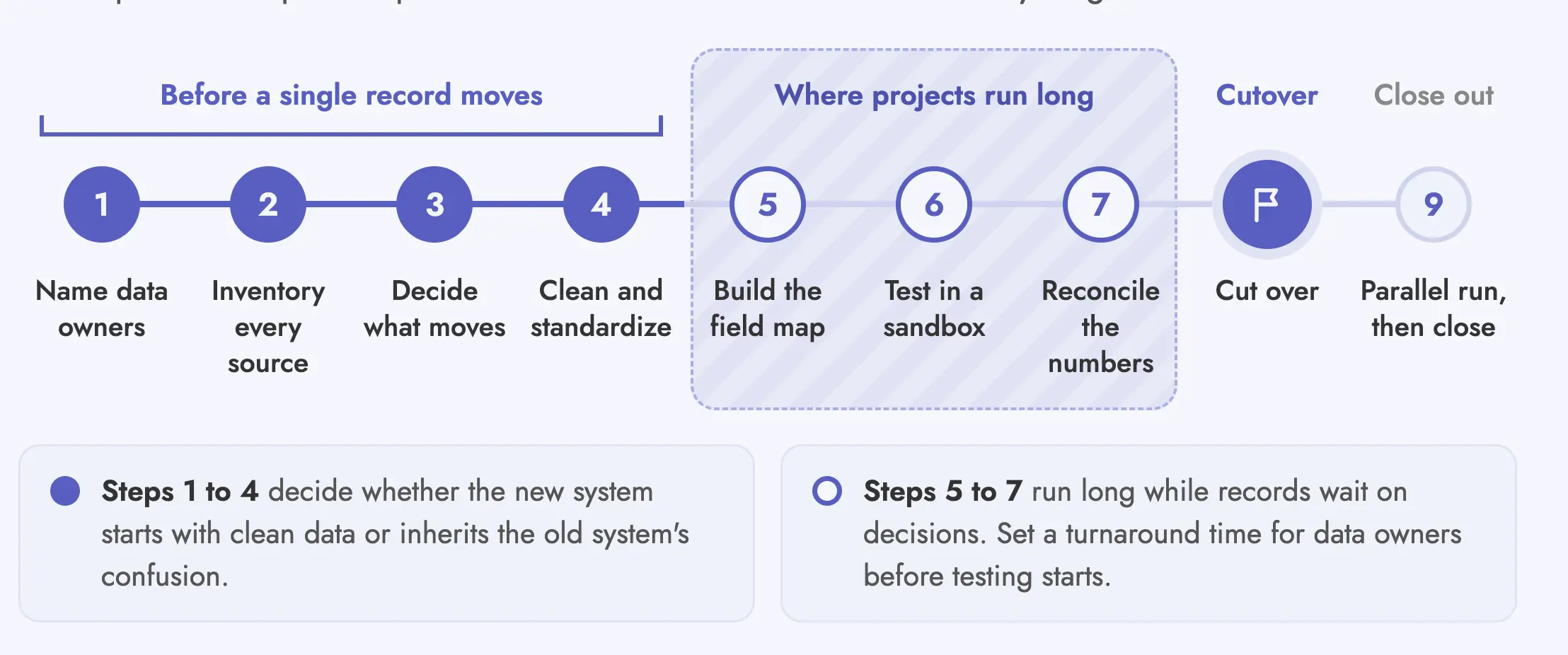
The process has nine steps, and the first four happen before a single record is transferred. Although the import gets most of the attention, it’s usually the quickest part of the project.
Decisions about ownership and scope made in the first few weeks matter far more, since they determine whether the new system starts with clean data or inherits the old system’s confusion.
Step 1: Assemble the Team and Name Data Owners: Bring in HR and payroll, along with IT and one person for each data domain. Beyond that, every domain needs a named owner who signs off that their data is correct.
Step 2: Inventory Every Source: Look past the HRIS to the spreadsheets and shared drives people quietly rely on, including any older applicant tracking system. As a rule, anything a manager uses stays in scope until you decide it doesn’t.
Step 3: Decide What Moves and What Gets Archived: Apply your retention policy first, then migrate whatever survives it. In other words, archiving is a decision you document rather than a step you skip.
Step 4: Clean and Standardize: De-duplicate records and fix inconsistent formats, then align job titles and location codes to one approved list. Once the data is clean, freeze the approved source file so people stop validating against a moving target.
Step 5: Build the Field Map: Write every source field against its destination field, along with the rule that converts one into the other. For a sense of what a finished map records, look at the worked example further down.
Step 6: Run a Test Migration in a Sandbox: Use the sandbox environment to import 10 to 20 records, and make sure your hardest cases are among them. For example, part-time staff and employees on leave count as hard cases, and so do recent transfers and anyone reporting to two managers.
Step 7: Run the Reconciliation: Compare counts and balances against the acceptance thresholds you agreed on. If anything falls outside them, fix the source data and run the test again instead of patching the new system by hand.
Step 8: Cut Over at a Low-Activity Moment: Pick a quiet week away from month end and payroll runs, when no review cycle is in progress. Even then, agree on the freeze window with payroll before you commit to a date.
Step 9: Run Both Systems in Parallel, Then Close the Old One: Name which system is the source of truth from the first day of the parallel period. After that, treat closing the old system as a planned step rather than an afterthought, since your contract’s access and retention terms decide which records you can still reach.
Steps five through seven are where most projects run long, although the software is rarely the reason. Instead, the delay comes from waiting on decisions about records that don’t fit anywhere in the new structure. To keep those decisions from piling up in the final week, set a turnaround time for data owners before the test migration starts.
💡 Did You Know? Switching to Teamflect doesn't mean starting from scratch. Our team handles your migration and implementation for free, transferring your existing goals, reviews, and employee data so you're up and running without the heavy lifting.
Most HR migrations need nothing more than a spreadsheet and the new vendor’s importer, plus one careful person who owns the file. A dedicated migration tool only earns its place in a few specific situations. Multiple source systems with custom transformations are one of them. Complex multi-entity history is another, and so is a document volume too large to handle by hand. Outside those cases, extra HR data migration tools mostly add another system to govern without reducing the real work.
| Situation | Method | Who Does the Work | When This Stops Working |
|---|---|---|---|
| Under roughly 500 employees, one source system | The vendor’s own CSV or Excel importer | Your HR admin, using the vendor’s template | When source data lives in more than two systems |
| Ongoing org and people data | Native HRIS integration, not a migration at all | Configured once, then automatic | When your HRIS isn’t on the vendor’s supported list |
| Several source systems with custom fields that need transforming | ETL tooling or scripting | IT or a data engineer | When the transformation logic outlives the project and nobody owns it |
| Multi-entity or multi-region setups with complex historical data | Vendor professional services or a migration partner | The vendor’s implementation team alongside yours | Rarely, since this is the case the service exists for |
| Documents and attachments at volume | Bulk transfer, usually separate from the record migration | IT | When retention rules differ by document type |
ETL (extract, transform, load) tooling is software that pulls records out of each old system and reshapes them to fit the new system’s fields before loading them in one controlled run.
For HR data, the transformation step covers jobs like converting date formats or mapping old job titles to a new picklist. The bigger issue is ownership. If the logic lives in a script only one engineer understands, you’ve created a maintenance problem that outlasts the project.
Multi-entity or multi-region work is a different story. Local fields and historical records don’t always behave consistently across HRIS connections, so a standard importer often isn’t enough.
In that situation, hands-on integration support for complex HRIS belongs in the enterprise implementation scope. Before work starts, agree on how responsibility splits between your own team and the HRIS owner, and on what the new vendor takes on.
Whichever methods apply to you, get the new vendor to confirm in writing which of these five they handle themselves before you sign. For the rest, you need to know whether they offer support or leave the work entirely to your team.
A field map is a line-by-line record of every field you’re moving, written before any data transfers. Each line pairs a source field with its destination and spells out the rule that converts one into the other.
In effect, field mapping turns an import file into a controlled decision record. More importantly, the map shows you where a value needs cleanup or a human decision before it reaches the new HR system.
| Source Field | Destination Field | Transformation Rule | Owner | Risk if Unmapped |
|---|---|---|---|---|
| Emp_ID | Worker Number | Keep as-is; must stay unique and match payroll | HR Ops | Duplicate people and a broken payroll join |
| DOB (DD/MM/YYYY) | Date of birth (ISO 8601) | Reformat; reject records with impossible dates | HR Ops | Silent date shifts and wrong age-based benefits |
| Job Title (free text) | Job title (picklist) | Map to the approved title list; unmatched values go to a review queue | HR Business Partner | Reporting by role becomes meaningless |
| Manager_Email | Manager (linked record) | Resolve to the person record; fail the row if there’s no match | IT | Review cycles route to nobody |
| Location Code | Work location | Map old codes to new locations; archive retired sites | HR Ops | Regional reporting and compliance break down |
| Leave_Balance_Days | Leave balance | Convert units if the systems differ; reconcile totals before and after | Payroll | Employees lose or gain days |
| Termination_Reason | Exit reason (picklist) | Map to the new taxonomy; unmapped values become “Other” with a note | HR Ops | Attrition analysis loses its history |
Anything that lands in a review queue or in “Other” is a decision someone still has to make. Count those rows before cutover, since they’re the real size of the project, not the total number of records you’re moving.
A useful field map also shows what shouldn’t be copied at all. For instance, an old free-text manager field may be replaced by a live HRIS relationship, and a retired location code may belong in an archive instead of the new picklist. Writing those choices down keeps them from turning into silent reporting errors six months later.
As for where the map lives, a shared spreadsheet with one tab per data domain works well. Each data owner can then sign off on their own section rather than being asked to approve a file they only partly understand.
A migration is finished when six numbers match on both sides, not when the import reports success. After all, a successful upload only proves the system accepted the rows. Reconciliation, by contrast, proves those rows represent the same people and balances you approved before cutover.
| What to Reconcile | Where to Read It in the Old System | Where to Read It in the New System | Acceptance Threshold |
|---|---|---|---|
| Active headcount | Employee list filtered to active | Employee directory, active filter | Exact match, zero variance |
| Leave and absence balances | Balance report as of the freeze date | Balance report as of the freeze date | Exact match per employee, zero variance |
| Payroll year-to-date totals | Payroll YTD summary | Dry-run payroll output | Exact match at company level; investigate any variance per employee |
| Manager relationships | Org chart export | Org chart export | Exact match; zero employees without a manager unless intended |
| Records with unmapped values | Review queue count | Review queue count | Zero before go-live, or an owner and a date for each |
| Access and permissions | Role assignment report | Role assignment report | No user with more access than they had before |
Before comparing anything, set the freeze date and read both systems as of that date. Otherwise, you end up comparing a live system to a snapshot, which produces variances that aren’t actually errors.
During the parallel run, write down which system is the source of truth for each data type. When two systems both look authoritative, people re-enter data in whichever one happens to be open, and bad records creep back in as a result.
Keep the parallel run short and purposeful. One full payroll cycle is a sensible minimum, since anything shorter never tests payroll end to end. Rather than clicking through screens, use the time to run real workflows, such as assigning a new manager or launching a review cycle.
In addition, log every correction someone makes during the period and note which system received it. Without that log, well-intentioned re-entry can quietly invalidate your reconciliation.
Read your current contract before you plan the migration. The export you’re entitled to may be narrower and slower than you assumed, and it may come with a fee.
Based on what the contract says, you may also need to move your cutover date, since the end date and deletion policy can dictate your real window. For this reason, treat exit planning as part of the migration plan rather than legal cleanup afterward.
Check the file format and whether the export covers attachments as well as core records.
A contract that only guarantees a CSV of core fields leaves you rebuilding documents and history by hand.
A thirty-day export window inside a sixty-day project plan is a problem you find too late.
To avoid that, get the delivery timeline in writing and plan your cutover date backward from it.
Some contracts price data extraction as a separate service, so budget for it as its own cost line.
Keep in mind that the fee is easier to negotiate before you give notice than after, when the vendor already knows you’re leaving.
You need your own archive before that date, not after.
Deletion windows vary by vendor and can be short, so confirm yours and have the final export checked and stored before it closes.
Migrations slip, and a renewal that triggers mid-project can cost you a full year.
Put the notice deadline in the project plan next to the cutover date, so a delay on one side doesn’t quietly trigger the other.
Microsoft retired Viva Goals on December 31, 2025, which left every customer facing the same deadline and the same question about years of OKR history. For organizations moving off Viva Goals, Teamflect documents three export routes (API, Excel and PowerPoint). However, they don’t all do the same job.
Of the three, the Excel export is the one meant for a platform move. Viva Goals produces a CSV or XLSX file of objectives and key results, with subgoals included if you choose, and Teamflect can bulk upload that file directly. By comparison, the PowerPoint export suits presenting goals to stakeholders rather than moving them.
Pure Environmental, an environmental services company in Queensland, Australia, is one organization that made the switch. The team exported its Viva Goals data and uploaded it through Teamflect’s Viva Goals migration template, and everything from goals and check-ins to reviews and development plans came across without outside help. The rollout started in January, and by the company’s March strategy meeting, it was done.
Rachel Irvine-Marshall, Executive General Manager, Services, described the process as straightforward. “We didn’t even need support,” she said. “We just followed the instructions, uploaded our Viva Goals data, and it worked.”
Pure Environmental’s experience is a textbook case in hr data migration, with the steps on record.
A simple migration from a single source system can take a few weeks, while multi-entity or document-heavy moves often take months. Import speed has little to do with it. Most of the time actually goes into data cleansing and field mapping, followed by testing and the back-and-forth needed to resolve exceptions. Vendor export timelines can also add weeks on their own, so check yours early.
Migrate the history people need to run and report on the business in the new system, plus anything you may need to defend a past decision. Core records and balances normally move, along with whatever payroll needs for continuity. Performance reviews and goal history are a judgment call that needs an explicit decision, and high-volume documents are usually better archived than migrated.
Most HR migrations under roughly 500 employees don’t. As long as someone clearly owns the data, a spreadsheet and the new vendor’s importer will do the job. A specialist tool or migration partner only becomes useful once you’re combining several source systems with custom transformations, or when multi-region history is involved.
Yes, but payroll year-to-date figures and balances need reconciling before cutover. Run a dry payroll comparison if you can, and agree on which system is authoritative during the parallel period. With this in mind, avoid cutting over during payroll processing or right before a statutory filing deadline.
The data stays with the old vendor until their deletion policy removes it, so export and archive the records you need before the contract ends. Confirm the vendor’s deletion timetable in writing, and check whether the export includes attachments or carries a charge. Keep a read-only copy of the final export in storage you control, because access to the old system can end quickly after termination.
HR owns the business requirements and the decisions about employee records. Payroll owns balances and IT owns identity and integrations. On top of that, every data domain has its own named sign-off owner, and one project lead coordinates across all of them to keep the cutover plan and acceptance thresholds on track.

.svg)
.avif)
Create high-performing and engaged teams - even when people are remote - with our easy-to-use toolkit built for Microsoft Teams