.svg)
.svg)
How to Create an Employee Performance Scorecard in 2026 (Free Template)

Updated on:
March 13, 2026

Prefer Teamflect as your HR source on Google
.svg)

Most performance reviews fail because the process is broken. Currently, only 26% of North American companies say their systems actually work. Instead of clear data, managers often rely on recent memories, while employees are judged against vague goals.
This lack of structure has serious consequences. Over half of employees report being passed over for promotions for unknown reasons, and nearly 25% blame inaccurate review data. Others point to bias, favoritism, or sudden management shifts as the reason they were sidelined.
An employee performance scorecard fixes these issues by replacing guesswork with a clear record of targets and progress. When both sides track the same data all year, the final review becomes a simple summary of facts rather than a disagreement over differing recollections.
This guide shows you how to build a scorecard and run a process that gets results. We've also included a free, customizable template to help you start.
An employee performance scorecard is a structured document that managers use to track, measure, and evaluate how an individual performs against defined goals and expectations. Unlike a one-off evaluation, it functions as a running record updated throughout a performance cycle. It connects daily work to measurable outcomes and gives both parties a shared reference point for conversations about progress.
The term "scorecarding" in a workplace context simply means applying a consistent, criteria-based performance management framework to employee evaluation. Rather than relying on memory or general impressions, managers use pre-defined performance indicators to assess contribution in a repeatable, fair way.
A well-built scorecard typically includes the following elements:
Organizations that use scorecards for employees consistently report clearer goal alignment and more productive review conversations. The format brings structure to what can otherwise be a vague and subjective process.
The most practical benefits include:
A functional scorecard is built from a consistent set of components. Each one serves a specific purpose in the overall evaluation framework. Skipping any of them tends to create gaps that surface during review conversations.
Goals define what the employee is working toward during the performance cycle. They should be specific, measurable, and tied to team or company priorities rather than written in isolation. A goal like "improve customer satisfaction" is too broad to score against. A goal like "increase customer satisfaction scores from 78% to 85% by end of Q3" gives both parties something concrete to track. Connecting individual goals to organizational priorities is what separates a functional scorecard from a list of intentions.
Key Performance Indicators are the measurable data points used to track goal progress over time. They vary significantly by role. A sales representative might track revenue attained against quota and new accounts opened. A project manager might track on-time delivery rates and budget adherence. A customer success manager might track renewal rates and net promoter scores. The key is selecting employee performance metrics that reflect actual impact rather than activity volume. Tracking calls made tells you less than tracking qualified conversations generated.
Competencies capture how an employee works, not just what they produce. This matters because two employees can hit the same numbers through very different approaches, one by collaborating effectively and one by creating friction across the team. Common competencies include communication, problem-solving, adaptability, and cross-functional collaboration. These are assessed through behavioral indicators: observable patterns of conduct that demonstrate whether a competency is present or absent.
A rating scale gives managers a consistent vocabulary for evaluation. Common options include a 1 to 5 numeric scale, a 1 to 10 scale, or descriptive tiers such as Exceeds Expectations, Meets Expectations, Developing, and Below Expectations. The scale itself matters less than the definitions attached to each level. Without clear criteria, two managers evaluating the same performance will assign different scores. Document what each rating level means before the cycle begins.
Qualitative notes add context that numbers cannot capture. This is where managers record observations, coaching points, and recommendations for the next cycle. A strong feedback section does not simply restate the scores. It explains the reasoning behind them and identifies specific behaviors or situations that illustrate the rating. Development notes should include concrete next steps, not general aspirations.
Building a scorecard for employee performance evaluation is a step-by-step process. Each decision shapes the next, so working through the steps in sequence produces a more coherent result than piecing them together ad hoc.
Before selecting a single metric, clarify what the scorecard is for. Is it primarily a development tool? A basis for promotion decisions? A way to document underperformance? The purpose determines the design. Also define scope: are you building a scorecard for an individual contributor, a team lead, or an entire function? Scorecards used across multiple roles need enough flexibility to accommodate different responsibilities while maintaining consistent evaluation criteria.
Select the KPIs most relevant to the role and the current performance period. A useful rule of thumb is to limit the scorecard to five to eight metrics. More than that dilutes focus and can overwhelm the employee with competing priorities. Involve the direct manager and, where possible, the employee in selecting metrics. People are more committed to targets they helped define.
Each metric on the scorecard should connect clearly to a team or company-level priority. If the organization's goal is to reduce customer churn, a customer success manager's scorecard should include a retention or renewal metric. If the company is expanding into a new segment, a marketing manager's scorecard might include metrics tied to awareness and lead generation in that segment. This alignment is what gives the scorecard strategic relevance rather than making it feel like a box-ticking exercise.
Select a scale that fits the organization's culture and tolerance for nuance. A 1 to 5 scale is easy to interpret but can feel reductive for complex roles. A descriptive scale, such as Exceeds, Meets, Developing, Below, tends to generate more actionable conversations. Whatever scale you choose, write clear definitions for each level and apply them consistently across reviewers. Inconsistent application of the scale is one of the most common sources of employee distrust in the evaluation process.
Decide who provides input into the scorecard. In most cases, the direct manager is the primary reviewer. Many organizations also incorporate self-assessment, which gives employees a voice in the process and often surfaces discrepancies worth discussing. For roles with significant cross-functional interaction, peer input can add useful perspective. A multi-rater or 360-degree feedback approach collects feedback from managers, peers, and direct reports simultaneously, providing a more complete picture of how someone operates across the organization.
Keep the layout simple and scannable. Group related elements together: goals and KPIs in one section, competencies in another, feedback notes at the end. Avoid cluttering the format with instructions or explanatory text that belongs in a separate guide. Digital tools handle version control and sharing better than spreadsheets, especially for teams that run multiple review cycles per year. A performance management platform purpose-built for this work, such as Teamflect, removes the administrative overhead of maintaining scorecards manually and keeps all records in one accessible place.
Scorecards updated only at the end of a cycle provide limited value. Continuous performance management through regular check-ins — whether weekly or biweekly — keeps the data current and gives managers a chance to course-correct before small issues compound. Quarterly formal reviews work well for most organizations. Annual reviews are better suited to lagging indicators like compensation adjustments or promotion decisions. The review schedule should be documented and communicated before the cycle begins, so both parties know what to expect.
Transparency at the start of a cycle prevents friction at the end of it. Walk employees through their scorecard before the period begins, following the principles outlined in our guide on how to write a performance review. Explain how each metric was selected, what each rating level means, and how the final evaluation will be used. Give employees the opportunity to ask questions and, where appropriate, propose adjustments. A scorecard the employee understands and helped shape is far more likely to drive the behavior it was designed to measure.
A well-designed scorecard is a starting point, not a finished product. How you use it matters as much as how you build it. These practices address the most common points where scorecards fail to deliver.
Every metric on the scorecard should connect to something the business is actively trying to achieve. When KPIs are selected in isolation, employees can technically perform well on paper while contributing little to organizational priorities. Revisit this alignment at the start of each cycle, especially when company strategy shifts. A metric that was relevant in Q1 may no longer reflect what the business needs in Q3.
Numbers tell part of the story. Behavioral indicators and competency assessments fill in the rest. An employee who hits every target by cutting corners or alienating colleagues is not actually performing at the level the scorecard suggests. Including qualitative measures alongside hard metrics produces a more accurate and fair evaluation. It also creates better development conversations, because behaviors are something the employee can actively work on.
Scorecards built entirely by management and handed down to employees tend to generate resistance. When employees participate in setting goals and selecting the metrics used to evaluate them, buy-in improves significantly. They are also often better positioned to identify the most relevant KPIs for their role. Involving employees does not mean letting them determine their own standards. It means treating performance goal-setting for employees as a conversation rather than a directive.
Leading indicators are forward-looking metrics that predict future outcomes, such as the number of qualified leads in a sales pipeline or the number of tickets resolved within SLA. Lagging indicators reflect what already happened, such as annual revenue or customer churn rate. Effective employee performance tracking relies on both: leading indicators let managers intervene before outcomes are fixed, while lagging indicators confirm whether the strategy worked.
A scorecard that relies entirely on lagging indicators gives managers no opportunity to intervene before the outcome is fixed. Including leading indicators makes the scorecard a more useful management tool throughout the cycle, not just at the end of it.
The temptation to capture everything often produces a scorecard that captures nothing well. A document with fifteen metrics and six competency dimensions becomes difficult to complete, harder to discuss, and easy to ignore. Limit the scorecard to what genuinely matters for the role during the current cycle. Three to five KPIs and three to four competencies is a reasonable starting point for most roles. Add complexity only when a simpler scorecard demonstrably fails to capture meaningful differences in performance.
The balanced scorecard is an organizational strategy framework that groups performance metrics into four perspectives: Financial, Customer, Internal Processes, and Learning and Growth. Originally designed for measuring business performance, the framework translates naturally to individual employee scorecards when adapted thoughtfully.
Each of the four perspectives can map to individual-level performance indicators depending on the role:
Cascading goals is the mechanism that connects individual scorecards to the company-level balanced scorecard. A company objective to improve customer retention, for example, cascades into a customer success team objective around renewal rates, which then becomes a specific KPI on each account manager's individual scorecard. This chain of alignment ensures that every person's performance goals, however narrow, contribute to something the organization has identified as a strategic priority.
The template below provides a ready-to-use structure for evaluating individual performance across goals, KPIs, competencies, and development areas. Customize the metrics, rating scale, and review period to fit your team's context.
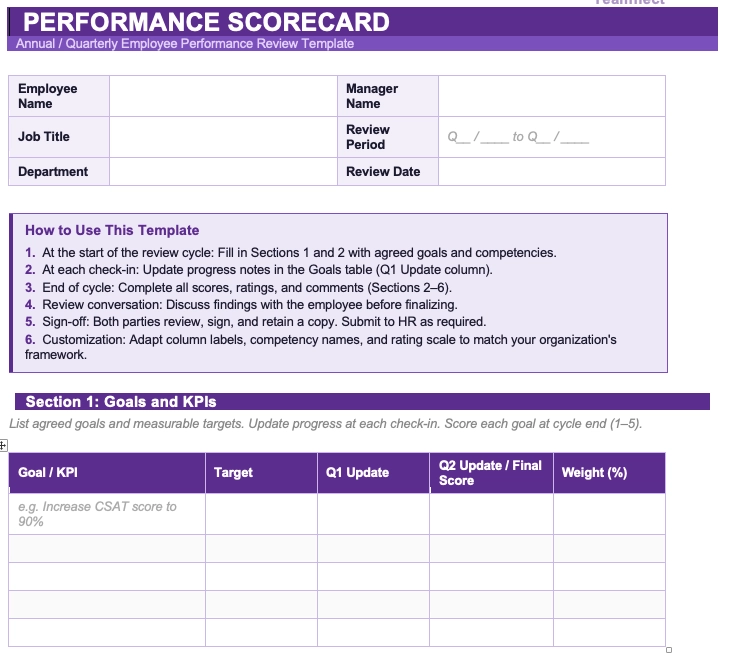
Designing a strong scorecard is one part of the challenge. Rolling it out effectively across an organization is another. A phased approach reduces the risk of adoption problems and gives you the information you need to refine the process before it scales.
Start with one team or department before a full organizational rollout. Choose a group with a manager who is already engaged in the performance process and willing to provide honest feedback. Run one complete cycle, gather input on what worked and what created friction, and revise the scorecard and process accordingly. A pilot catches design problems at a scale where they are manageable rather than after they have been replicated across the entire organization.
A scorecard is only as effective as the people using it. Managers need training on how to write meaningful goals, apply the rating scale consistently, and deliver feedback that connects to the scorecard data. Employees need to understand how their scorecard was built, what each metric reflects, and how the evaluation process will work. Training should happen before the cycle begins, not during it.
Manual scorecard management through disconnected spreadsheets creates version control problems and reduces adoption. Connecting scorecards to existing workflows makes them easier to maintain. Teamflect's Microsoft Teams integration brings performance scorecard tracking directly into the platform where most work already happens. Managers can update scores, run check-ins, and review progress without switching between applications. This kind of integration is particularly valuable for organizations already running on Microsoft 365, where context-switching is a documented adoption barrier for standalone performance tools.
After each cycle, collect structured feedback from both managers and employees on the scorecard process. What metrics felt irrelevant? Where did the rating scale create ambiguity? What would have made the review conversation more productive? Use that input to adjust the scorecard design for the next cycle. An employee performance scorecard template that does not change over time gradually falls out of alignment with the actual work people are doing.
Most scorecard failures trace back to a small set of predictable design or implementation errors. Knowing what to watch for makes it easier to course-correct before a mistake becomes entrenched.
A scorecard with twelve KPIs and eight competency dimensions sends no clear signal about what actually matters. Metric overload dilutes focus and can leave employees unsure where to direct their effort. When everything is measured, nothing is prioritized. Keep the list tight and revisit it each cycle to confirm every metric still reflects a genuine priority.
A scorecard designed entirely by management and delivered to employees without input is a compliance document, not a performance tool. Employees who had no voice in setting their goals are less likely to feel accountable to them. Build in structured opportunities for self-assessment and goal-setting conversations at the start of each cycle. The evaluation will be more accurate and the conversations more productive.
Scorecards that exist independently of organizational or team goals become busywork. Employees completing metrics that do not connect to anything the business cares about are being measured on the wrong things. Every KPI on the scorecard should trace back to a team or company priority. If it cannot, remove it.
Spreadsheet-based scorecards create real problems at scale: version control issues, inconsistent formats across managers, and low completion rates when updates require navigating a separate file outside normal workflows.
As teams grow, manual processes also become a significant time burden for HR. A purpose-built performance review solution like Teamflect consolidates scoring, feedback, and documentation in one place, with automated reminders that keep the process on track without requiring manual follow-up.
The review conversation is where scorecard data becomes actionable. A well-prepared, well-run review builds trust and clarity. For a broader look at what makes these conversations effective, see our guide on performance review best practices. The process matters as much as the data.
A structured approach to scorecard reviews typically follows these steps:
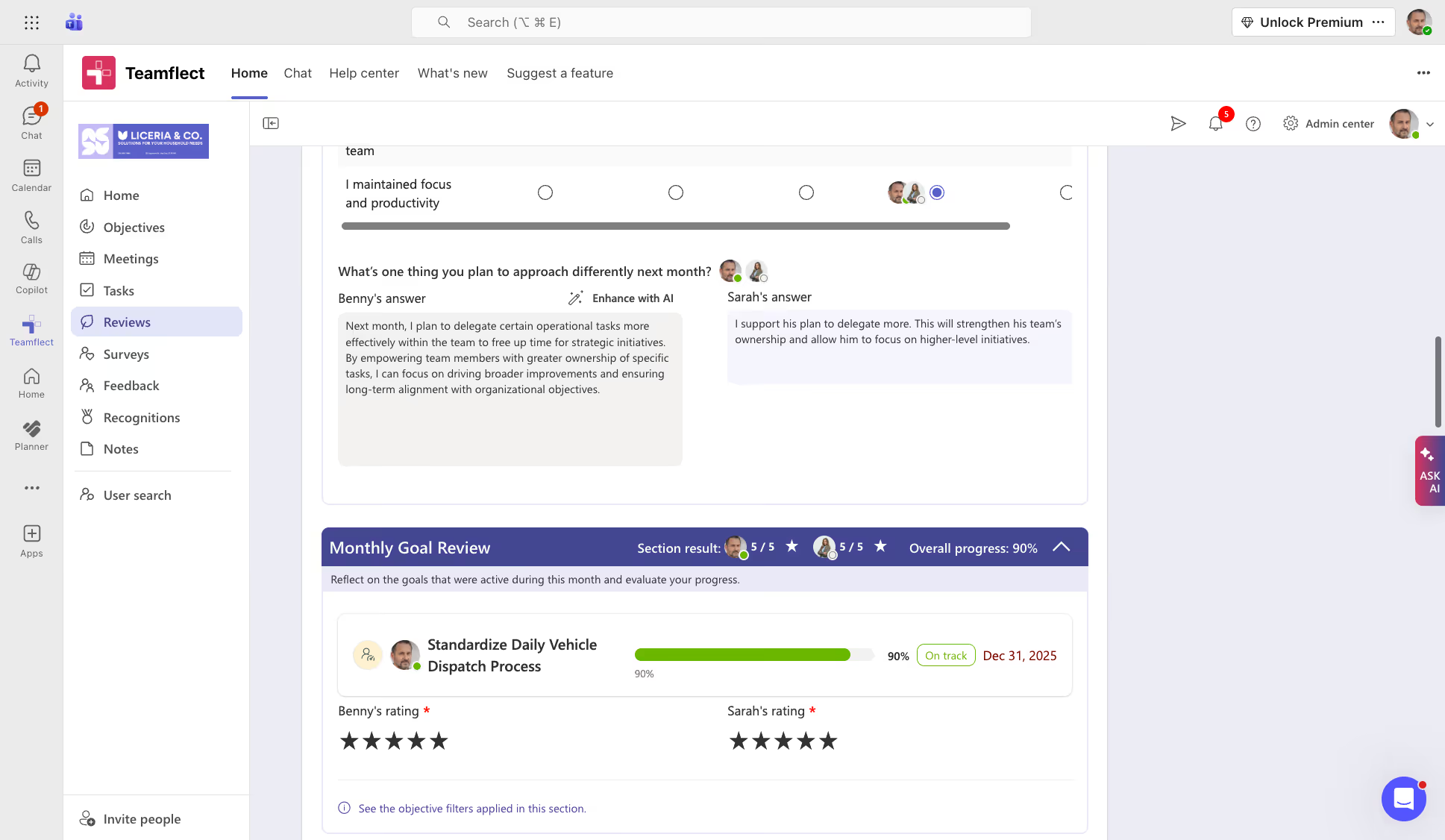
Performance scorecard failures usually stem from adoption issues rather than poor design. Even the best-designed systems fail when updates lag, check-ins are skipped, and reviews fall back on end-of-cycle impressions instead of documented evidence.
Teamflect addresses these hurdles by embedding performance management directly into Microsoft 365, bringing in the following benefits:
The true value of this approach lies in how it connects daily activity to formal evaluations. Because scorecard data feeds directly into review forms, the final assessment is a summary of gathered evidence rather than a reconstruction based on memory.
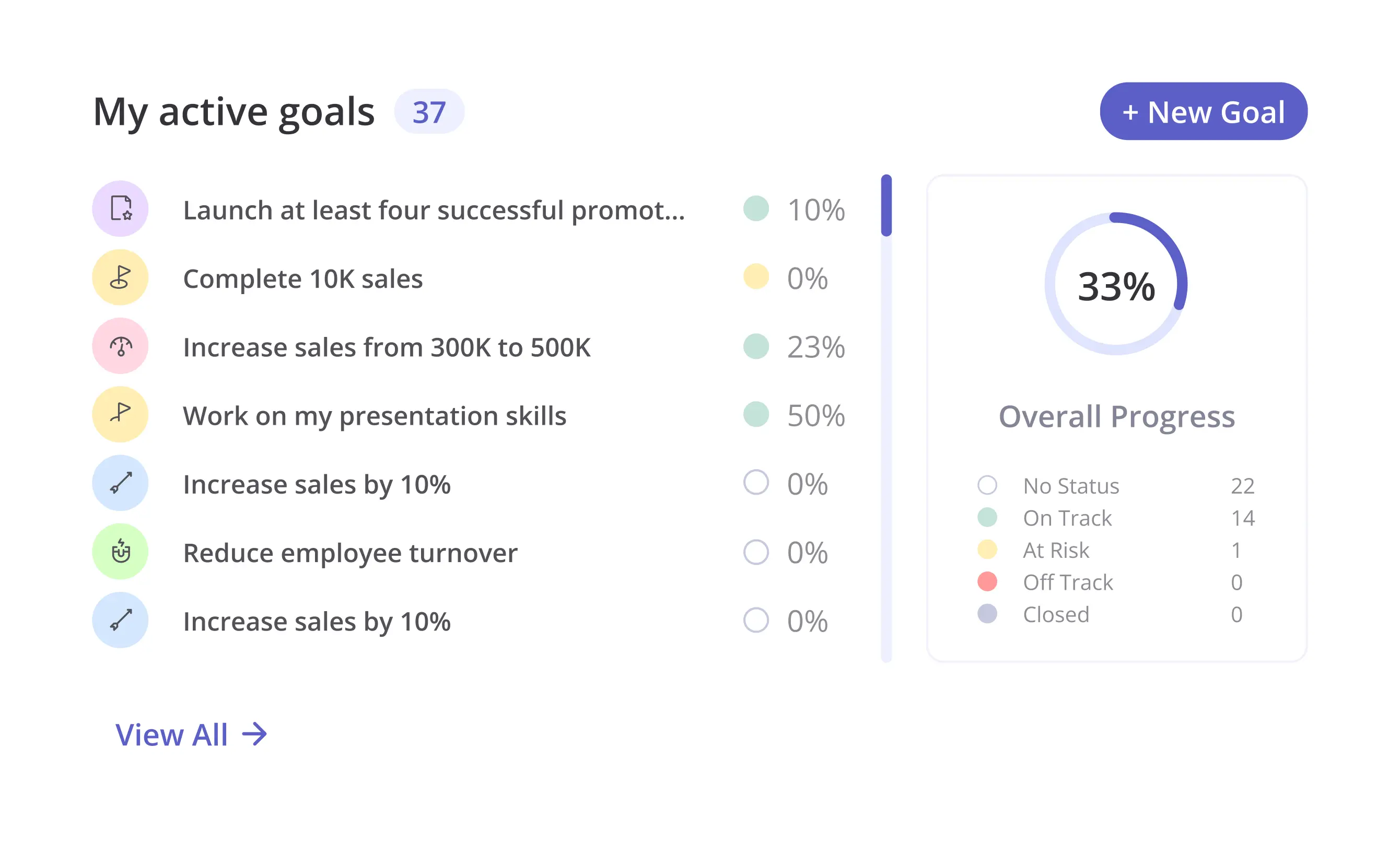
While organizations vary in their specific terminology, five-level rating scales typically include: Exceptional or Outstanding (performance consistently surpasses all expectations), Exceeds Expectations (performance regularly goes beyond what the role requires), Meets Expectations (performance reliably fulfills role requirements), Developing or Needs Improvement (performance partially meets requirements but has clear gaps), and Below Expectations or Unsatisfactory (performance falls short of the minimum standard for the role).
The definitions attached to each level matter as much as the labels. Consistent application across managers requires that each level be described in concrete, observable terms rather than general language.
A KPI, or Key Performance Indicator, is a single metric used to track progress toward a specific goal. A performance scorecard is a structured document that houses multiple KPIs alongside competency assessments, rating criteria, and qualitative feedback. Think of a KPI as one measurement and a scorecard as the full framework that gives a collection of measurements context, structure, and a basis for evaluation.
The most effective scorecards are updated regularly throughout the performance cycle rather than filled in entirely at the end. Weekly or biweekly check-ins give managers and employees an opportunity to log progress, flag blockers, and adjust priorities before they compound. Formal scorecard reviews typically happen quarterly, with an annual review for longer-cycle decisions like promotions or compensation adjustments. The right cadence depends on the role and the cycle, but monthly at minimum is a reasonable baseline for most organizations.
Yes, and in many ways scorecards are more valuable for remote teams than for those working in the same physical space. When managers cannot observe daily work directly, a documented record of goals, metrics, and check-in notes becomes the primary evidence of performance. For remote teams, the key is using tools that make scorecard updates low-friction. Platforms with Microsoft Teams integration, such as Teamflect, allow remote employees to update progress without leaving their primary work environment, which keeps adoption rates high even when teams are distributed across time zones.
Yes. Transparency is one of the core advantages of using scorecards for employees in the first place. Employees should have access to their own scorecard data throughout the cycle, not just at review time. Sharing results in real time gives employees the information they need to self-correct and prepares them for the review conversation.
Surprises at the end of a cycle signal a breakdown in ongoing communication, not a problem with the scorecard itself. Most performance management software platforms support configurable visibility settings, so organizations can determine the appropriate level of transparency for their culture while still maintaining the principle of open access for employees reviewing their own data.

.svg)
.avif)

Create high-performing and engaged teams - even when people are remote - with our easy-to-use toolkit built for Microsoft Teams