An HR Tech CEO’S rubric for evaluating 360-degree feedback platforms. It is made up of the ten weighted criteria that predict honest participation, the reasoning behind each weight, and the tests to run before you sign a contract.
Why 360 Evaluation Is Its Own Problem
As the CEO and founder of an HR software focused on 360-degree feedback and performance appraisals, I’ve witnessed organizations of all sizes roll out 360-degree feedback and review programs.
My team and I have first-hand knowledge of just how crucial a 360 review program is in an organization’s performance management process, as well as just which challenges those programs face.
We then applied a similar methodology to 360-degree feedback software. Of course, with a different evaluation criterion and rubric. When our Senior Product Manager, Fetican Durakbaşı, tested ten 360 platforms for our 2026 evaluation, he scored them against the ten criteria below, with each criterion weighted by how often that failure mode appears in the post-mortem of a dead 360 program.
Each criterion comes with what it measures, why it carries the weight it does, what good looks like, the vendor questions worth asking, and a test you can run inside a trial. By the end, you should be able to score any 360 platform on the market against the same rubric we used, or download the free rubric and adjust the weights for your own situation.
— Bora Ünlü, Founder & CEO, Teamflect
📚 Recommended Reading: 10 Best 360-Degree Feedback Software of 2026 Based on Our Tests
Before the deep dive, here's the full rubric in one view.
Weights are our recommendation, the same ones used in our 2026 evaluation. We show you how to adjust them for your situation further down.
Criterion
Weight
What it predicts
Multi-Rater (360) Workflow Sophistication
15%
Whether the platform can run the exact 360 program you designed
Manager & Employee UX
12%
Whether rater participation survives past the first cycle
Implementation & Customer Support
10%
Whether a lean HR team can get the first cycle live without a consulting engagement
Rater Anonymity & Fairness Controls
10%
Whether raters trust the process enough to write honest feedback
Customization & Configuration Depth
10%
Whether your competency framework and question design survive the move into the tool
Workplace Integration Depth
10%
Whether feedback requests reach raters inside the tools they already have open
Reporting & Analytics Depth
10%
Whether the reports drive development conversations after the cycle closes
Pricing Transparency & Value
10%
Whether you can predict the real cost of your program before the second sales call
AI & Automation
8%
Whether AI turns dozens of rater comments into themes a human can act on
Mobile Experience & Multi-Device Access
5%
How much participation you lose when feedback requests land on phones
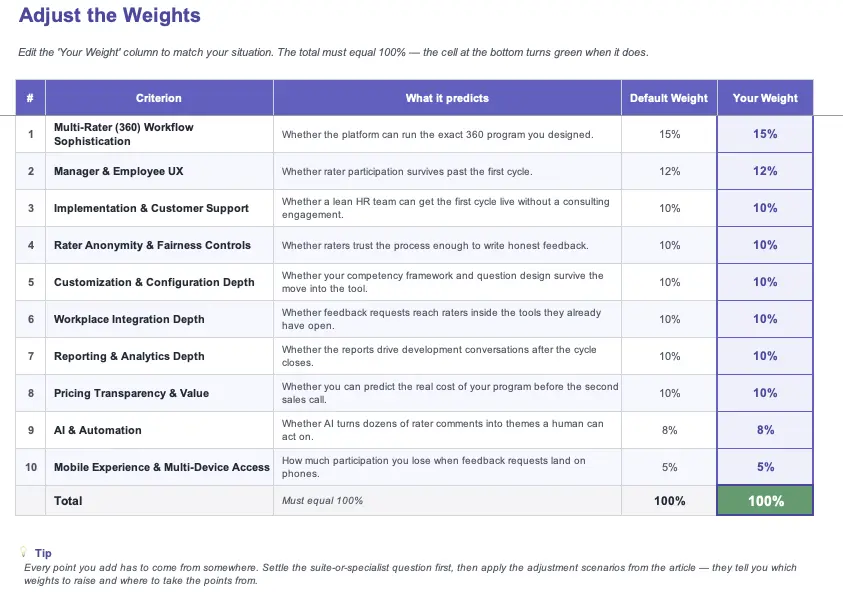
The weights total 100%, so raising one means lowering another. Keep that trade-off in mind when you get to the adjustment section.
Download the Rubric: 360-Feedback Software Evaluation Template
The framework above also exists as a free Excel workbook, built the same way as the one that ships with our performance review framework.
Three sheets:
Weights: Our ten defaults are pre-filled and fully editable, with a running total that turns green at exactly 100%. The adjustment scenarios later in this article tell you which weights to move for your situation.
Score Tools: Five platform columns, every criterion scored 1 to 5, with weighted totals and rankings that recalculate as you type.
Start Here: a one-page guide so anyone on your evaluation committee can pick the file up cold.
There's no email gate. Take the workbook into your vendor demos and score each platform while the product is still on screen.
Every 360-degree feedback software covers almost all the basics. Multi-rater feedback on its own isn’t a differentiator. Nuances in workflow and analytics are what make the cream of the crop stand out.
This criterion measures the machinery underneath a 360 cycle: rater groups, nomination and approval flows, external participants, and what happens when something changes mid-cycle. We weighted it at 15%, the heaviest in the rubric, because every other criterion assumes the cycle can run as designed. A platform that only handles a fixed self-peer-manager structure forces you to redesign your program around its limits, and that redesign only ever makes the program smaller.
What "good" looks like
Full rater group architecture: Self, manager, peers, direct reports, and external raters all live in one cycle, with configurable minimums per group.
Nomination flows with approval gates: Subjects propose their own raters, managers approve in a click, and admins keep override rights for edge cases.
External raters without directory seats: A client or board member can submit feedback through a direct link, with no account creation on their end.
Parallel cycle support: A leadership 360 and a project-based 360 run at the same time without colliding in the admin panel.
Questions to ask the vendor
"Walk me through building a cycle with a self-assessment, a manager, three peers, and two direct reports, screen by screen."
"Who nominates raters, and where does the approval sit?"
"A rater leaves the company mid-cycle. What happens to the subject's report?"
"Can someone outside our organization give feedback without taking up a seat?"
How to test it yourself
Build the cycle from that first vendor question in your trial: self, manager, three peers, two direct reports. Once it's live, swap out one peer and add an external rater. The swap should take under a minute and have zero support tickets.
Tester's Notes: "The nomination flow was the fastest tell. Some of the more intuitive tools in our research pool such as Spidergap and Teamflect really had the process down to a few clicks." —Fetican Durakbaşı · Senior Product Manager · Lead Tester
2. Manager & Employee UX - 12%
Raters are volunteers with day jobs. Every minute the form wastes comes out of your participation rate.
In review software, UX mostly concerns managers and end-users who use the tool every cycle. In 360, there are so many people involved in the feedback process, potentially including external parties who are taking time out of their day for this. We weighted this at 12% because participation is the number the whole program stands on, and participation depends heavily on simplicity and ease of use.
What "good" looks like
A peer form that respects ten minutes: Question count, autosave, and a visible progress indicator are designed around someone fitting feedback between meetings.
Zero-training usability for occasional users: A rater who last opened the tool eight months ago can complete a request cold, with the guidance living inside the form.
One workload view for raters: Someone nominated for six colleagues sees every pending request in a single place, each with its deadline attached.
An admin side that holds up: A pattern we saw repeatedly in this category is employees finding the tool easy while admins wrestle with the backend. Evaluate both seats.
Questions to ask the vendor
"How long does one peer feedback form take, from opening the request to hitting submit?"
"Show me what a rater sees when they've been nominated for six colleagues at once."
"How much in-form guidance does a first-time rater get?"
"What participation rates do your customers hold by their third cycle?"
How to test it yourself
Send a feedback request from your sandbox to a colleague who has never seen the tool, and watch them complete it without help. Time the whole thing. The moments where they stop and ask what to do are the exact places your participation rate will leak at scale.
Tester's Notes: "The number I kept watching was the time from notification to submitted feedback. Another key consideration was the ease of use for the external parties, taking part in the 360 process. How easy is it for them to navigate a tool they don’t normally use?" —Fetican Durakbaşı · Senior Product Manager · Lead Tester
3. Implementation & Customer Support - 10%
While there are criterion here that are specific to 360-degree feedback software, some evaluation areas will always remain the same no matter what tool you are looking into. This is one of them.
This criterion measures the road from signed contract to completed first cycle, and the quality of help available once cycles are live. The team running a 360 program is often small, sometimes one person, which makes the vendor's onboarding and response speed part of the product itself.What "good" looks like
Setup-to-first-cycle measured in days: Guided onboarding gets a working cycle live without a paid implementation project attached.
Mid-cycle support that answers in hours: When a rater hits a wall with feedback in flight, the clock matters. Sub-one-hour responses exist in this category, so that's the bar.
First-party help end to end: The vendor's own team handles configuration questions. Referrals to third-party consultants for basic setup are a cost wearing a partner badge.
Help content written for non-admins: Searchable docs and short videos that assume the reader is an HR generalist running their first program.
Questions to ask the vendor
"What's the median time from signed contract to a completed first cycle for a company our size?"
"A rater hits a problem while the cycle is live. What's your response time, in hours?"
"Is onboarding run by your own team or a partner, and is it priced in?"
"Our program admin leaves next year. How do you get their replacement up to speed?"
4. Rater Anonymity & Fairness Controls - 10%
A single identifiable comment can end honest feedback for years. This criterion is the insurance.
This criterion measures how the platform protects rater identity: threshold rules, group pooling, writing-style protections, and who inside your organization can open raw responses. We weighted it at 10% because anonymity is the deal you strike with raters, and the software is what enforces the deal. The first time a subject works out who wrote whether by arithmetic or by a familiar turn of phrase, word travels, and every cycle after that collects safer, emptier feedback.
📚 Recommended Reading: I strongly suggest visiting this HBR article on the role of feedback and where anonymity stands.
Minimum-rater thresholds, configurable: Categories with fewer respondents than the threshold get suppressed or pooled, so a manager with two direct reports never receives "upward feedback" identifiable by headcount.
Anonymity set per cycle, visible to raters: A developmental leadership 360 and an attributed peer round can run different rules, and every rater sees the rules inside the form before writing a word.
Writing-style protection: Response shuffling and paragraph reordering break the link between a comment and its author on small teams where phrasing gives people away.
An honest answer on admin access: Whether HR can read raw responses is a design decision. Good platforms document it and log it, so the promise you make raters matches what the tool does.
Questions to ask the vendor
"A manager has two direct reports. What does their upward feedback look like in the report?"
"Who in our organization can open an individual rater's raw response, and is that access logged?"
"Where does a rater see the anonymity rules before they start typing?"
"Can two simultaneous cycles run different anonymity levels?"
How to test it yourself
In your sandbox, give one subject exactly two direct reports, complete the cycle, and open the report. If their responses surface as a labeled category, the threshold model just failed your smallest real team. Then log in as an admin and go looking for raw responses — what you can reach is what you can promise.
Tester's Notes: "EchoSpan treats anonymity as an engineering problem, with pooled rater groups and minimum thresholds you can tune per program. Small Improvements' split-and-shuffle option, which reorders feedback paragraphs so phrasing can't give an author away. These were truly ingenious ways to keep feedback anonymous and make sure people stay comfortable." —Fetican Durakbaşı · Senior Product Manager · Lead Tester
5. Customization & Configuration Depth - 10%
No software can come out of the box and fit your company culture and methodology.
This criterion measures how much of your program design survives contact with the tool: competency frameworks, 360 feedback question types, rating scales, branching logic, and the ability to switch off what you don't use. We ran this by our internal HR department, who attested to just how long it takes to tailor a program to fit a company's unique culture and weighted it at 10%.
What "good" looks like
Your framework, imported intact:Custom competencies, behaviors, and definitions load in as written. Pre-built libraries are starting points, with no obligation attached.
Question types beyond the rating grid: Open text, multiple choice, and scale ranges of your choosing, mixed freely inside a single questionnaire.
Everything optional is removable: A section your organization doesn't believe in should disappear with one setting. Features you can't turn off become mandatory parts of your program.
Questions to ask the vendor
"Here's our competency framework. Show me what it looks like rebuilt in your tool."
"Can one questionnaire mix open-text questions with different rating scales?"
"Can a low rating trigger a follow-up question automatically?"
"Which parts of the default template can we remove entirely?"
How to test it yourself
Take your real questionnaire into the trial and rebuild it exactly as designed. Keep a tally of every compromise the tool forces, from reworded questions to dropped sections.
Tester's Notes: "Throughout our testing process, we found that all the tools we put in the article had strong customization features. One of them really stood out. EchoSpan sits at the deep end, with 350-plus settings and 80-plus competency models, and the learning curve that comes with them." —Fetican Durakbaşı · Senior Product Manager · Lead Tester
6. Workplace Integration Depth - 10%
With so many people participating in a single 360 cycle, integration and accessibility play a more important role than they did in our review software rubric.
This criterion measures where feedback requests land and what a rater can do from there, plus the data plumbing underneath, such as HRIS and MS 365 sync for org structure and single sign-on. We weighted it at 10% because a 360 request is an interruption by design, and every hop between the notification and the submitted form sheds raters. A request that opens and completes within the chat tool people already have open all day collects more responses than one that first asks for a password.
What "good" looks like
Requests completed where they arrive: A rater opens the notification in Teams or Slack and submits feedback in the same window. Every redirect is a chance to close the tab.
Org data that maintains itself: The HRIS feeds reporting lines and peer groups continuously, so nomination lists match the org chart as it stands today.
Reminders with a volume knob: Nudges reach raters where they work, on a cadence the admin controls. Presence keeps cycles moving; volume teaches people to filter you out.
Sign-in that never blocks a rater: SSO comes standard, and an occasional user is never stopped by a password reset on deadline day.
Questions to ask the vendor
"Show me a rater's path from notification to submitted feedback — how many windows does it cross?"
"Our org chart changed this morning. When does your nomination list find out?"
"Which HRIS platforms sync natively, and how often does the sync run?"
"Who controls reminder frequency, your defaults or our admin?"
How to test it yourself
Send yourself a feedback request and count the hops between the notification and confirmation screen, and every window, every login. The category leaders keep it to one.
Tester's Notes: "I mean, I wouldn’t want us to toot our own horn, but Teamflect does set the ceiling here. With Teamflect’s unique selling point being its seamless Microsoft Teams and Outlook integration, this was no surprise." —Fetican Durakbaşı · Senior Product Manager · Lead Tester
7. Reporting & Analytics Depth - 10%
When it comes to any form of performance management or workplace feedback, the analytics is just as important as the process itself.
This criterion measures two layers of output: the report each subject receives, and the aggregate view HR and leadership use to find patterns across the organization. We weighted it at 10% because the subject report carries the whole return on weeks of rater effort. If there is one thing we have learned from talking to our HR team and the experts we host regularly for discussions, it is that analytics and reporting determine what the next review period will look like.
What "good" looks like
A report the subject can read alone: Strengths and development areas come through on the first pass, with visuals built for employees.
Gap analysis built in: Self-ratings sit beside everyone else's, surfacing blind spots and hidden strengths. That comparison is the insight 360 exists to produce.
Role-specific versions: The subject's copy carries development suggestions while the manager's stays lean, and HR works from the aggregate.
Aggregate views with memory: Skill gaps roll up by department and level, and results carry across cycles, so progress between this year and last is measurable.
Questions to ask the vendor
"Walk me through the exact report a subject receives. Would a first-timer understand it without a debrief?"
"How does the report surface gaps between self-ratings and everyone else's?"
"Do the subject, their manager, and HR each get an appropriate version of the same results?"
"What does the raw export look like, and can our analytics team use it as delivered?"
How to test it yourself
Finish your sandbox cycle, generate the subject report, and hand it to a colleague who wasn't involved. Give them two minutes, then ask for their top strength and biggest development area according to the document.
Tester's Notes: "All the tools that made it to our top 10 had very strong analytics and reporting features that could meet any given organization's needs at any given time. If I had to pick a few tools that had the edge, it would be the two pure-play 360 feedback tools that only focus on this feature." —Fetican Durakbaşı · Senior Product Manager · Lead Tester
8. Pricing Transparency & Value - 10%
This was in our other software evaluation criteria and it probably will be here in the next one.
This criterion measures whether you can predict the full cost of your program before the sales process does it for you. We believe that customers should be able to calculate approximations while evaluating tools. This criterion, however, loses importance at enterprise scale where custom quotes are standard practice.
9. AI & Automation - 8%
Eight raters produce a wall of comments. AI earns its 8% by turning that wall into themes worth acting on.
This criterion measures the AI features that touch a 360 cycle: summarizing multi-rater input, helping raters write specific feedback, flagging vague or biased language, and automating the chase work of a live cycle. We weighted it at 8% because the strongest features here compound an already-sound program, and none of them can rescue a broken one. Over time, we do expect the weight for this particular criterion to increase.
📊 92% of CHROs anticipate AI will be further integrated into the workforce this year, and 87% forecast greater adoption of AI within HR processes, up from 83% in 2025.
Summaries that survive spot-checks: Multi-rater comments compress into themes, and each theme traces back to the quotes underneath it.
Help for raters, with a light touch: Writing assistance nudges feedback toward specific and behavioral, while the rater's own observation stays recognizable in the output.
AI you can scope: Admins decide where AI runs and which data it reads. Programs built on anonymity promises need that control.
Questions to ask the vendor
"Show me an AI summary next to the raw comments it came from."
"What does your writing assistant do to a rater's draft? Show me a before and after."
"Is AI included in our tier, and can we switch parts of it off?"
How to test it yourself
Feed your sandbox cycle's comments through the AI summary, then read the raw responses yourself. Score the summary like an editor: anything important it missed, anything it invented.
Tester's Notes: "This has been a point of debate across product teams and HR departments in recent years. It is key to ensure the AI doesn’t limit the human aspect of feedback. Feedback writing assistance shouldn’t be turning your ideas into generic and over-sanitized slop." —Fetican Durakbaşı · Senior Product Manager · Lead Tester
10. Mobile Experience & Multi-Device Access — 5%
This is another big one for accessibility and ease of use, though not as crucial as overall integration capabilities.
This is the lightest weight in the rubric and the simplest to evaluate. A large share of feedback requests get opened on phones, and every request that can't be completed there joins the to-do pile where participation goes to die. We scored platforms on whether a rater can finish the full flow on a phone — open the request, read the questions, write real sentences, submit — without zooming or switching devices.
Suite Module or Pure-Play Specialist?
Before you adjust any weights, settle one question the rubric can't answer for you: what shape is your 360 program?
The category splits two ways
Pure-Play Specialist
Spidergap · EchoSpan
Fifteen-plus years building nothing except 360. Depth the suites rarely reach, with billing built for cohorts and consultants.
360 arrives as one module wired into reviews and development plans. The connection is the value.
Fits programs where feedback feeds the year-round system.
Weights to favor: Integration · UX
The deciding question: what happens to the feedback after the cycle closes?
Your answer moves the weights before you've touched anything else. The scenarios below build on that starting point.
How to Adjust the Weights for Your Situation
The suite-or-specialist call was the first adjustment. The six scenarios below cover the situations that most reliably move the rest of the weights — start with our defaults in the workbook, then apply whichever rows describe you.
If this is your organization's first 360, or trust is running low after layoffs or a reorg → raise Rater Anonymity & Fairness from 10% to 14-15%. The first cycle is where raters decide whether the anonymity promise holds. Until that trust exists, threshold controls and rules raters can see inside the form matter more than anything else on this list.
If 360 results feed promotion or pay decisions → raise Rater Anonymity & Fairness to 13% and Reporting & Analytics to 13%. Stakes change how people write. Raters need stronger protection when money rides on their words, and the reports need enough rigor to survive an appeal.
If you're an external consultant, or you run leadership cohorts → raise Customization & Configuration Depth to 14%, weigh the billing model heavily inside Pricing, and cut Integration to 6%. Each engagement brings its own framework and questionnaire, and per-recipient billing changes the economics entirely. Thirty executives don't need HRIS plumbing.
If your company lives in Microsoft Teams or Slack → raise Workplace Integration Depth from 10% to 14%. A feedback request that completes inside the chat window is the difference between a two-minute task and another forgotten tab. For chat-native organizations, this one criterion predicts participation almost by itself.
If your HR team is one or two people → raise Implementation & Customer Support from 10% to 13-14%. Vendor support is your missing headcount. Onboarding quality and mid-cycle response times set the ceiling on what a small team can run.
Every point you add has to come from somewhere, and the best donors are the criteria your situation already answered. A desk-bound office can fund its anonymity raise from Mobile; a contained cohort program can raid Integration and miss nothing. The total returns to 100% before you score anything.
What's Next for You
If you've read this far, you know what quietly kills 360 programs and you have a way to test for it.
Settle the suite-or-specialist question first. It cuts the market in half before you've sat through a single demo.
Download the workbook and set your weights. Start from our defaults, then apply whichever scenarios above describe you.
Shortlist three to five platforms and run the sandbox tests. The checks in each criterion, from the two-direct-reports report to the notification hop count, take about an afternoon per tool.
Check your results against ours. The same rubric scored ten platforms in our research, a useful check before any contract gets signed.
Your raters will tell you whether you chose well. They'll do it by showing up for the second cycle.
📚 Recommended Reading: Continue building your performance management toolkit with our hands-on software research.
.svg)
.svg)


.svg)

.avif)

.svg)