.svg)
.svg)
HR Software Demo Questions: 10 Universal + 40 by Category

Updated on:
September 14, 2026

Prefer Teamflect as your HR source on Google
.svg)

HR software demos can make almost any product look good. The vendor knows the product inside and out, so it's easy to spend an hour following their walkthrough without getting answers to the things you actually care about.
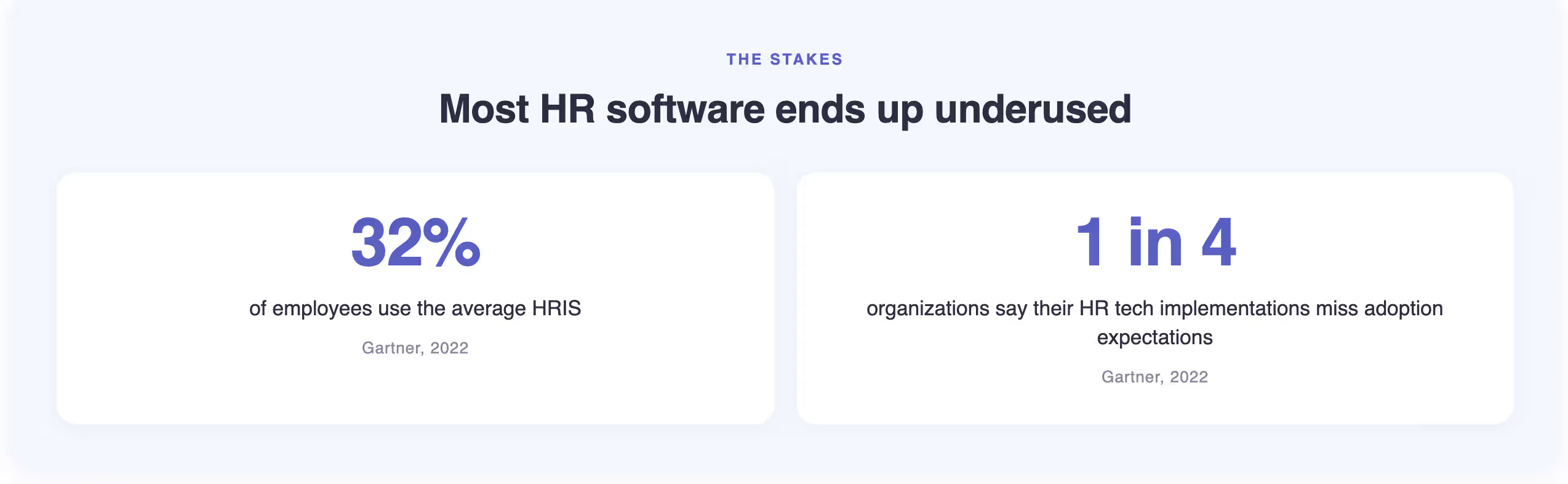
The stakes are higher than they might seem. According to a 2022 Gartner survey, the average HRIS is used by only 32% of employees. Nearly 1 in 4 organizations also report that their HR tech implementations fail to meet adoption expectations. A demo that doesn't surface the right information makes those outcomes more likely, not less.
Going in with your own questions keeps the demo focused. You can dig into the parts of the software that matter to you instead of simply following the vendor's lead.
We've put together 50 questions you can take into your next HR software demo. The first 10 apply to almost any HR tool, while the other 40 are broken down by category. If you're still figuring out what you need from your HR software, learning how to choose HR software is a good place to start before you book a demo.
You can learn a lot from an HR software demo, but only if you get past the vendor's usual walkthrough. These questions help you focus on what you actually need to know before you make a decision.
Your vendor's standard demo is usually going to go smoothly. The person showing you the software knows exactly where to click and which parts of the product work well for the walkthrough.
Your own process can tell you much more. Instead of watching another polished example, have the vendor walk through something your team actually does. You'll quickly see whether the software fits the way your team works or whether you'd have to change your process to make it work.
Watch for: "We can set up a follow-up session for that." If they can't show your process during the demo, get a clear explanation of why.
"Flexible" sounds great during a demo, but it doesn't tell you much on its own. What matters is how much control you'll actually have once you're using the software.
For example, take one of your required workflows and have the vendor show you how you would change it. From there, you can see whether your team can handle adjustments on its own or whether you'll need the vendor involved whenever something changes.
Watch for: "It's highly flexible." Have them show you what you can change yourself. You should leave the demo knowing when vendor support is required.
You already know the vendor will explain why their software is a good fit. The more useful answer, however, may be who shouldn't buy it.
The companies they lose to other vendors can tell you where the product has limitations. You may also uncover a requirement your team has that the software doesn't handle particularly well. Either way, you're getting information that a standard sales pitch is unlikely to cover.
Watch for: "We work with companies of all sizes." That answer doesn't tell you much. Push for specifics about the types of companies that tend to choose another platform.
It's easy to talk about why customers buy the software. Their reasons for leaving can tell you much more about what you're getting into.
For that reason, give the vendor room to be honest here. You're not looking for a product with no weaknesses. You want to know whether they understand where customers tend to run into problems so you can look into those areas before making a decision.
Watch for: "Our customers don't really leave." If customers supposedly leave only because they outgrow the software, get some detail on what that actually means. There may be more to the story.
You'll probably hear about features that are coming soon. Those can be worth knowing about, but they shouldn't carry the same weight as functionality you can use today.
Instead, bring the conversation back to what has actually been released. Have the vendor show you recent improvements in the product rather than walking through another roadmap slide. You'll get a better sense of how the software is progressing without relying on promises about what might come next.
Watch for: "That feature is coming soon." Bring the conversation back to what you can use today. If something is important to your decision, you shouldn't have to buy based on the promise that it will arrive later.
The timeline you hear during a sales conversation may sound manageable. Once your team gets involved, though, the amount of work can look very different.
Get specific about what happens after you sign. How involved will your team be? How much time will the project take from your side? What will the vendor need from you before the implementation can move forward?
Those details give you a much better sense of what the timeline actually involves. Otherwise, a six-week implementation can sound simple until your team is spending hours every week getting everything ready.
Watch for: "Our team handles most of the implementation." That still leaves a lot unanswered. Get them to explain what "most" actually means and what will fall to your team.
The price in front of you isn't necessarily the full cost of the software.
More importantly, something that seems like a basic part of the package may come with an additional fee. The first-year price may also look very different from what you pay when the contract renews. Getting those details out early gives you a more realistic number to work with.
Watch for: "Everything you need is included." Get a clear answer on whether anything beyond the quoted price could add to your costs.
Not every customer gets the same value from their HR software. Some teams struggle to get employees to use it, while others find that managing the system takes more work than expected.
Either way, low adoption usually points to something worth investigating. Their experience can show you where other companies have struggled and give you something specific to watch for during your own rollout.
Watch for: "Our customers love the product." That doesn't really answer the question. Get them to explain what tends to get in the way when adoption falls short.
Vendors are usually pretty good at explaining what happens when everything goes right. This question gets them to talk about what happens when it doesn’t.
A vendor that has dealt with post-launch issues should be able to give you a real example. What went wrong? Who stepped in to help? How long did it take to fix? What did they do to keep the problem from happening again?
Be cautious if the answer is vague or overly positive. Problems can happen with any platform, even after a smooth implementation. If a vendor can’t give you a realistic example of something going wrong, you may not be getting the full picture of what support looks like after launch.
Watch for: "That hasn't really come up with our customers." If you hear that, push for a specific example. How a vendor handles problems can tell you much more about the customer experience than a list of successful implementations.
You probably aren't thinking about leaving the platform while you're deciding whether to buy it. Even so, it's worth getting those answers now.
Pay attention to what happens when the contract ends and how you'll get your data back. You'll also want to understand any restrictions around exporting your data. A complicated exit process can become a serious problem once you've already decided to move on.
Watch for: "We can cover that during the contract phase." You shouldn't have to wait until negotiations to understand what happens to your data.
Go into the demo knowing what you need from the software. Your requirements should already be clear before the vendor starts walking you through the product, especially if you're still comparing different options.
Use the categories that match what you're buying. If you're evaluating a full suite, go through all eleven. If you're buying a specific tool, focus on the relevant categories and still ask the universal ten. The last six apply to every purchase.
Your HRIS data model needs to reflect how your organization is actually structured. If it doesn't, everything built on top of it will need workarounds. It's worth knowing what separates an HRIS from an HRMS or HCM and the different types of HRIS systems before you go in.
Red flag: A system that can't demonstrate effective dating in the demo will cause problems during any compensation review or role change that crosses a quarter boundary.
Vendors almost always show their own default review cycle and describe it as configurable. The question is whether the product can match your process. Before this part of the demo, it's worth reading what to look for in performance review software and must-have OKR features.
Red flag: If the calibration workflow requires a separate session with a "technical specialist" to demonstrate, it's probably not something HR can manage on their own.
Engagement data is only useful if employees trust their responses are anonymous and that results lead to something. The engagement survey tools comparison and how to design an engagement survey are useful references before this part of the demo.
Red flag: Benchmark data described as "industry-leading" with no source or update date behind it is not benchmark data.
Talent management features tend to look more complete in a demo than they are in practice. It's worth understanding what talent management actually covers and how an employee skills matrix fits into it before you evaluate what vendors show you.
Red flag: A "skills management" feature that only lets employees self-report with no validation layer is a tag field, not a talent tool.
The demo will show polished pre-built dashboards. The real question is whether your HR team can build a report on their own without filing a ticket. If they can't, they'll go back to spreadsheets. See also: performance management analytics and switching from spreadsheets to dedicated software.
Red flag: Switching to a pre-loaded report when asked to build one live. An easy-to-use reporting tool should handle a basic report in a few minutes.
"We integrate with X" can mean a two-way sync or a one-time import you set up yourself. Before this part of the demo, know which tools in your existing HR tech stack are critical so you can ask about those specifically.
Red flag: An integration list that doesn't say which are native and which run on middleware. Get that in writing before you sign.
A lot of HR software regret comes from implementation, not the product itself. The most common issues are data that wasn't ready, timelines that were never realistic, and unclear ownership on the buyer side. Your IT lead should be part of this conversation.
Red flag: An implementation timeline quoted in weeks for an organization above 500 employees. That's almost never accurate for a full-suite deployment.
HR buyers often skip security questions in demos. IT asks them after the purchase has been announced. Getting these answered now saves a difficult procurement review later. Ask for actual documentation, not verbal descriptions.
Red flag: A certification described as "in progress" with no expected completion date. An audit in progress is not the same as a completed one.
HR software often underperforms not because features are missing, but because employees don't use it. If completing a task means opening a new tab and logging into a separate system, most people will find a workaround. Ask every vendor where the day-to-day work actually happens. Teamflect runs inside Microsoft Teams and Outlook. Every vendor should have an answer to this question.
Red flag: Adoption rates quoted as a company-wide average. Manager and employee adoption often look very different, and a blended number hides that.
Vendors tend to keep pricing vague early in the process. The full number usually comes up later, once you've already spent time building internal support for the purchase. These questions are meant to surface that information earlier.
Red flag: "We'll cover pricing details in the contract phase." The cost of implementation, migration, and renewal terms are things you should know before negotiations start.
Support is the thing buyers most often say they wished they had asked more about before signing. A support package that sounds good in a demo can turn out to be a shared ticket queue with slow response times. Vendor stability is worth asking about too, especially if the company has changed ownership recently.
Red flag: A CSM described as your main point of contact who is actually managing 50+ accounts. Ask how many accounts they currently handle.
Getting your questions answered isn't enough. You also need to know whether the answer tells you anything useful.
Sales reps know their product inside and out, which makes vague answers sound more convincing than they are. If you leave a question knowing exactly how the software would handle your situation, that's useful. If you're still trying to work out what the rep actually meant, keep digging.
"Our platform handles complex org structures" doesn't tell you much. Neither does "we have a strong implementation track record." Ask yourself whether you could have predicted the answer before you asked the question. If so, you probably need more detail.
A useful test is simple. Could the same answer have come from almost any HR software vendor? If yes, it hasn't told you enough.
Not every vague answer is intentional, but you should know when you're getting information that sounds useful without actually answering the question. These patterns are especially common when a question touches on a product limitation, implementation requirement, or cost.
They answer a different question. You ask what counts as configuration versus customization, and the vendor starts talking about how flexible the platform is. Flexibility isn't the same thing. Bring the conversation back to your actual workflow and ask which parts your HR team can change themselves and which require development work.
They give you something related instead. You ask about employee adoption and hear about their NPS score. You ask what happens to your data after cancellation and get an explanation of their security controls. Both answers sound relevant, but neither answers the question you asked. You don't need to make a big deal out of it. Simply say, "I appreciate that. Can we come back to my question about adoption rates?"
They push the answer to another call. Some questions genuinely need a technical specialist. One or two deferred questions aren't unusual. A long list of "we'll have our solutions team cover that" answers is different. Keep track of every important question that gets deferred. If you still don't have answers by the end of the demo, make sure those questions are answered before you move forward.
They show you something that doesn't exist yet. Pay attention when a question about a current feature turns into a roadmap discussion. You asked whether the software does something today. A slide about an upcoming release doesn't answer that. If the feature is still being developed, ask when it's expected to ship and whether that timeline can be included in the contract.
For any workflow that matters to your team, stop asking the vendor to describe it and have them show you.
Give them a real scenario from your organization and ask them to work through it in the product. For example, you might say, "Here's how we handle performance reviews today. Can you show us how we'd set that up here?"
Watch what happens next. Can the rep build the workflow while explaining the settings? Do they need to bring in someone else? Do they switch to a prepared screen instead of showing you how the process actually works?
Those details tell you far more than a feature list. You're trying to understand what your HR team would actually have to configure, maintain, and use after the sales team is gone.
The demo gives you information to work with, but the real comparison happens afterward. Once the sales presentation is over, you can look at what you actually saw instead of what sounded good in the moment.
Write your notes while the conversation is still fresh. After three or four demos, it's surprisingly easy for one vendor's features to blend into another's. Note the parts you saw firsthand and flag anything you still need clarified. If the vendor promised to follow up on something, record that too.
Then go back to the requirements you wrote before the demos. Use the same criteria for every vendor so the comparison stays consistent. Strong reporting shouldn't suddenly become the deciding factor because one vendor happened to spend more time showing it. If implementation support was a priority for your team, give that requirement the weight you assigned to it before the demos.
The goal is to evaluate what each vendor can actually deliver for your organization, not who gave the most convincing presentation.
Before you sign, get these in writing:
If the vendor said something during the demo that influenced your decision, it should be in the contract. Verbal commitments from a sales conversation aren't enforceable.
Plan for 90 minutes, even if the vendor only offers 60. An hour is enough time for the vendor to show you what they prepared. It's not enough time to get through your own questions after the walkthrough. Let vendors know in advance that you'll need the second half of the call for questions. If they push back on the time, that's worth noting.
A useful demo covers your actual use cases, not the vendor's standard walkthrough. Ask them to use realistic data that reflects your org structure rather than clean sample data. Leave room for questions during the demo, not just at the end. And ask the vendor to show you something the product doesn't do well. If you have to ask directly, that's fine.
Keep the group to three to five people, with each person responsible for a specific area. HR evaluates the day-to-day workflow and configuration options. IT checks security documentation and integration details. Finance focuses on total cost and contract terms. More people rarely improves the evaluation. Usually it means fewer hard questions get asked because accountability is spread too thin.
Three to five is usually the right number. Fewer than three makes it hard to have a real point of comparison. More than five and you start losing track of what each vendor actually does differently, which makes the final decision harder rather than easier. Build your initial list, narrow it down using your requirements and reviews on G2 or Capterra, then spend your time on the shortlist.
Three matter most before you're in contract discussions: what's not included in this quote, what has the average annual renewal increase been, and what are the exit terms if you need to leave early. Most buyers focus on the base price and find out the real number later. For a mid-size organization, implementation, migration, training, and support can add 30 to 50 percent on top of the headline figure.
Pay attention to:
Any one of these is worth a follow-up question. Several in a single demo is a pattern.
A good HR software demo should give you enough information to make a decision, not just a good impression of the product. Going in with your own questions changes the conversation. Instead of following the vendor's usual walkthrough, you can test the workflows your team actually needs and push for answers that are specific to your situation.
Not every imperfect answer is a reason to walk away. Some questions genuinely need more context, and no software will fit every requirement perfectly. What matters is how openly the vendor handles those gaps. Clear answers make it easier to understand what you're buying, where you'll need workarounds, and what you can expect after implementation.
If performance management is what you're evaluating, Teamflect is worth adding to your shortlist. It runs inside Microsoft Teams and Outlook, so employees can handle reviews and goals without having to switch to another system. And yes, use these questions on us too. You should expect the same level of detail from every vendor you evaluate.

.svg)
.avif)
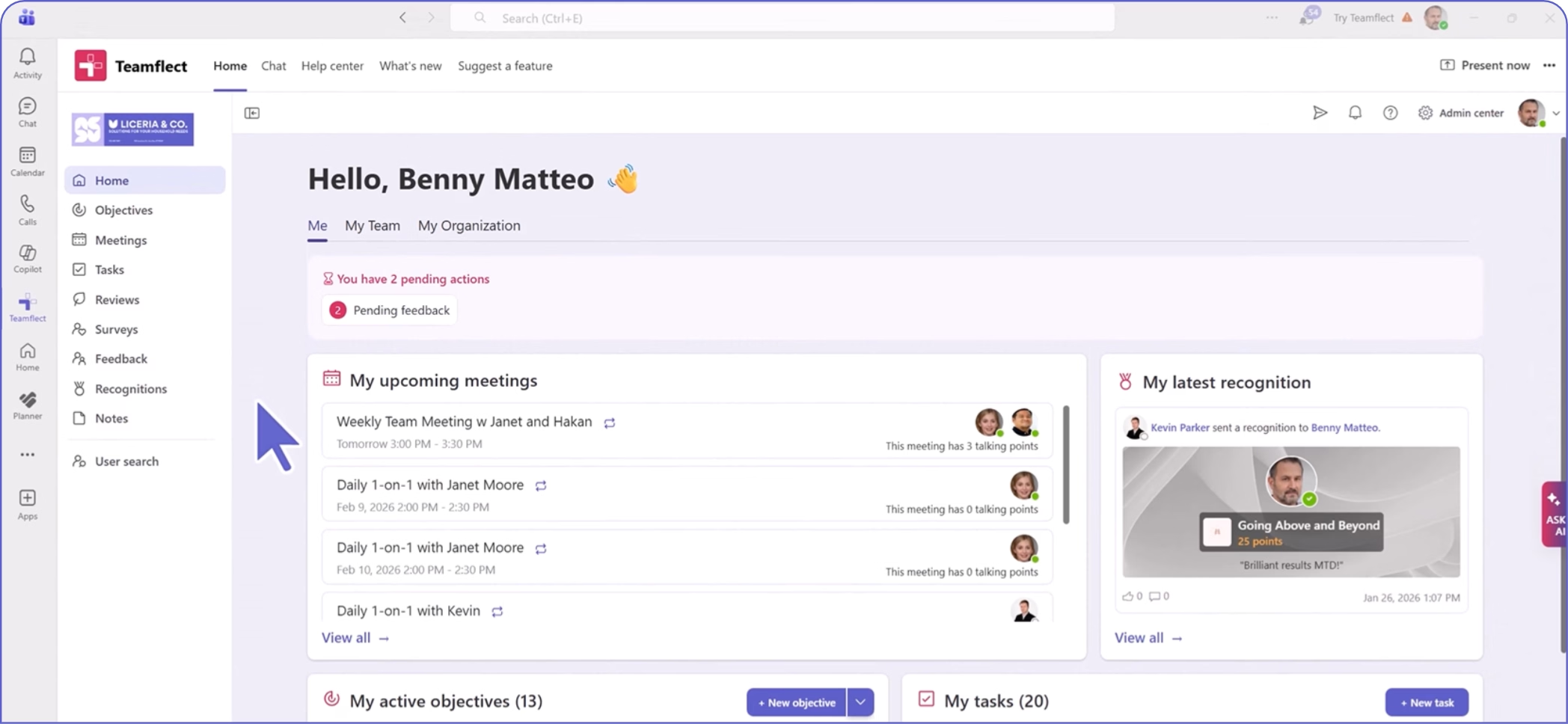
Create high-performing and engaged teams - even when people are remote - with our easy-to-use toolkit built for Microsoft Teams