Comparing MCP Servers Across HR and Performance Management Software

Updated on:
November 4, 2026

Prefer Teamflect as your HR source on Google


An HR MCP server lets an AI assistant such as Claude, ChatGPT or Microsoft Copilot read, and sometimes change, data in your HR or performance software through a secure connection.
Teamflect, BambooHR, Lattice, 15Five, Betterworks, Leapsome and Culture Amp are the seven vendors that publish one today. This guide compares what each server reads, writes and needs from your admin.
MCP is no longer niche. In fact, Anthropic reported more than 10,000 active public servers in December 2025, when it donated the protocol to the Linux Foundation’s Agentic AI Foundation.
In the seven vendor pages we read, the AI assistant sees only what the signed-in user can already see, so the real choices are status, write access and who switches it on. Some servers give assistants broad access to employee records, whereas others limit them to specific feedback or meeting workflows in the HR platform. Before you connect, check what the server offers and which actions it allows. After that, review how your assistant handles data and whether you can restrict or revoke its access.
The table below turns that review into seven questions you can put to any vendor. Each row also pairs a check with the reason it matters.
The MCP tools specification recommends human oversight and confirmation, but it does not require one particular interface. As a result, test how your chosen client actually behaves, because the standard alone cannot tell you what it will do.
In addition, a server that sends data to an assistant adds another place where it is processed. Check retention and model-training terms, along with any other connected services, before you let sensitive HR content into a conversation, and keep a record of what you agreed to.
Vendors change these pages often, so confirm each row on the vendor’s own page on the day you decide.
Teamflect, BambooHR, Lattice, Betterworks, Leapsome and Culture Amp all let an assistant read HR data and write a limited set of changes, while 15Five has announced its server with few published details.
BambooHR’s MCP documentation labels its server beta, whereas Culture Amp requires registration and approval. Teamflect documents a full tool list, while 15Five’s Feature Overview confirms company-level setup and a separate Updates setting. For that reason, treat these differences as inputs to your buying decision.
The table below shows each vendor’s published status and coverage, along with the clients it names and what your admin must switch on. Wording also matters here, because a feature a vendor does not mention is not the same as a feature it does not have.
Checked October 19, 2026. The table shows what each vendor publishes, not a hands-on test of every server.
Five details in the vendor documentation change how you should read the table, so each is worth a closer look before you shortlist a server.
BambooHR also documents silently partial results. A response may leave out restricted fields or employees, so “no records returned” can mean “no records visible to this caller,” not “no records exist.” The difference matters most when you ask for a team count or a company-wide report.
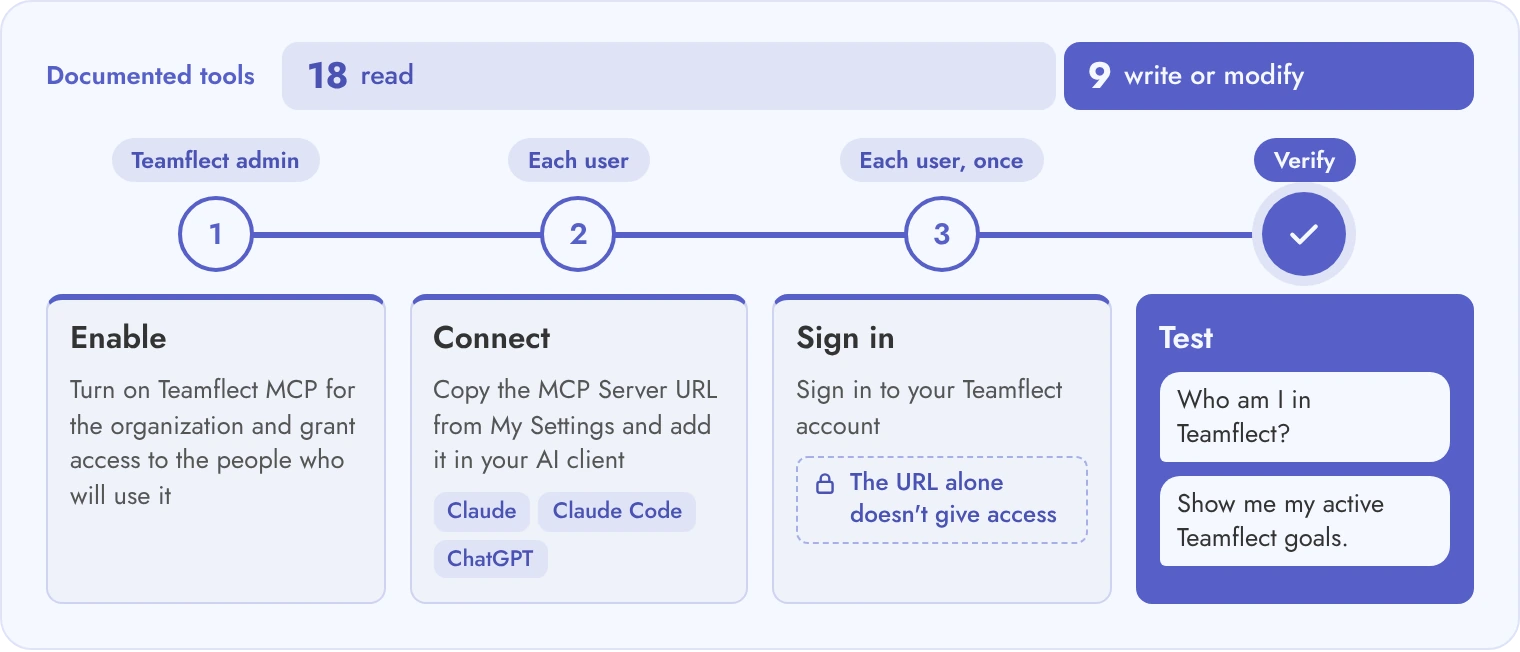
Teamflect MCP lets Claude, Microsoft Copilot and ChatGPT read Teamflect data and make a set of supported changes, always with the signed-in user’s own permissions. In addition, the user guide lists 18 read tools and nine write or modify tools, and the setup steps below cover Claude, Claude Code and ChatGPT.
The table groups the documented tools by product area, so you can see where an assistant can only read and where it can also act. In addition, where a cell says none is listed, the guide documents no tool of that kind.
The inventory describes the types of tools available, not a promise that every user can reach every object. The goal tools, for example, act on the goals held in Teamflect, so you see only what your Teamflect role allows. Nine-box and succession information, likewise, stay subject to source permissions.
Four steps take a pilot user from a disabled connection to a verified first result, and each one belongs to either the Teamflect side or the client side.
The Claude Code command from the second step also appears below as a copyable block.
claude mcp add --transport http teamflect YOUR_TEAMFLECT_MCP_SERVER_URL
Your AI-client subscription and workspace permissions, however, are separate from Teamflect’s plan, and each has its own cost or approval step. Plan details also change, so confirm availability and your intended client first. Teamflect MCP is included in the Professional plan and has a 30-day free trial.
Most HR MCP servers read freely and write only where the vendor lists a specific action, so read the write list before you enable it. For example, a connection that reads reviews may not submit them, and an agent that adds meeting notes may not read them back. Take extra care where an action sends information or deletes records, or where it finalizes a people process.
The table lists each vendor’s published write actions beside the safeguard it documents, or the question it leaves open where the documentation is silent. As a result, treat an open question as a risk, and resolve it before you turn writes on.
Betterworks’ current product page explicitly documents writes, although another vendor article still describes a read-only stage. The product page is the stronger evidence. Even so, the conflict is a reason to confirm which version is enabled for your account before you plan around it.
Leapsome’s product page says MCP is included in all plans and that admins control scopes and write access. The help center, however, adds that review responses stay drafts, so the MCP never submits or finalizes a review.
Before you enable any write, run five checks on every action, because a vague capability description does not tell you what the assistant will actually change.
If a server has no read-only control, use a client or permission restriction you can enforce, or hold off on the pilot. After all, a prompt saying “do not write” is not a security boundary. Start with read access, then turn on one write action at a time and ask a person to confirm each change.
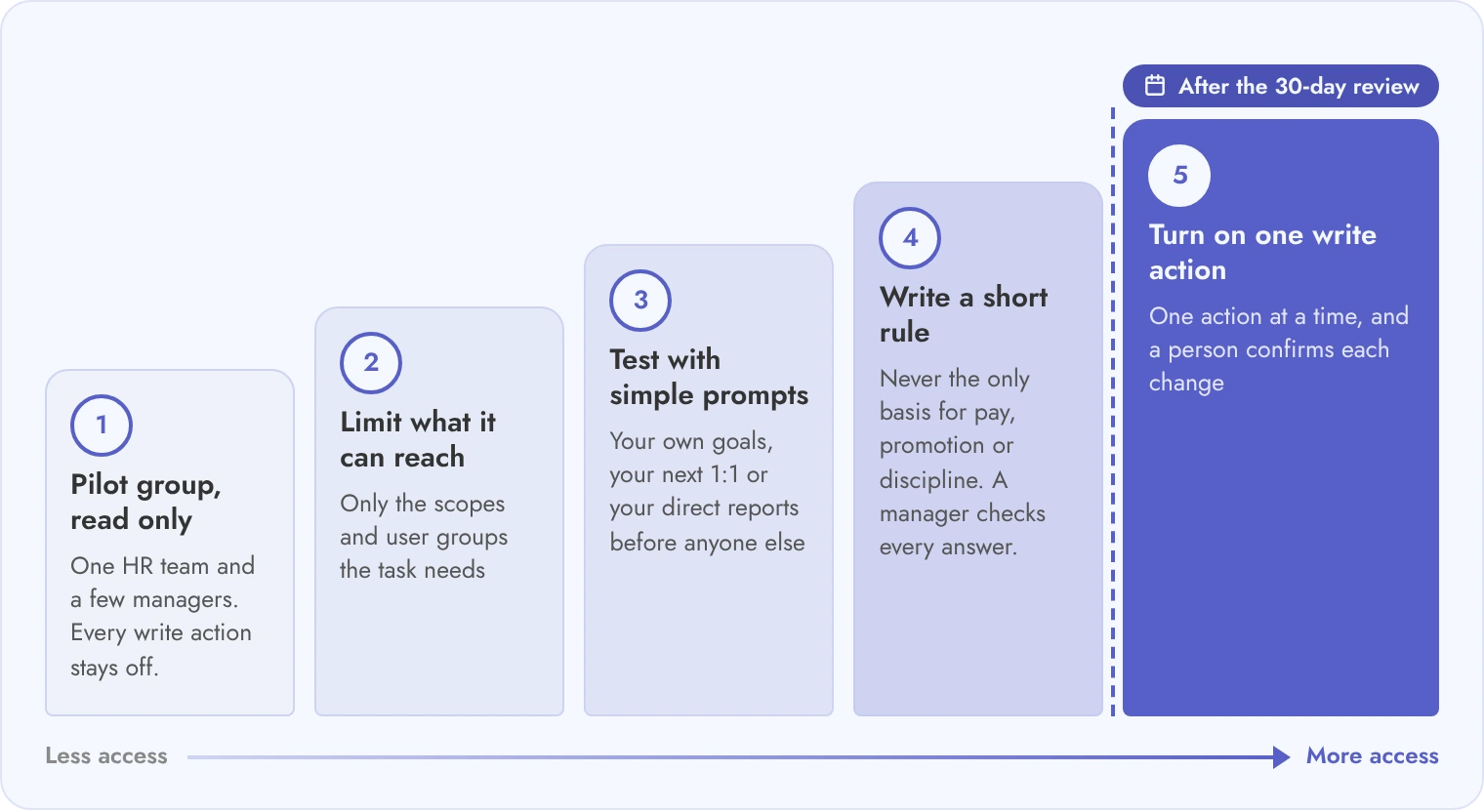
Roll out an HR MCP server to a small pilot group with read access first, because the assistant can only be as careful as the permissions behind it. Source permissions are only part of your controls.
The assistant also receives data and may combine it with other connected tools. Accordingly, your pilot should prove that retrieval is appropriate and revocation is reliable, as well as that the answers are useful, and the six steps below show how.
Keep a record of each test below, because the pass evidence is what lets you justify widening the pilot or stopping it. Each row, in addition, names a test and the evidence that shows it passed.
Culture Amp’s setup documentation makes two limits concrete. Older SAML sign-in may not work for the connection, and removing the client connector does not immediately end a session you have already approved.
The administrator activation switch, by contrast, is the documented organization-wide cutoff, so review differences like these instead of assuming every server disconnects the same way.
Even so, AI workspaces differ in permitted uses and retention arrangements, so adapt any policy to the assistant and connector you use. A written usage rule works the same way for Copilot, so you can reuse the policy clauses from your Microsoft Copilot adoption plan.
Pick the server by the data you want the assistant to reach, not by the number of tools a vendor lists. The platform you already use is usually the first filter. An MCP connector is not a reason to move all your employee records to a new HR suite. After that, compare the candidate servers on the same task and the same access limits.
The table below maps common situations to the server most likely to fit. Even so, treat the first column as a starting point, because your platform and your client may change the answer, and read the last column to see why each one fits.
Three read tests make a fair comparison, starting with identifying the user, then retrieving a current goal you own along with its source, then listing a meeting agenda you are allowed to see.
Grade each result on correctness and completeness, as well as permission behavior, and only after that, compare one harmless test and write in an isolated or approved environment. If two servers fit, run the same three test prompts in a pilot and compare the answers on your own data.
An HR MCP server is a connection that lets an AI assistant such as Claude or ChatGPT read data in your HR software, and in some cases make supported changes, using the signed-in user’s permissions.
Teamflect, BambooHR, Lattice, 15Five, Betterworks, Leapsome and Culture Amp each publish one, as of October 2026. Their status differs: BambooHR and Leapsome call theirs beta, and Culture Amp gives access by request.
Only where the vendor lists a write action. Teamflect lists nine write tools, BambooHR lists employee and time off updates, and Culture Amp allows changes to 1:1s only. Most servers ask the user to confirm a change.
The vendor pages we read say the assistant sees only what the signed-in user can already see. Safety still depends on your pilot group, the scopes you choose and whether write access is on.
Yes, Teamflect MCP works with Claude, Claude Code and ChatGPT. It reads goals, 1:1s, check-ins, feedback, reviews, recognitions, surveys and tasks, and it can create and update goals, tasks and recognitions.
Teamflect MCP is included in the Professional plan, and you can try it free for 30 days.



Create high-performing and engaged teams - even when people are remote - with our easy-to-use toolkit built for Microsoft Teams