HR Software Security Review: The Questions IT Will Ask in a Microsoft 365 Environment

Updated on:
November 20, 2026

Prefer Teamflect as your HR source on Google

 Request a Demo
An IT security review of HR software in a Microsoft 365 tenant comes down to twelve questions: which Graph permissions the app requests, who must give admin consent, how sign-in and directory sync work, which audits exist, where data lives, and how access ends. This guide answers each one, with Teamflect as the worked example.
IT asks twelve questions, and they split into two groups: what your Microsoft 365 tenant controls, and what the vendor has to prove with documents.
The tenant side matters more than many HR teams expect. Conditional Access policies are if-then rules that Microsoft Entra ID enforces after the first sign-in factor, so question 4 tells you whether your MFA and device rules reach the HR app at all.
| # | Question IT asks | Evidence that answers it | Teamflect’s answer |
|---|---|---|---|
| 1 | Which Microsoft Graph permissions does the app request, and which need admin consent? | The consent screen and the vendor’s permission list | 11 permissions are documented, and only 2 are required (User.Read and User.ReadBasic.All). The 1 application permission (Directory.Read.All) needs administrator consent. |
| 2 | Can we remove a permission after consent? | Enterprise application, Permissions tab in Microsoft Entra ID | Yes. The help center documents removing Calendars.Read, and each optional permission switches off only its own feature. |
| 3 | Does the app read email or Teams chats? | The permission list | No. Teamflect states that it does not request permissions to read emails or Microsoft Teams chats and cannot access them. |
| 4 | How do users sign in, and do our Conditional Access policies apply? | Vendor SSO documentation | Single sign-on through Microsoft 365 (Entra ID). Teamflect says sign-in uses your existing identity policies. |
| 5 | What does directory sync read, and what happens when someone leaves? | Sync documentation and the offboarding procedure | Directory.Read.All reads department, manager and team data, read-only. With auto-sync on, users deleted from Entra ID are removed and their records stay. |
| 6 | Which independent audits does the vendor hold? | SOC 2 Type II report | SOC 1, SOC 2 Type I and Type II, and GDPR compliance. |
| 7 | How often is the product penetration tested, and can we see a summary? | Penetration test executive summary | Independent testing, with results shared through the Trust Center. Teamflect’s security measures document says tests run every six months. |
| 8 | Where is our data stored, and can we choose the region? | Hosting documentation and the DPA | Microsoft Azure, in the United States, Canada, the Netherlands, Singapore and the United Arab Emirates, with no data synchronization between regions. Choosing the region is an Enterprise control. |
| 9 | How is data encrypted? | Encryption statement | Encrypted in transit and at rest. Sensitive data at rest uses 256-bit AES, and connections use TLS 1.2 or 1.3. |
| 10 | Is our data used to train AI models? | AI policy | No. Teamflect states that customer data is never used to train AI models, and its AI features run on OpenAI on Azure. |
| 11 | Who are the sub-processors? | Sub-processor list and the DPA | The DPA, SLA and Master Services Agreement are linked from the security page. The sub-processor list is in the Trust Center. |
| 12 | How do we cut access in an incident, and what happens to data at exit? | Incident procedure and contract terms | An administrator can block access for the whole organization with one toggle in the admin center. The Master Services Agreement lets you request an export for 30 days after the contract ends, and account data is deleted 3 months after termination. |
IT usually owns the HR software security review, so agree who does what during an HR software implementation before the evidence pack arrives. That way HR knows which answers it owes, and IT knows which documents to chase.
Questions 1 to 5 are settled mostly in your Entra ID tenant, questions 6 to 11 by documents the vendor hands over, and question 12 needs both.
Delegated permissions act as the signed-in user, while application permissions act as the app itself and always need an administrator to approve them.
Microsoft's Teams admin documentation says only Global Administrators can grant org-wide consent to Graph permissions, and that application permissions are never classed as low risk. If an app update adds a permission that needs admin consent, users cannot use the updated app until an administrator grants it. A tenant can also turn on the admin consent workflow in Microsoft Entra ID, so a user who sees an "Approval required" message can send a justification to designated reviewers.
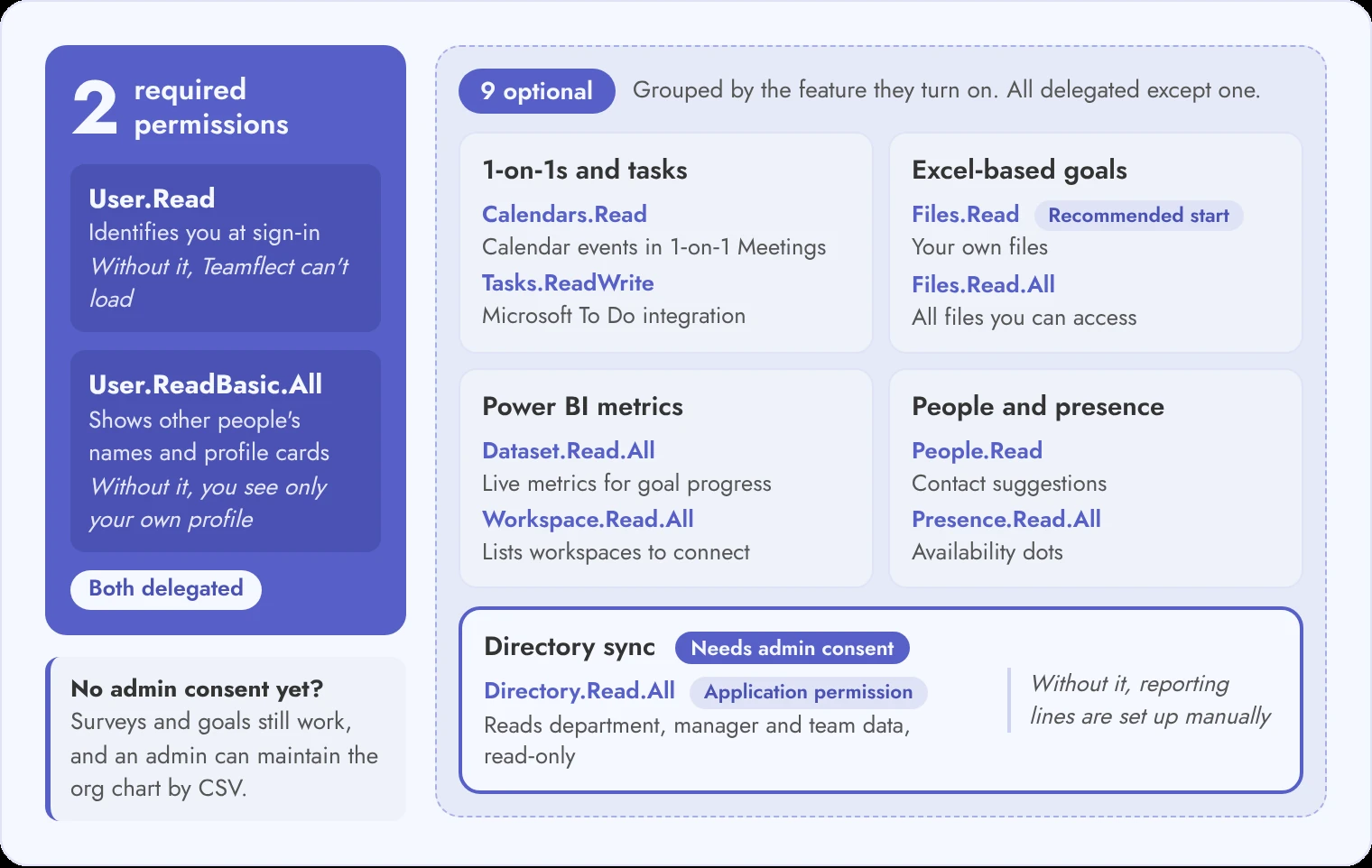
| Permission | Type | Required | Used for | Without it |
|---|---|---|---|---|
| User.Read | Delegated | Required | Identifies you at sign-in with your name, email and profile photo | Teamflect cannot load |
| User.ReadBasic.All | Delegated | Required | Shows other people’s names and profile cards | You see only your own profile |
| Calendars.Read | Delegated | Optional | Reads calendar events for 1-on-1 meetings, read-only | Calendar meetings do not appear in 1-on-1 Meetings |
| Tasks.ReadWrite | Delegated | Optional | Connects to Microsoft To Do so tasks can be viewed and managed in Teamflect | The To Do integration is unavailable |
| Directory.Read.All | Application | Optional | Reads department, manager and team data, read-only | Reporting lines must be configured manually |
| People.Read | Delegated | Optional | Suggests the contacts you email or meet with most | No contact suggestions |
| Presence.Read.All | Delegated | Optional | Shows availability dots next to names | No availability indicators |
| Files.Read | Delegated | Optional | Reads your own files, such as your OneDrive, for Excel-based goals, read-only | Excel-based goals cannot use your files |
| Files.Read.All | Delegated | Optional | Reads all files the signed-in user can access, including SharePoint and OneDrive files shared with them, read-only. Teamflect recommends starting with Files.Read | Excel-based goals cannot use organization-wide files |
| Dataset.Read.All | Delegated | Optional | Reads Power BI datasets so live metrics can feed goal progress, read-only | Power BI metrics are unavailable |
| Workspace.Read.All | Delegated | Optional | Lists Power BI workspaces so datasets can be connected, read-only | Power BI workspaces cannot be listed |
An administrator can grant admin consent from Enterprise applications once the first user has signed in. Record each approved permission in your vendor security questionnaire, and use our Microsoft Graph permissions guide for HR apps in Teams to check what each scope can read.
Read the scope of each ".All" permission before you approve it, because that is where most HR data security risk sits. A delegated Files.Read.All grant reaches only the files the signed-in user can already open, while the application version of the same permission reads files in every site collection with no user signed in.
Teamflect states that it does not request permissions to read emails or Microsoft Teams chats, cannot edit or delete your files, and does not share your data with third parties.
Partly: Teamflect's core modules work without organization-level permissions, but directory sync, bulk review cycles and Group Goals need admin consent.
| Capability | Without admin consent | With admin consent |
|---|---|---|
| Sign-in | Works when the tenant allows individual user consent for basic permissions | Users skip the consent dialog |
| Surveys and goals | Fully functional | Fully functional |
| Group Goals tied to Teams teams | Not available | Available |
| Org chart and reporting lines | An admin uploads and maintains the data by CSV | Auto-sync of titles, departments and reporting lines from Microsoft Entra ID |
| Reviewer assignment | Manual, with static lists | Reviewers can follow the synced reporting lines |
| Bulk review, survey and 360-degree feedback cycles | Not available | Available |
While consent is pending, IT can control who installs the app with Teams admin center app permission policies or security groups. If the tenant restricts user consent, IT may need to approve minimal access first. Because Teamflect runs inside Microsoft Teams, IT can later push it to everyone from the Teams admin center with a setup policy.
A surveys and goals pilot with a small group can run while IT finishes reviewing the Directory.Read.All application permission.
Ask for the SOC 2 Type II report, a penetration test summary, the data processing agreement, the sub-processor list, the SLA and the master services agreement.
A certification badge tells you a vendor claims a control. The report tells you which controls an auditor tested and over what period. UKG's buyer guide poses the right first question: does the SOC 2 report cover privacy, or only security?
SOC reports are issued by CPAs, so check which firm signed any vendor's report. Article 28 of the GDPR bars a processor from engaging another processor without the controller's prior specific or general written authorisation, which is why the sub-processor list belongs in the evidence pack.
| Document | What IT checks | Teamflect |
|---|---|---|
| SOC 2 Type II report | Report period, trust criteria in scope, exceptions noted | SOC 2 report linked from the security page and available through the Trust Center |
| Penetration test summary | Date, scope, tester independence, remediation of findings | Independent testing, with results shared through the Trust Center. Teamflect’s security measures document says tests run every six months. |
| Data processing agreement | Roles, sub-processors, breach notice, deletion terms | DPA linked from the security page |
| Sub-processor list | Names, purpose and region of each sub-processor | Listed in the Trust Center and linked from DPA section 5.2 |
| SLA and status page | Uptime commitment and remedies | 99.9% uptime guarantee under the SLA, with a public status page |
| Master services agreement | Liability, termination and data return | Master Services Agreement linked from the security page |
Teamflect links the SOC 2 report, DPA, SLA and Master Services Agreement from one security page, so IT can start the evidence pack in a single visit.
Teamflect runs on Microsoft Azure, so data stays inside the Microsoft cloud, and the strictest isolation controls belong to the Enterprise plan.
The security page lists five Azure regions: the United States, Canada, the Netherlands, Singapore and the United Arab Emirates, with no data synchronization between them. AI features run on OpenAI on Azure, and Teamflect states that customer data is never used to train AI models. Section 13.4 of its DPA says the same.
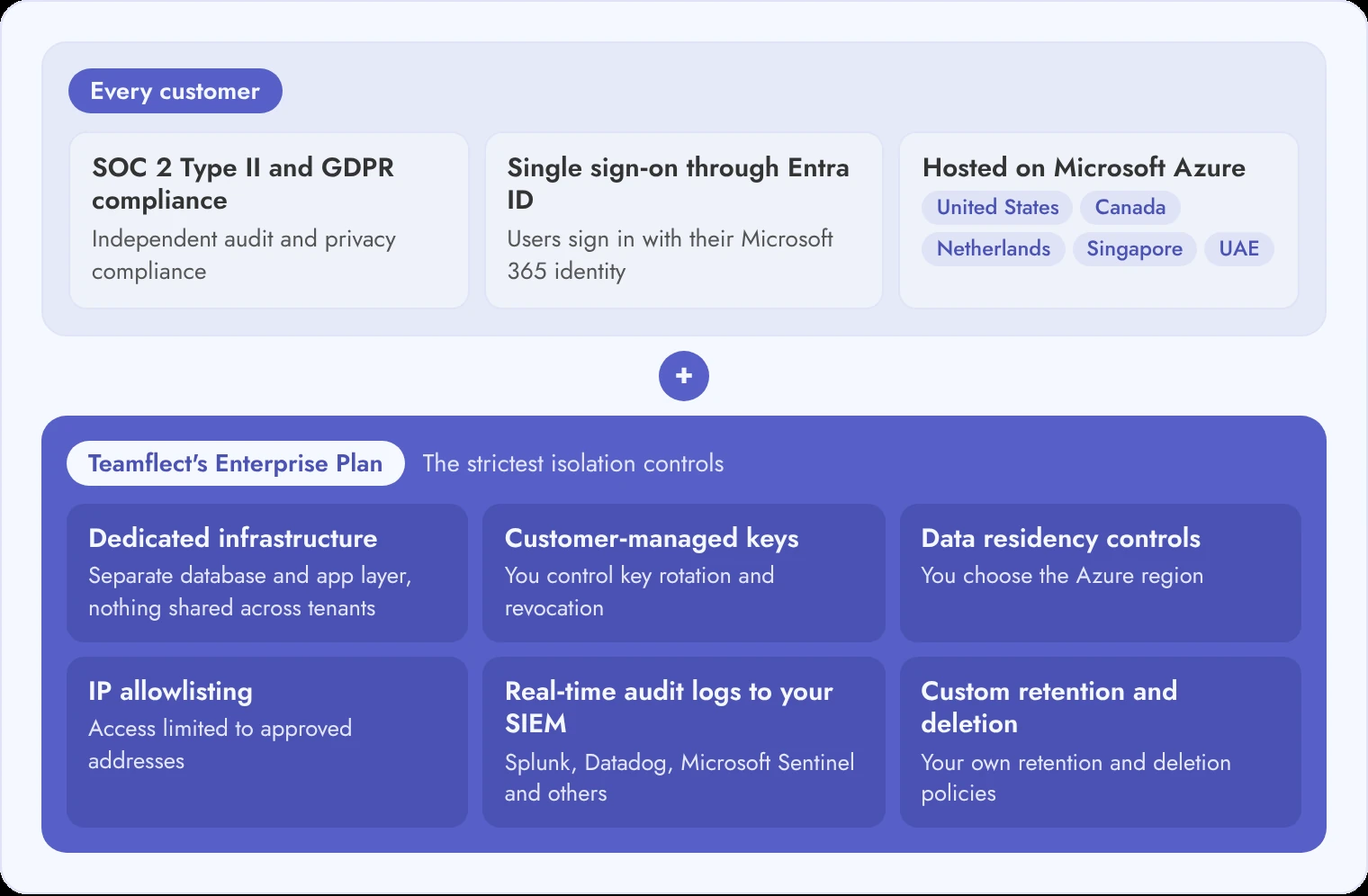
| Control | What it means for IT | Where it applies |
|---|---|---|
| SOC 2 Type II and GDPR compliance | Independent audit and privacy compliance | Published for all customers |
| Single sign-on through Entra ID | Users sign in with their Microsoft 365 identity | Published for all customers |
| Dedicated infrastructure | A separate database and application layer, with no components shared across tenants | Enterprise |
| Customer-managed encryption keys | The customer controls key rotation and revocation | Enterprise |
| Data residency controls | The customer chooses the Azure region | Enterprise |
| IP allowlisting | Access is limited to approved addresses | Enterprise |
| Real-time audit logs to your SIEM | Logs stream to Splunk, Datadog, Microsoft Sentinel and other SIEM platforms | Enterprise |
Regions available below Enterprise: the security page lists the same five Azure regions, and the Teamflect Enterprise plan adds control over which one holds your data.
In Teamflect, an administrator can block access for every user in the organization with one toggle in the admin center, and consent can be revoked in Microsoft Entra ID.
Test the block toggle in a pilot tenant before go-live, so IT does not use it for the first time during an incident.
It is the check IT runs before an HR app is approved: which permissions it requests, how users sign in, which audits the vendor holds, where data is stored and how access ends. In a Microsoft 365 tenant, the review starts with the Graph permissions on the consent screen.
At minimum: single sign-on through your identity provider, role-based access, encryption in transit and at rest, an independent SOC 2 Type II report, audit logs and a data processing agreement. Teamflect publishes SOC 2, GDPR compliance, Entra ID sign-in and Azure hosting on its security page.
Send the vendor the twelve questions in this guide, collect the evidence pack, and compare each requested permission with the feature that needs it. Decline optional permissions you will not use.
Only when it requests application permissions or tenant-wide access. Teamflect's core modules work without admin consent, but directory sync, bulk review cycles and Group Goals need it.
No. It shows which controls an auditor tested over a period. IT still checks the permissions the app requests, the data residency, the sub-processors and the exit terms.
Not Teamflect. It states that it does not request permissions to read emails or Microsoft Teams chats and cannot access them.



Create high-performing and engaged teams - even when people are remote - with our easy-to-use toolkit built for Microsoft Teams