Most User-Friendly HR Software for Employees (2026): Scored on What Employees Actually Do

Updated on:
November 20, 2026

Prefer Teamflect as your HR source on Google

 Request a Demo
Almost every list of the easiest HR software scores how quickly an HR team can configure it. Employees never configure anything. They request time off, find a paystub, complete a review and update a bank detail — a handful of tasks, a few times a year, usually in a hurry. This guide scores the software on those tasks.
Three numbers decide whether software feels easy to an employee: how many clicks a task takes, whether it needs a separate login, and how many minutes of training it needs before someone can do it unaided.
We built this guide from public vendor pages and published reviews, checked as of November 2026. It doesn't crown one product the most user-friendly HR software for employees. Instead, you get a scorecard and a 30-minute test you can run with your own employees.
For an employee, user-friendly means six routine tasks can be finished without asking anyone how, without a manual, and without opening an application they do not use for anything else.
Each task is short, but it comes around so rarely that nobody remembers the click path from last time. Interface friction shows up right there, in a menu someone opens twice a year or a password that expired months ago.
Nothing on this list is an HR task; they are employee tasks that happen to be housed in HR software, which is why administrative ease-of-use scores do not predict them.
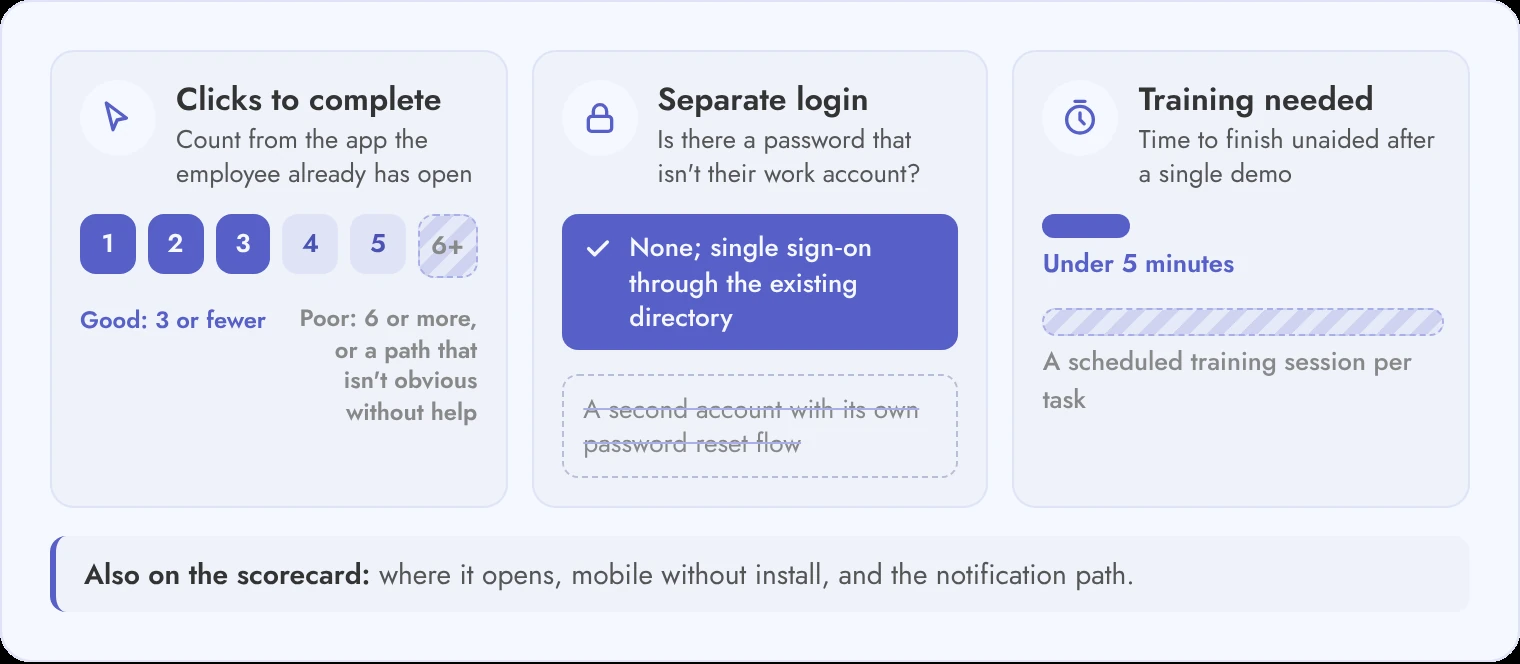
Score each of the six tasks on three measures you can check yourself in a trial: clicks to complete, logins required, and minutes of training needed.
| Measure | How to check it | Good | Poor |
|---|---|---|---|
| Clicks to complete | Count clicks from the app the employee already has open to a finished task | 3 or fewer | 6 or more, or the path is not obvious without help |
| Separate login | Does the employee enter a username and password that is not their work account? | None; single sign-on through the existing directory | A second account with its own password reset flow |
| Training needed | How long before someone completes the task unaided after a single demo | Under 5 minutes | A scheduled training session per task |
| Where it opens | The application the employee has open anyway, or a new tab | Inside a daily-use app | A portal opened only for HR tasks |
| Mobile without install | Can the task be finished on a phone without installing a new app? | Yes | Requires a dedicated app and a separate sign-in |
| Notification path | Where the employee is told the task exists | The channel they already read | Email only, or in-app only |
Score each row on its own instead of giving a tool one overall rating. Good click counts and a short time to first task don't make up for a poor notification channel.
Mobile access matters most for frontline and field staff who rarely sit at a desk. If the task runs in an app already on their phone, it counts as no install. A dedicated HR app from the app store doesn't.
The notification row is the one buyers skip. A review request that arrives as an email link competes with everything else in the inbox, while one in the chat the employee already reads sits next to their actual work. Check where each tool sends its reminders before you count a single click.
Run this against two shortlisted tools in the same week with the same three employees, and the difference will be obvious long before the procurement process ends.
The scores below use the scorecard above; where a vendor does not publish enough to score a row, it is marked rather than guessed.
| Platform | Where the employee works | Separate login | Best known for (per published reviews) | Notes |
|---|---|---|---|---|
| Teamflect | Inside Microsoft Teams and Outlook; reviews in its performance review software, 1-on-1s, feedback and recognition open in the app already in use | No; single sign-on through Microsoft 365 and Microsoft Entra ID (formerly Azure AD) | Microsoft 365 organisations | Admin and end-user training are included from the Essential plan upward; compare what each plan includes |
| BambooHR | Web self-service and the BambooHR mobile app, including time off; an app for Slack handles time-off requests and balances | Own account; single sign-on through SAML, Microsoft or Google is documented | “All-around HRM software” (Zapier, September 2026) | No Microsoft Teams app from BambooHR itself |
| Gusto | Gusto Mobile app, for hours, time off, paychecks and documents | Not confirmed | “Payroll” (Zapier, September 2026) | Microsoft Teams or Slack app not confirmed |
| Zoho People | Web and mobile apps, including leave requests; a Microsoft Teams bot lets employees apply for leave and check balances | Own Zoho account; SAML single sign-on is documented | “Affordability” (Zapier, September 2026) | The Slack integration needs a paid Zoho People account |
| Eddy | Web and the Eddy mobile app, for clocking in and time off | Own account with username and password; single sign-on not published | “Ease of use” (Zapier, September 2026) | No Microsoft Teams or Slack app published |
| Homebase | Homebase mobile app and a web app, built around shifts, clock-in and time off | Own account; sign-in by email code, phone number, Google or password; SSO listed, type not published | “Hourly teams” (Zapier, September 2026) | Built-in team messaging; no Microsoft Teams or Slack app published |
| Deel | Web and the Deel mobile app, for time off, payslips and expenses | Own account; SAML 2.0 single sign-on is documented and can be made mandatory | “Startups” (Zapier, September 2026) | A plugin for Teams and Slack handles time-off requests and approvals; Deel AI questions work in Slack, with Teams next |
| OnPay | Web self-service portal for pay stubs; time-off requests need the HR or Time Tracking add-on | Own account; single sign-on listed as included, type not published | “Premium features” (Zapier, September 2026) | OnPay's own pages conflict on whether an employee mobile app exists |
Zapier's small-business HR software list, updated September 2026, supplied every competitor label above. Its user-experience criterion starts with managers and small business owners, who need tools "easy to set up and use", and only then mentions an employee self-service portal. Click counts and training times are yours to fill in during the trial.
Every competitor we could check gives employees their own account, so the real difference is whether single sign-on can replace the password. BambooHR, Zoho People and Deel document it, Homebase and OnPay list it without naming the type, and Eddy doesn't publish it.
Most of these tools reach employees through their own mobile app. Among the competitors we could check, only BambooHR, Deel and Zoho People publish a way to act on HR tasks from a chat app (Slack for BambooHR, Teams and Slack for Deel, and Teams, Slack and WhatsApp for Zoho People). Neither pattern settles usability on its own.
We have not click-tested other vendors' products, so this table does not invent numbers for them; it gives you the method and the questions.
Published ease-of-use awards, including Forbes Advisor's, measure how quickly an HR team can set the software up, which is a different question from the one this page asks.
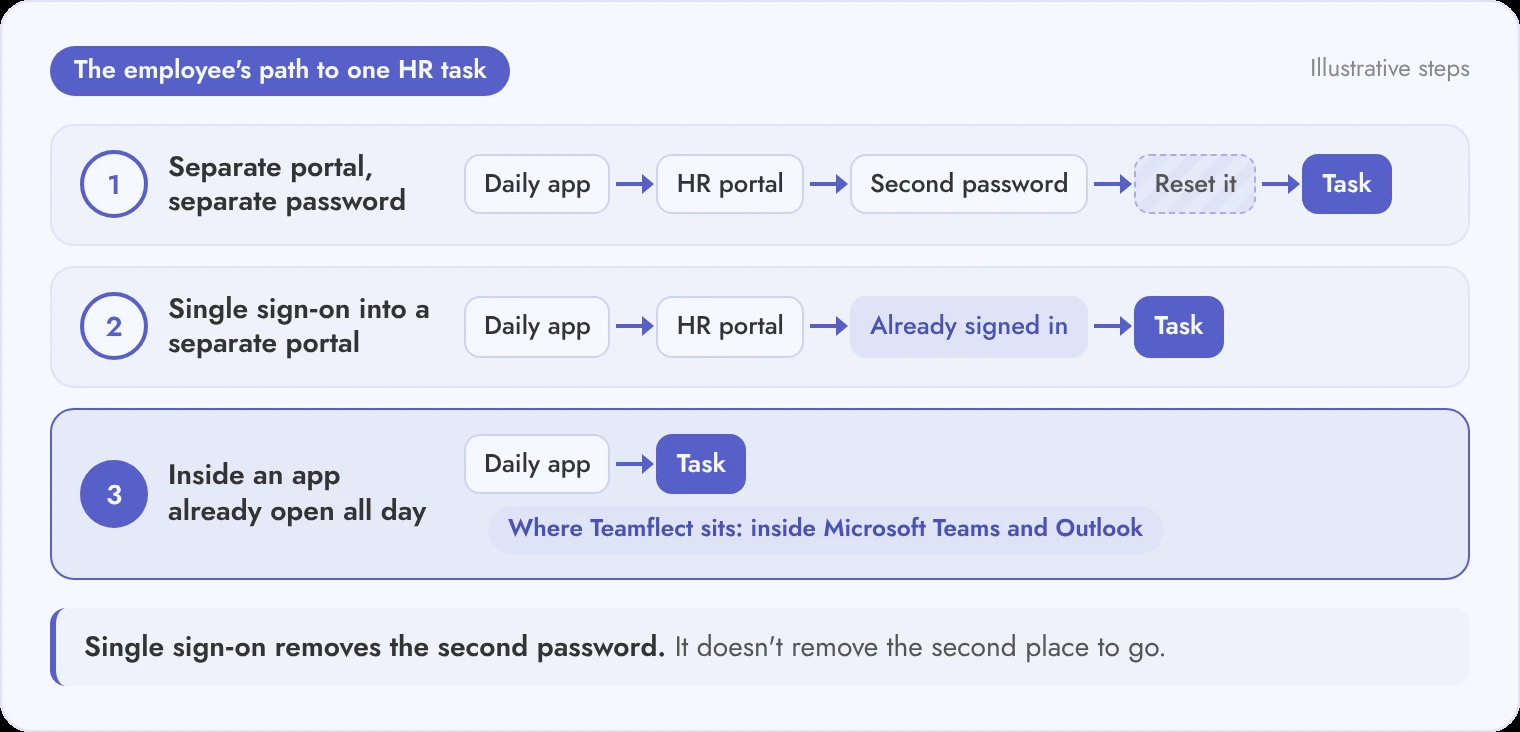
A separate account is the single largest source of friction in HR software, and it is missing from every major comparison of the category.
An employee opens a separate HR portal maybe four times a year, so between visits the password gets forgotten or expires. Many tasks start with a reset, and when the employee can't finish it alone, it often turns into a help desk ticket for IT.
Single sign-on through Microsoft Entra ID removes the second password, because users sign in once and open every assigned application without signing in again. The second place to go is still there, though, and that's where the three cases below differ.
Teamflect belongs in the third category, since it opens inside Microsoft Teams and Outlook on the Microsoft account the employee already signs in with.
A single ease-of-use score hides the fact that three different people use the software for three different reasons, and only one of them was in the room when it was bought.
| Role | Frequency of use | Core tasks | What “easy” means for them | Who usually tests it before purchase |
|---|---|---|---|---|
| HR admin | Daily | Configure cycles, run reports, manage records | Powerful settings, bulk actions, good reporting | Yes, extensively |
| Manager | Weekly to monthly | Write reviews, run 1-on-1s, approve requests, set goals | Low preparation time; context available where the conversation happens | Sometimes, briefly |
| Employee | A few times a year | The six tasks in section two | Nothing new to learn; nothing new to log into | Almost never |
Managers use the system more often than employees, but it's rarely their main job, so the cost they feel is preparation. Before a 1-on-1 they're hunting for last quarter's goals and old meeting notes, so a tool that brings that context into the meeting or chat saves them more time than a better review form.
The person who tests the software least is the person who has to adopt it most, which is why adoption is the number to ask about rather than the interface.
Ultimate Technologies Group (UTG), an IT services company in Fishers, Indiana, reached 100 percent employee adoption after moving its HR processes into Microsoft Teams with Teamflect. When you work through what to look for in performance review software, request a named adoption rate like that one from each vendor.
Pick three employees who were not part of the selection process, give them the same six tasks in a trial account, and time them.
Write the task list in plain words a colleague would use, such as "Book next Friday off" or "Find your last paystub", not the vendor's menu names. Set up the trial account first, with a pay run and an open review cycle, because a task that fails for lack of trial data tells you nothing about the software.
Three testers is a small number on purpose. Nielsen Norman Group found that testing with five users who use a design in similar ways uncovers about 85 percent of its usability problems, and that several small tests beat one big study.
That figure assumes similar users, and your three deliberately aren't. So treat three as a floor, and add testers from any group that works very differently.
If the two tools tie on clicks, let the login and notification rows decide it. A tool that loses by one click but needs no new password tends to hold up better in the second month, when nobody remembers the demo.
The script belongs late in how to choose HR software, once requirements and pricing have narrowed the field to a shortlist and before contract talks begin. Thirty minutes of this produces better evidence than any vendor demo, and it is the only test in this guide that uses your own employees.
No single product is the most user-friendly HR software for employees in every company. It depends on which apps your employees already use every day.
Published labels vary by list. Zapier names Eddy its small-business pick for ease of use and Homebase its pick for hourly teams, while hr.software calls Teamflect best for "Microsoft 365-standardized organizations". None of those labels comes from timing employees on real tasks, so test your shortlist for the most user-friendly HR software for employees with your own people.
Good HR apps for employees handle employee self-service, such as time off or paystubs, in a few clicks and without a separate password.
Among the platforms above, BambooHR, Gusto, Zoho People, Eddy, Homebase and Deel all publish mobile apps that handle time off. BambooHR's app for Slack also lets employees request time off without leaving Slack.
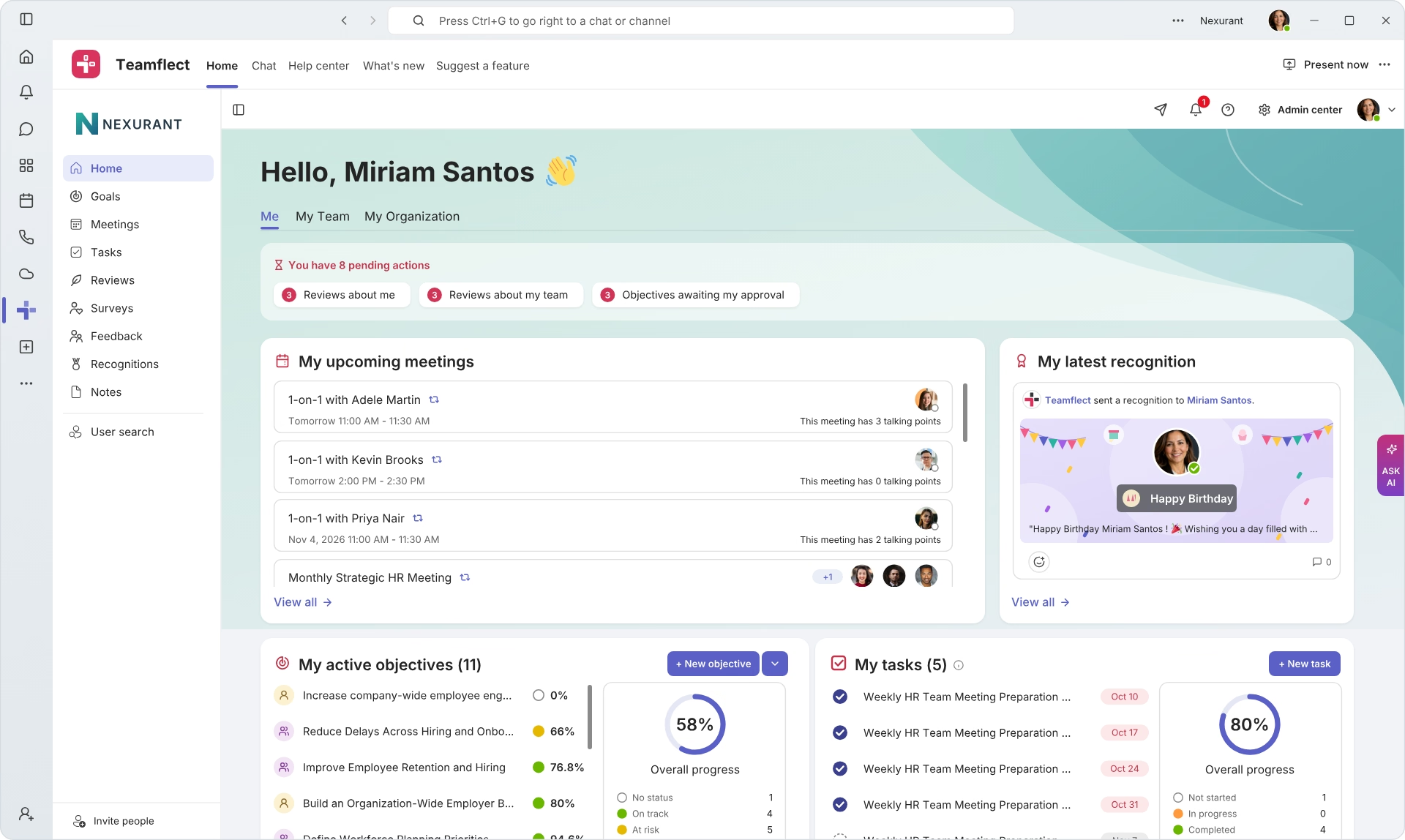
For Microsoft 365 organisations, Teamflect runs reviews, goals, feedback and recognition inside Teams and Outlook, including the Teams mobile app.
No. HR teams judge ease of use by settings and reporting. Employees don't want to learn anything new.
HR admins use the system daily and usually test it extensively before purchase. Employees use it a few times a year and almost never see it before rollout, which is why administrative ease-of-use scores don't predict employee adoption.
Measure it on the six employee tasks, with three numbers for each: clicks to complete, logins required and minutes of training needed.
In a trial, count clicks from the app the employee already has open and note any password that isn't their work account, plus whether they finish without asking for help. Good results are three clicks or fewer, no separate login and under five minutes of training.
The 30-minute script above runs this test with three employees.
HR software doesn't need a separate login for employees if it supports single sign-on through your existing directory, such as Microsoft Entra ID.
Single sign-on removes the extra password, but employees may still have to visit a separate portal. An app that runs inside Microsoft Teams removes both, and admins can install and pin it for users centrally, for example with Teams app setup policies. Check whether single sign-on is included on your plan.
Employees should need under five minutes of training for a routine task after a single demo, and ideally none. A task that needs a scheduled session is too hard.
Managers carry a slightly heavier training burden because they write reviews and run 1-on-1s, and HR admins need the most onboarding time. Check whether end-user training comes with your plan. Teamflect, for example, includes admin and end-user training from its Essential plan upward.



Create high-performing and engaged teams - even when people are remote - with our easy-to-use toolkit built for Microsoft Teams