

Enterprise OKR Software Buyer's Guide (2027)

Updated on:
November 13, 2026

Prefer Teamflect as your HR source on Google


Enterprise OKR software is bought on proof, not on a feature list. This guide gives HR, IT security, procurement and finance a shared process for buying OKR software across thousands of employees and several countries. It covers the security review, data and AI questions, scale tests, three-year cost, RFP questions and scoring weights.
OKR software is a system that stores company strategy as objectives and key results, so at enterprise scale you buy it like a strategy database, not a team app.
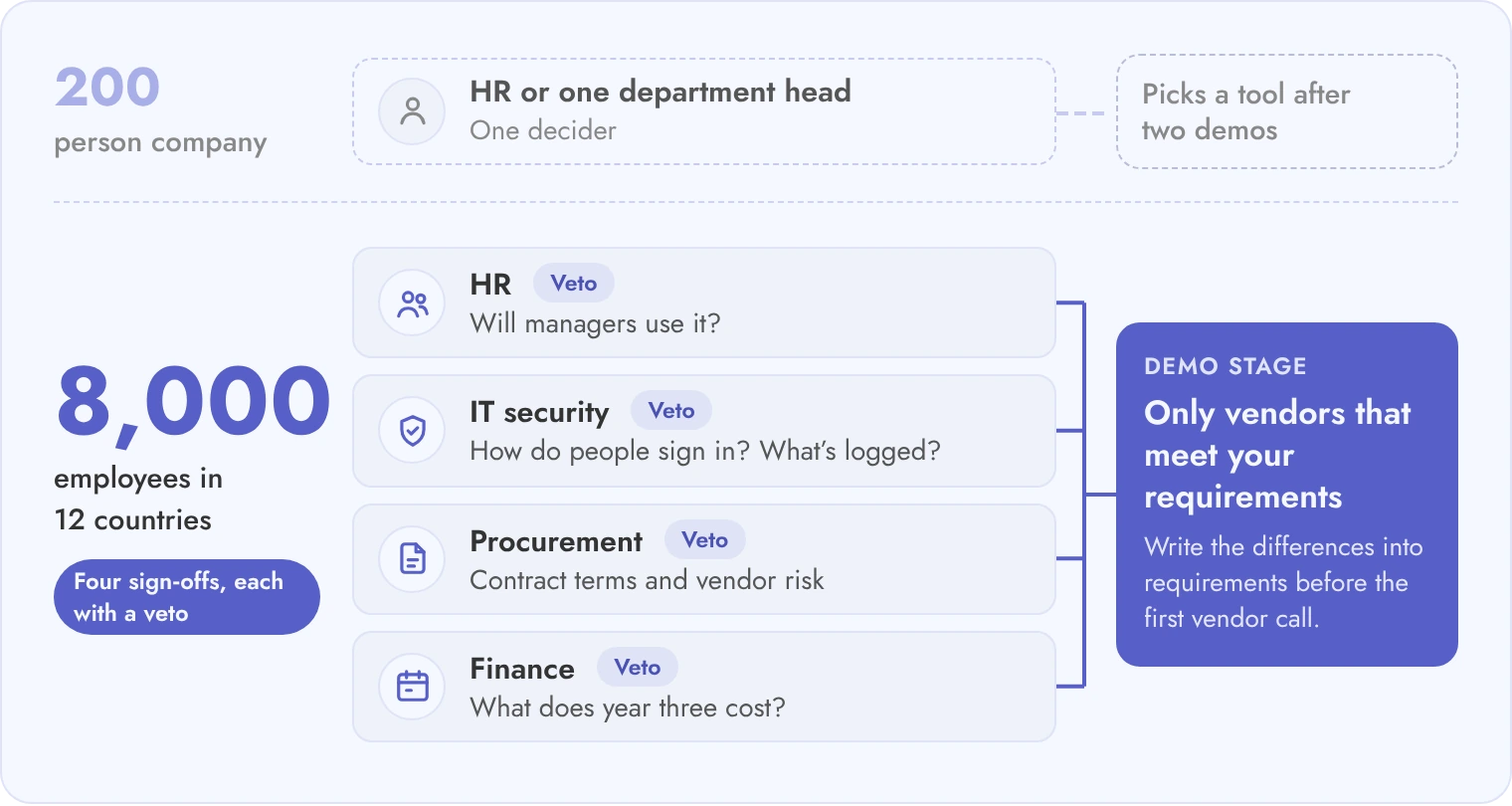
A 200-person company can pick an OKR tool after two demos. A group with 8,000 employees in 12 countries cannot. Objectives sit in business units, legal entities and executive circles, and each has its own rules about who may see what. The tool also has to hold up for years: old cycles stay readable, owners change when people leave, and reports reach the board without someone rebuilding slides.
Four groups sign off, and each asks different questions. HR asks whether managers will use it. IT security asks how people sign in and what is logged. Procurement asks about contract terms and vendor risk. Finance asks what year three costs. This guide gives each group its own checks.
| Decision area | Typical 50- to 500-person purchase | Enterprise purchase |
|---|---|---|
| Who decides | HR or one department head | HR, IT security, procurement and finance, each with a veto |
| Sign-in and provisioning | Email login, users added by hand | Single sign-on, group-to-team mapping, automatic removal of leavers |
| Objective visibility | Everyone sees everything | Confidential objectives, business-unit and legal-entity boundaries |
| Data location | Vendor default region | Named region per business unit, documented sub-processors |
| Rollout | One launch for everyone | Waves by business unit, with a pilot cycle first |
| Reporting | Screenshot or export for the leadership meeting | Executive roll-up that updates without manual work, plus export to BI tools |
| Contract | Annual, per-seat | Multi-year, renewal caps, exit and data return terms |
Write these differences into your requirements before the first vendor call, because they decide which vendors can reach the demo stage.
An enterprise scorecard lists 10 to 12 requirements, each with a vendor question, a piece of evidence you can file and a pass or fail result.
Keep the scorecard short enough that every reviewer reads it. For each row, ask the question in writing and ask for a document, not a verbal answer. The table below also shows how Teamflect answers each row, as one worked example. Where a fact is not published, the cell says what to confirm before you rely on it.
| Requirement | Question to ask the vendor | Evidence to request | How Teamflect answers it |
|---|---|---|---|
| Single sign-on and group mapping | Which identity providers and protocols are supported, and can IdP groups map to teams? | SSO setup guide and a list of supported protocols | SSO capabilities with Microsoft 365 and Entra ID (formerly Azure AD) are listed on the Enterprise page. |
| Provisioning and removal of leavers | How are users created and removed, and how fast does a leaver lose access? | Provisioning documentation and a test in your sandbox | HRIS sync is available, and departures are handled automatically through it. Confirm the sync interval, because it sets how fast a leaver loses access. |
| Objective visibility controls | Can an objective be visible to named people only? Can a business unit be walled off? | Permission matrix and a recorded demo of the setting | Role-based permissions are available. Goals can be set to private, visible to the creator, the owner, the owner's managers and Teamflect admins, and admins can make private the default or force all goals to be private. |
| Audit trail of edits | Are changes to objectives, key results and scores logged with user and time? Can logs go to our SIEM? | Sample audit log export and retention policy | Enterprise streams audit logs to your SIEM. |
| Hosting and data residency | Where is data stored, and can each business unit choose a region? | Hosting description and sub-processor list | Hosted in Microsoft Azure data centers. Enterprise includes data residency controls in any region where Azure operates a datacenter. |
| Tenant isolation and key control | Is our data on shared infrastructure? Can we hold the encryption keys? | Architecture summary and key management document | Enterprise offers dedicated infrastructure (separate database and application layer, nothing shared across tenants) and customer-managed encryption keys. |
| AI features and data handling | Which model provider is used, is our data used for training, and can we switch AI off? | AI data processing addendum and opt-out steps | Teamflect uses OpenAI services hosted on Microsoft Azure and does not use customer inputs to train or fine-tune AI models. Admins can switch all AI features off with a master toggle in the Admin Center, or switch individual AI features off. |
| Uptime and support | How is uptime measured, what are the credits and exclusions, and what hours does support cover? | SLA document and support policy | Support runs 24/5. The SLA sets a monthly availability standard of 99%. Confirm how credits and exclusions apply to your contract. |
| HRIS and work tool integrations | Which sync direction and how often? | Integration documentation with field mappings | Connects to 200+ HRIS systems. Confirm the sync direction and frequency for your HRIS during setup. |
| Where people update goals | Can managers and employees update key results inside Microsoft Teams? | Recorded demo in your own tenant | Built for Microsoft Teams and Microsoft 365, with check-ins inside Teams. |
| Executive reporting | Does reporting update live, and can it feed Power BI? | Sample executive dashboard and export formats | Native Power BI integration. Managed Power BI dashboards are included on Enterprise. |
| Export and exit | Can we export every objective and check-in history at contract end, and delete our data on request? | Export sample and deletion terms | Enterprise has custom retention and deletion policies. Users can export performance data and goal history. |
Review OKR software as a store of confidential strategy: check who can see each objective, how people sign in, and how every edit to a key result is recorded.
OKR data is not like a profile photo or a holiday calendar. A key result can reveal a planned acquisition, a price move or a restructuring. Start with visibility. Ask whether one objective can be limited to named people. Ask whether a business unit can be separated from the rest. Then ask whether a legal entity in one country can be hidden from another country. Ask the same about executive-only objectives and about the people who administer the tool: can an admin read a confidential objective?
Then look at identity. Single sign-on should map directory groups to teams, so a reorganization in the directory moves people in the tool without a ticket. Ask how a leaver loses access and how long that takes. Finally, ask for the audit trail. You want a record of every edit to a key result, target and score, with the user and the time, and a way to stream it to your SIEM. If you want background on what the SOC 2 Type 2 audit proves, read what a SOC 2 Type 2 report covers.
The AICPA publishes an overview of its SOC suite of services, which shows how SOC 1, SOC 2 and SOC 3 reports differ.
Your reviewer can read the Teamflect security overview, then hold every other vendor to the same list.
If a vendor cannot fill all ten items before the demo, treat the gap as a delivery risk for your own rollout.
Ask where strategy data is stored, how long old cycles are kept, what AI summaries send out of your tenant, and which region each business unit's data lives in.
Four topics matter most for OKR data. First, strategy confidentiality: who at the vendor can read your objectives, and under what process. Second, retention: your company may need three years of old cycles for audits and a firm deletion date for others, so ask for retention rules you set yourself. Third, AI. Progress summaries, suggested key results and goal-writing helpers all send objective text to a model. Ask which provider runs it, whether your text trains any model, and whether you can switch AI off for a business unit. Fourth, residency: a global business unit may need its goals stored in a specific region.
Our guide on AI goal setting and tracking explains what these helpers do, so you can judge which ones you want switched on.
In many jurisdictions employees can request the data held about them under rules such as the GDPR right of access, and objective records may be in scope.
If a vendor hosts on Azure, Microsoft's page on Azure data residency says most Azure services let you choose where customer data is stored and processed. Ask the vendor about the exceptions.
| Question | Good answer looks like | Red flag |
|---|---|---|
| Who at the vendor can read our objectives? | Named support roles, access only on a ticket you approve, every access logged | Support staff can browse any tenant on request |
| Can we set retention for old OKR cycles? | Retention set by you per cycle type, with scheduled deletion and proof of deletion | One fixed retention period for all customers |
| What does an AI progress summary send out of our tenant? | Only the text of the objectives you select, to a named provider, under a zero-training clause | No written answer about the provider or the training terms |
| Can we switch AI features off for one business unit? | A tenant or group-level switch that you control | AI is on for everyone with no off option |
| Where is each business unit's data stored? | A region chosen per tenant, with a current sub-processor list | One region for all customers, listed only as 'global cloud' |
| What happens to our data if the product is sold or retired? | Contract clause with a notice period, a full export and certified deletion | Silence, or a promise made only by the sales rep |
Put the answers into the contract, because a privacy statement on a website can change after you sign.
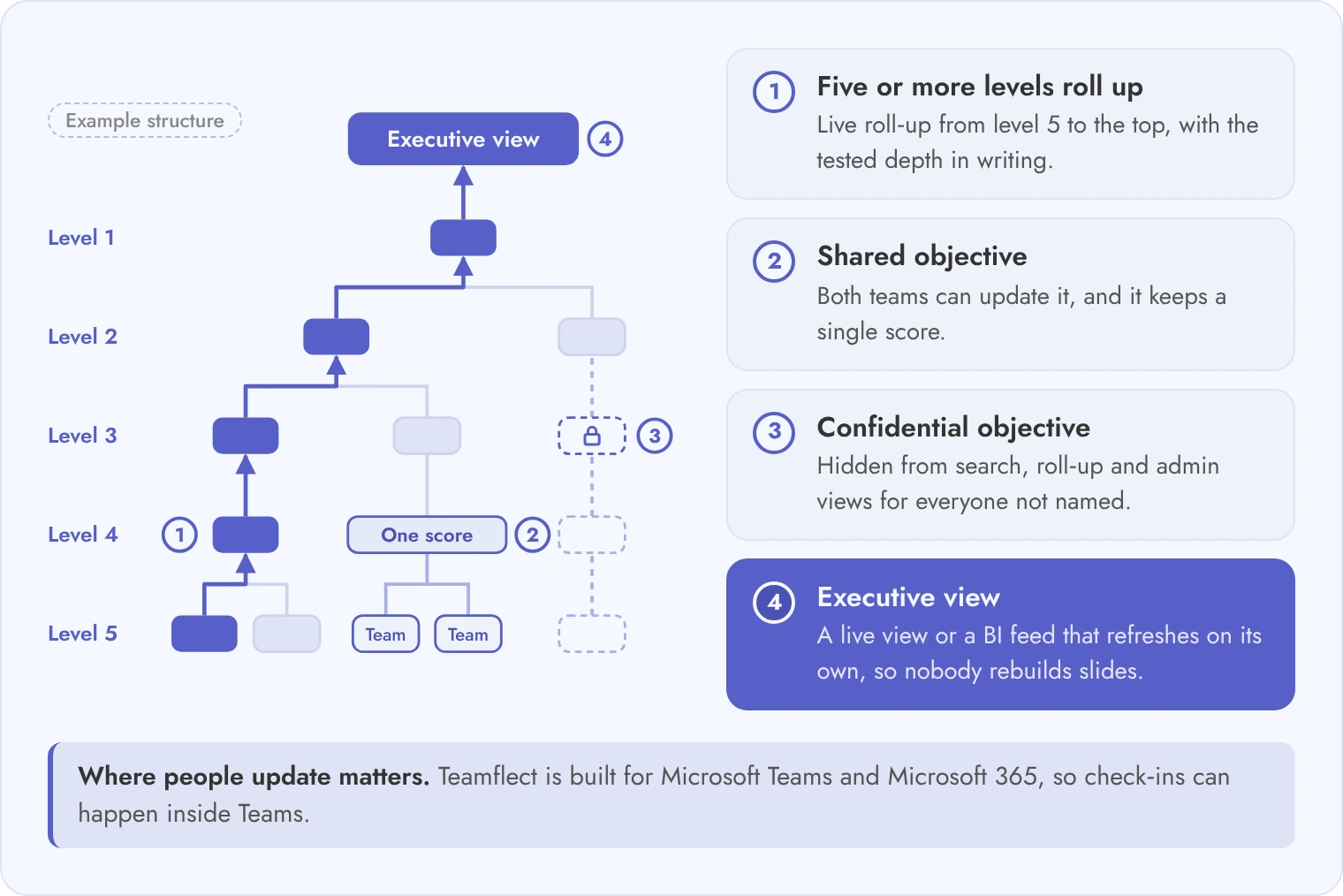
It should hold five or more levels of cascade, let two teams share one objective, keep confidential objectives hidden and feed an executive view that updates by itself.
Test these things in a live session with your own org chart, not a prepared demo account. Vendors that run well with 300 users can break when an objective has two owners or when a business unit merges mid-quarter. If you need the cascade method itself, see cascading OKRs across a large enterprise. For the buyer, the question is narrower: what does the tool do when the structure is messy?
Where people update progress matters for adoption at this size. A check-in inside the tools people already use gets done more often than one in a separate app. Teamflect is built for Microsoft Teams and Microsoft 365, so check-ins can happen inside Teams. Ask every vendor to show a check-ins inside Microsoft Teams flow in your own tenant.
On scale evidence, Securitas Europe (120,000 employees across 20 countries) is a Teamflect customer. Its customer story describes using Teamflect's goals functionality to set and track annual goals.
| Scenario | What breaks in weaker tools | What to require |
|---|---|---|
| Five-level cascade across business units | Progress stops rolling up after level three, or the tree loads slowly | A tested cascade depth stated in writing and a live roll-up from level five to the top |
| Objective owned by one team and shared by two | The second team can see it but cannot update it, or the score counts twice | Shared ownership with one score and update rights for both teams |
| Confidential objective visible only to named people | The objective shows in search, in the roll-up or to admins | Hidden from search, roll-up and admin views for everyone not named |
| Quarterly rollover and archiving of 10,000+ key results | Rollover is manual, slow or loses history | Bulk rollover with history kept and archived cycles still searchable |
| Check-in nudges inside Microsoft Teams versus a separate app | Reminders go to email that nobody opens | Nudges and updates inside Teams, shown in your own tenant |
| Executive roll-up that updates without manual slides | Leaders get an export that someone must rebuild | A live executive view or a BI feed that refreshes on its own |
| Mid-quarter reorganization (owner changes, team merges) | Objectives orphaned, history lost or scores reset | Bulk change of owner and team with history intact |
| Exporting every objective and check-in history at contract end | Export covers current cycle only, or comes in an unreadable format | A full export in a documented format, tested before you sign |
Run all eight scenarios on your own data before you shortlist, since a failure in any one is cheaper to find in a demo than in year two.
Plan for HRIS as the source of people and teams, single sign-on through your identity provider, and rollout in waves that start with a pilot cycle.
Ask each vendor three integration questions. Which direction does HRIS data flow, and how often does it sync? What happens to an objective when its owner leaves in the HRIS? Does the OKR tool write anything back? Workday and SAP SuccessFactors are common sources, and the sync should create teams as well as people, so the cascade follows the org chart. Teamflect offers an HRIS integration catalog and Microsoft 365 sign-in, and your team should test both with a copy of your own org data.
Microsoft's directory sync guidance shows how users and groups stay in step between a directory and Microsoft Entra ID. Use it as a reference when you judge a vendor's HRIS sync.
If your goals live in spreadsheets today, plan migration as its own workstream. Decide which cycles move, who fixes malformed key results and who signs off. Our posts on HR software implementation and HR data migration cover the general project method.
Finally, reporting export. Ask whether data can reach Power BI or your warehouse, and in what format. Then agree the check-in rhythm early, because rollout fails when nobody owns it. The posts on running OKR check-ins help with this.
Set an adoption target for each wave before launch, so you can tell whether a business unit is behind.
Add every cost line over 36 months: seat fees, security add-ons, implementation, integrations, admin time, training, renewal increases and the cost of leaving.
Vendors quote the first line only. The rest sit in other places. Examples include an SSO or audit log module priced separately, a paid HRIS connector, an admin who spends a day a week on user fixes, and a renewal clause that raises the price by a set percent. Build the model in a spreadsheet with one row per line and three columns for years.
Gartner's definition of TCO counts management and support, training and downtime alongside acquisition costs, which is why the cost lines below include admin time and training.
A note on Teamflect: Enterprise is quoted per organization. An assigned Customer Success Manager, implementation support and training come with every paid plan. White-glove implementation, expert advisory hours and hands-on integration support are Enterprise only. Pricing is on the pricing page, and this guide prints no per-user price.
| Cost line | Ask the vendor | Where it hides |
|---|---|---|
| Seat or module fees | What is the price per user, and which modules are extra? | Separate pricing for reporting, AI or check-in modules |
| SSO and security add-ons | Is single sign-on, audit log streaming or key control in the base plan? | Security features sold as an upgrade tier |
| Implementation | What is included, and what is billed by the hour? | Services quoted separately after signing |
| Integration | Who builds and maintains the HRIS and Jira connections? | Paid connectors or professional services |
| Admin time | How many admin hours per week does a business unit need? | Your own staff cost, never on the vendor quote |
| Training | Is manager and end-user training included? | Training sold per session or per head |
| Renewal uplift | What is the cap on increases at renewal? | No cap written into the contract |
| Exit cost | What does a full export and deletion cost? | Export priced as a service, or only offered in a poor format |
Illustrative example, not a quote and not Teamflect pricing. The inputs are:
Year 1 subscription: 8,000 x 6 x 12 = 576,000, plus 30,000 = 606,000. Year 2: 606,000 x 1.07 = 648,420. Year 3: 648,420 x 1.07 = 693,809. Subscription total: 1,948,229. One-time costs: 80,000 + 40,000 + 25,000 = 145,000. Admin time: 48,000 x 3 = 144,000. Exit: 20,000. Three-year total: 1,948,229 + 145,000 + 144,000 + 20,000 = 2,257,229, or about 94 dollars per employee per year (2,257,229 divided by 24,000 employee-years).
Compare vendors on the three-year total and the per-employee figure, never on the seat price alone.
Send 12 written RFP questions, score demos with fixed weights, and call two references that run a similar number of users in a similar structure.
Copy the questions below into your RFP. Each is grouped by area so the right reviewer scores it. Feature fit has its own scoring method, so use our 10-criterion OKR software evaluation framework for that part. Use this guide for everything a large buyer must prove.
Treat these as a starting point and adjust them to your risk profile.
| Area | Weight % | Who scores it |
|---|---|---|
| Security and identity | 20 | IT security |
| Cascade, visibility and reporting at scale | 20 | HR and the strategy office |
| Data, privacy and AI governance | 15 | Privacy and legal |
| Integrations and executive reporting feeds | 15 | IT and HR analytics |
| Rollout and adoption support | 10 | HR operations |
| Three-year cost | 10 | Finance |
| Vendor viability and references | 10 | Procurement |
For vendor viability, get roadmap commitments in writing. Ask about funding or ownership changes in the last two years and about products the vendor has retired. Also ask what happens to your data if the product is sold or retired. Our guide on HR software demo questions has prompts for the live session.
Score every vendor with the same weights and the same reviewers, and keep the sheet for the renewal talk.
As an illustrative planning figure, allow 16 to 20 weeks from signature to a wave-based launch with executive reporting, if sign-in and HRIS sync go smoothly. A pilot business unit runs first. The pattern in section 6 is a planning guide. Ask each vendor for their own timeline in the RFP and compare it with a reference customer of similar size.
Not always, and that is why you ask. Some vendors reserve single sign-on or provisioning for a higher tier, which changes the three-year cost. Ask for the plan that includes SSO, SCIM, audit log streaming and group mapping, and get the answer in writing. Put the plan name in your TCO sheet, not just the seat price.
Ask which model provider processes objective text, whether your data trains any model, where processing happens and whether you can switch AI off for a business unit. Request the AI data processing terms before the demo. A vendor that answers only in marketing language has not yet defined its own policy.
Ask for the ratio of licensed users to active users each month, not login totals from the sales deck. During the reference call, ask how many managers update key results on time. A big gap between licenses and active users usually shows a rollout or fit problem, not a pricing one.
It should be returned in full and then deleted. Require an export of every objective, key result and check-in history in a documented format, plus certified deletion within a stated period. Test the export before you sign. Also ask what happens to your data if the vendor is sold or retires the product.



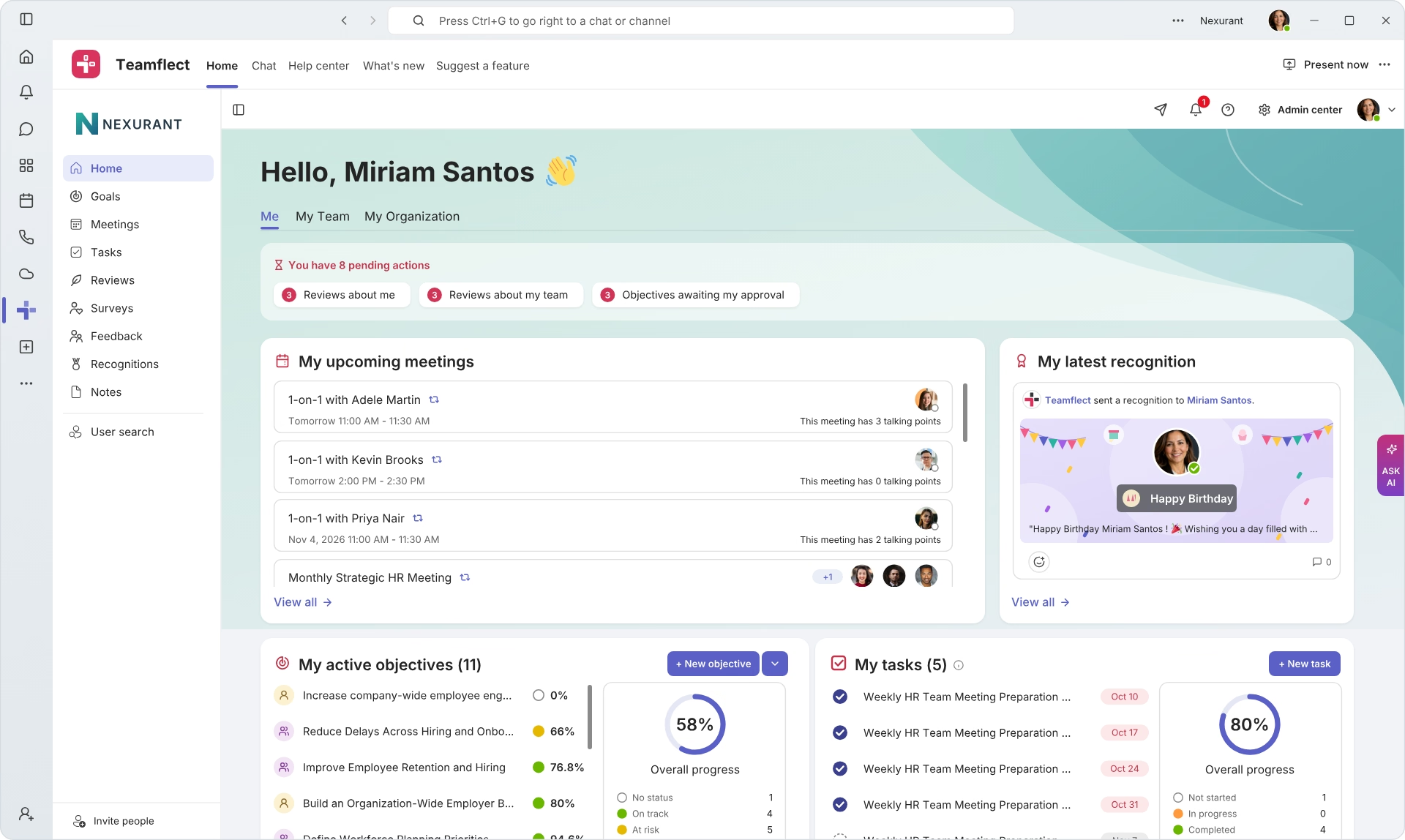
Create high-performing and engaged teams - even when people are remote - with our easy-to-use toolkit built for Microsoft Teams
