Enterprise one-on-one meeting software is judged on note confidentiality, Microsoft 365 permissions, AI summary handling, retention and three-year cost, not on agenda templates. This guide gives HR, IT security, procurement and finance a scorecard, evidence pack, demo tests, RFP questions and cost model for multi-country purchases.
1. What changes when you buy one-on-one meeting software for a large, multi-country organization?
At enterprise scale, one-on-one meeting software stops being a manager convenience and becomes a system that stores confidential conversations about thousands of people under several legal regimes.
A team of 100 can pick a tool by trying it for a week. A company with thousands of employees in several countries cannot, because the notes are the risk. A 1:1 note can hold a grievance, a health disclosure, a pay complaint or an honest comment about a senior leader. The buyer has to know who can read each note, where it is stored, how long it lives and what an AI feature does with it.
Four groups sign off. HR owns the process and the employee relationship. IT security owns identity, permissions and hosting. Legal and works council contacts own consultation and privacy rights. Finance owns the three-year cost. Each group asks different questions, and a purchase that satisfies only HR stalls in security review. This is the gap that a generic roundup ofone-on-one meeting tools does not cover.
Where enterprise buying differs
Decision area
Typical 50- to 500-person purchase
Enterprise purchase
Note visibility
Manager and employee see the note; nobody asks about anyone else
Rules for skip-level managers, HR, admins and delegates, written down and tested
Calendar connection
One person clicks "allow" on the Outlook prompt
IT reviews requested permission scopes and grants tenant-wide admin consent
Identity
Email and password or a Microsoft sign-in
SSO plus automated user provisioning and removal tied to the HRIS
AI summaries
Switched on if they look useful
Model provider, training use and consent for recording reviewed by security and legal
Retention and deletion
Default settings
Written retention periods by country, deletion on exit, legal hold on named people
Employee representation
Not considered
Works council or employee representative consultation checked by HR legal before launch
Rollout
Everyone invited at once
Waves by country or business unit with a manager enablement plan
Exit
Not discussed
Full export of notes and action items in a usable format at contract end
If a vendor cannot answer the questions in this table in writing, the purchase is not ready for enterprise review.
2. What belongs on an enterprise requirements scorecard for one-on-one meeting software?
An enterprise scorecard lists twelve requirements, each with a question for the vendor, the document that proves the answer and a place to record how each vendor responds.
The scorecard below skips agenda templates and talking-point libraries on purpose, because those are feature questions that any demo answers. It covers what blocks a signature: confidentiality, identity, calendar permissions, AI handling, retention and support. Send it to every vendor in the same format so answers can be compared line by line.
The last column shows how Teamflect answers each line, using only what is documented. Where a fact is not published, the cell says so. Ask for the same evidence from every vendor, including Teamflect. The Teamflect Enterprise plan adds dedicated infrastructure, customer-managed encryption keys and data residency controls that the standard plans do not include.
Enterprise requirements scorecard for one-on-one meeting software
Requirement
Question to ask the vendor
Evidence to request
How Teamflect answers it
Calendar connection and permission scopes
Which Microsoft 365 scopes do you request, read or read-write, delegated or application?
Permission list and admin consent documentation
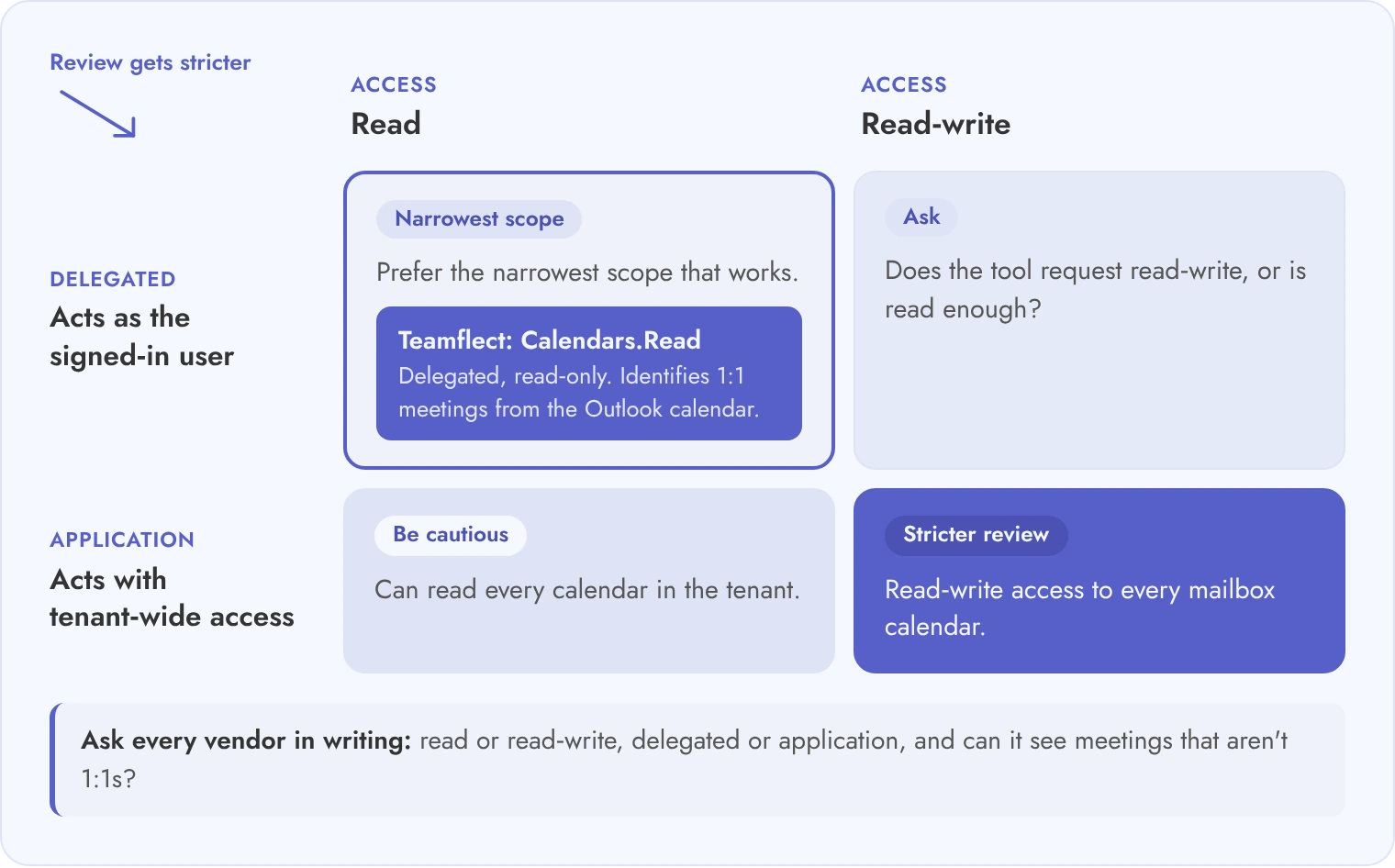
1:1 meetings are identified from the Outlook calendar through Calendars.Read, a delegated, read-only permission. The only application permission, Directory.Read.All, syncs the org chart and needs admin consent.
SSO and provisioning
Which identity protocols and automated provisioning do you support?
Identity setup guide, supported protocol list
Sign-in uses Microsoft Entra ID single sign-on, and Microsoft's app certification lists Conditional Access support for blocking access and requiring MFA. Users sync from the Microsoft 365 directory, and users deleted in Entra ID can be removed automatically. SAML and SCIM are not documented.
Note visibility by role
Who can read a note: manager, employee, skip-level, HR, admin?
Role matrix, screenshots of each view
Meeting notes are shared (visible to participants) or private (visible to the author). Admins set separately what managers in the reporting line and what Teamflect administrators can see: shared notes, shared and private notes, or none.
Admin access and audit trail
Can an administrator open a note, and is every open logged?
Audit log sample, admin permission list
Administrator access to notes is a configurable setting. Activity logs cover feedback, goals, reviews, tasks, recognition and logins for 90 days, and every admin impersonation of a user is logged. Note opens are not listed as a logged event. Enterprise streams audit logs to your SIEM.
AI summaries and transcription
Which provider processes notes, are they used for training, how is consent handled?
Subprocessor list, AI data processing terms
AI features run on OpenAI services hosted on Microsoft Azure, in regional data centers. Teamflect states that customer inputs are not used to train or fine-tune models. Admins can switch AI summaries and writing assistance off for the whole organization.
Retention, deletion and legal hold
Can we set retention by country and freeze one person's notes?
When a user leaves, their notes stay and are visible to Global Admins only; a new manager does not inherit them. Permanent deletion is handled by request to support. Custom retention and deletion policies are part of Enterprise. Legal hold is not documented.
Data residency and hosting
Where are notes stored and can we choose the region?
Hosting and residency statement
Hosted in Microsoft Azure data centers; Enterprise offers data residency controls in any region where Azure operates a datacenter.
Encryption and isolation
Who holds the keys and is infrastructure shared between customers?
Encryption architecture summary
Enterprise offers dedicated infrastructure with a separate database and application layer, and customer-managed encryption keys.
Attestations
Which audit reports and privacy commitments can you share under NDA?
Current audit report, data processing agreement
SOC 2 Type I and Type II; GDPR and CCPA compliant.
HRIS sync
Which direction does data flow, and how often does it refresh?
Integration specification, field mapping
Integrates with 200+ HRIS platforms on the Professional plan. Data flows one way, from the HRIS into Teamflect, matched on work email and refreshed every 24 hours (up to 48).
Leader reporting
What do leaders and HR see about individuals and teams?
Report samples with real column names
The 1:1 report shows meeting counts, days since the last 1:1, whether talking points or tasks were used, and who has had no 1:1s, without meeting content. A separate Notes report shows 1:1 notes to admins, with AI theme analysis. Managed Power BI dashboards are Enterprise only.
Support and uptime
What support hours, named contacts and uptime commitment apply?
Support policy, SLA document
An assigned Customer Success Manager, implementation support and training come with every paid plan; 24/5 support across the US and Europe. The SLA commits to 99% monthly availability.
Score every row from 0 to 3 for each vendor, and treat any 0 in the first six rows as a stop until the vendor sends evidence.
3. How do you review security and identity for software that stores confidential 1:1 notes?
Review Microsoft 365 permissions first, then who can open a note, then the audit trail, because each control decides who can read a confidential conversation.
Start with the calendar connection. A 1:1 tool that reads Outlook calendars needs a Microsoft Graph permission. Ask whether it requests calendar read or read-write access. Ask whether permissions are delegated (acting as the signed-in user) or application (acting with tenant-wide access). Then ask whether it can see meetings that are not 1:1s. Application permissions with read-write access to every mailbox calendar need a stricter review than delegated read-only access.
Next, map note access role by role. Ask the vendor to show the note screen as a manager, an employee, a skip-level manager, an HR partner and a tenant administrator. A tool that lets any administrator open any note without a trace is a different risk from one that logs every open. Ask for a sample log line that names the person, the note and the time.
Read each vendor's security page and audit report together. Teamflect's is on its security page, and a separate post explains what a SOC 2 Type 2 certification covers. Ask each vendor for the same evidence pack below.
Security evidence pack to send to every vendor
Current SOC 2 report (or equivalent audit report), with the report type and period stated.
Microsoft 365 permission list for the calendar connection, with delegated or application type and admin consent steps.
Role matrix for note visibility: manager, employee, skip-level, HR, tenant admin.
Sample audit log export showing note opens, edits and deletions.
SSO and provisioning setup guide, with supported protocols and how a leaver is removed.
Subprocessor list, including any AI model provider that receives note text.
Hosting, region and encryption summary, including who holds the keys.
Latest penetration test summary and the date of the next one.
Incident notification terms in the data processing agreement, with the time limit in hours.
Support and SLA document with escalation contacts.
A vendor that answers all ten items in one reply within a week has usually done this review before.
4. What data, privacy and AI governance questions should you ask about 1:1 notes?
Ask where notes live, how long they are kept, whether AI reads them and whether employees were consulted, because 1:1 notes are personal data.
Notes differ from most HR data because managers write them in free text. A manager may record that an employee is caring for a sick parent, or that a colleague is the subject of a complaint. That text can fall under a subject access request. In several countries, this gives an employee the legal right to obtain the personal data a company holds about them. The same text can also become evidence in a dispute.
AI adds a second question: where does the note text go once a summary is generated? Ask which provider processes it and whether that provider keeps the content. Ask whether it trains any model, and how participants are told when a meeting is transcribed or recorded. Consent rules differ by country, so HR legal should own that answer.
Finally, ask HR legal whether a works council or employee representative body must be consulted before a tool that records or analyzes 1:1 meetings is introduced. This is a question for your lawyers, not for the vendor, but the vendor should supply the documents they need to answer it.
Data and AI governance questions for 1:1 notes
Question
Good answer looks like
Red flag
Can a manager mark a note private, and who can still see it?
Private notes are visible to the author only, and the vendor shows what a tenant administrator can and cannot do
"Admins can see everything" with no log, or no private option at all
How long are notes kept, and can we set it by country?
Retention is configurable per region and enforced by deletion, with a record of what was deleted
One fixed retention for all customers, or deletion that only hides notes from the screen
What happens to notes when an employee leaves?
Documented rules: archive, transfer to HR, or delete, applied on the HRIS leaver event
Notes remain visible to the former manager indefinitely
Can we place a legal hold on one person's notes?
A hold freezes edits and deletion for named people without affecting others
Hold means exporting everything or switching off deletion tenant-wide
How are subject access requests handled for notes?
A documented export for one employee, including notes where they are mentioned
Manual database queries by vendor staff with no stated turnaround
Where does AI summary text go?
Named provider, region, no training on customer content, no retention by the provider beyond processing
Provider not named, or content used to improve models by default
How is consent handled for transcription or recording?
Participants are notified in the meeting and the setting can be turned off by country
Recording starts without a visible notice to the employee
What did your customers do about works council consultation?
The vendor supplies a data flow description and a feature summary your HR legal team can hand to representatives
"We have never been asked"
Write the answers into the data processing agreement, because a verbal answer in a demo does not bind the vendor after signature.
5. Who should see one-on-one notes, and how should the software handle AI summaries and retention?
Employees and their direct manager should see shared notes, only the author should see private notes, and HR and administrators should reach a note only through a logged, role-limited route.
Vendors describe this in a sentence. Your team should watch it happen. These tests cover data handling; for the meeting itself, see how to run effective one-on-one meetings. Run the tests below in the demo with real role accounts, not slides, and ask the vendor to repeat any step they skip. Each test covers a situation that happens sooner or later at this size. A manager records something they should not have, a leaver's notes stay behind, or a lawyer asks for one person's data.
Use two or three test employees in different countries and one HR partner account. Give the vendor the scenarios a week ahead so the demo environment is configured, and record every step. Record each result as pass, partial or fail.
Note-handling tests to run in the demo
Test
What to do
Pass looks like
Manager marks a note private
Create a note as a manager, mark it private, then log in as the employee
The employee sees only what is shared, and the manager can tell which items are private
HR admin tries to open a private note
Log in as an HR administrator and search for the note
Access is blocked or requires a documented, logged override
Skip-level views shared items
Log in as the manager's manager and open a direct report's 1:1 history
Only items the rules allow are visible, and nothing marked private appears
Employee leaves the company
Trigger a leaver event for a test employee and check their notes
Notes follow the documented rule: archived, transferred or deleted, with a log entry
Subject access request for one employee
Ask the vendor to export everything held about one test employee
A single export, including notes where the person is mentioned, in a readable format
AI summary for a meeting
Generate a summary and ask where the text was processed and stored
Provider and region are named, retention is stated, and an admin can switch the feature off
Legal hold on one person's notes
Place a hold, then try to edit and delete a held note as the manager
Edits and deletion are blocked for that person only, and the hold is logged
Export all notes at contract end
Request a full export of notes and action items for the tenant
A complete file set in an open format with authors, dates and visibility flags
Attach the written result of every test to the vendor scorecard before anyone scores the area.
At the scale of Securitas Europe, with 120,000 employees across 20 countries, a tool has to apply these rules without anyone checking each manager by hand.
6. How do integrations and rollout work for 1:1 software across a large organization?
Sync people data from the HRIS on a schedule, connect Outlook with admin consent, and roll out in country waves after managers are trained.
Three integrations matter. The HRIS integration supplies the org chart that decides who is a manager, who is a skip-level and who has left. Ask which direction data flows (HRIS to the 1:1 tool only, or both ways), how often it refreshes, and how a manager change is handled on the day it happens. Workday and SAP SuccessFactors are common sources, so check each vendor's list of supported systems against yours. Teamflect's HRIS integration covers 200+ platforms and pulls updates into Teamflect every 24 hours, so a manager change made in the HRIS can take a day to appear.
The calendar connection is the second. Teamflect is built for Microsoft Teams and Microsoft 365, and 1:1 meetings are identified from the Outlook calendar, so the Microsoft 365 permission review in section 3 applies. The third is reporting export: ask whether 1:1 data reaches your analytics tools. Teamflect has native Power BI integration, with managed dashboards on Enterprise.
For tasks that are not specific to 1:1s, such as moving existing meeting notes from another tool, use the implementation guide and the data migration guide. The sequence below is a planning pattern, not a promise; adjust the weeks to your change calendar and works council timeline.
Rollout sequence for one-on-one meeting software
Weeks 1 to 2: confirm HR legal position on consultation, notes retention periods and AI settings by country.
Weeks 2 to 4: IT grants Microsoft 365 admin consent and configures SSO; HRIS sync is tested in a sandbox.
Weeks 4 to 6: pilot with 50 to 100 managers in two countries, using the demo tests from section 5 on live data.
Weeks 6 to 8: fix the findings, publish a one-page note-handling guide for managers and train HR partners.
Weeks 8 to 12: wave one, one country or business unit, with manager enablement sessions before employees are invited.
Weeks 12 to 20: waves two and three, adding countries as local consultation finishes.
Weeks 20 to 24: review adoption by team and a sample of notes handling against policy; set the renewal checkpoint.
Do not invite employees to a country wave until its managers have been trained and the local retention setting is live.
7. How do you build a three-year total cost of ownership model for 1:1 software?
Add license fees, security add-ons, implementation, integration, admin time, training, renewal uplift and exit cost across three years, then divide by seats to find the true price per seat.
Seat price is the line that vendors quote and the one that moves least. The other lines decide the total. Ask each vendor to price every line in the table in writing. Teamflect Enterprise is quoted per organization, so see the pricing page for how to request a quote. An assigned Customer Success Manager, implementation support and training come with every paid plan, while white-glove implementation, expert advisory hours and hands-on integration support are Enterprise only.
Three-year cost lines for one-on-one meeting software
Cost line
Ask the vendor
Where it hides
Seat or module fees
Is a seat every employee or only managers and active 1:1 participants?
Seat definition that counts all employees when only managers hold meetings
SSO and security add-ons
Is SSO, provisioning or audit log export a separate charge?
A "security tier" that sits above the plan you were quoted
AI summary fees
Are AI summaries included, metered or sold as a separate module?
Usage-based fees that grow with the number of meetings
Implementation
Is onboarding fixed-fee, hourly or included?
Hourly rates for work you assumed was included
Integration
Who builds and maintains the HRIS and calendar setup?
Custom integration fees and a change charge for each HRIS update
Admin time
How many internal hours per month for user changes, access reviews and requests?
Internal HR operations time that never appears in the vendor quote
Training
Are manager sessions and employee materials included?
Per-session charges for each country wave
Renewal uplift
What is the maximum increase at renewal, and is it capped in the contract?
An uncapped uplift clause in the order form
Exit cost
What does a full export of notes cost and in what format?
Export fees or a professional services charge at termination
Worked example (illustrative only)
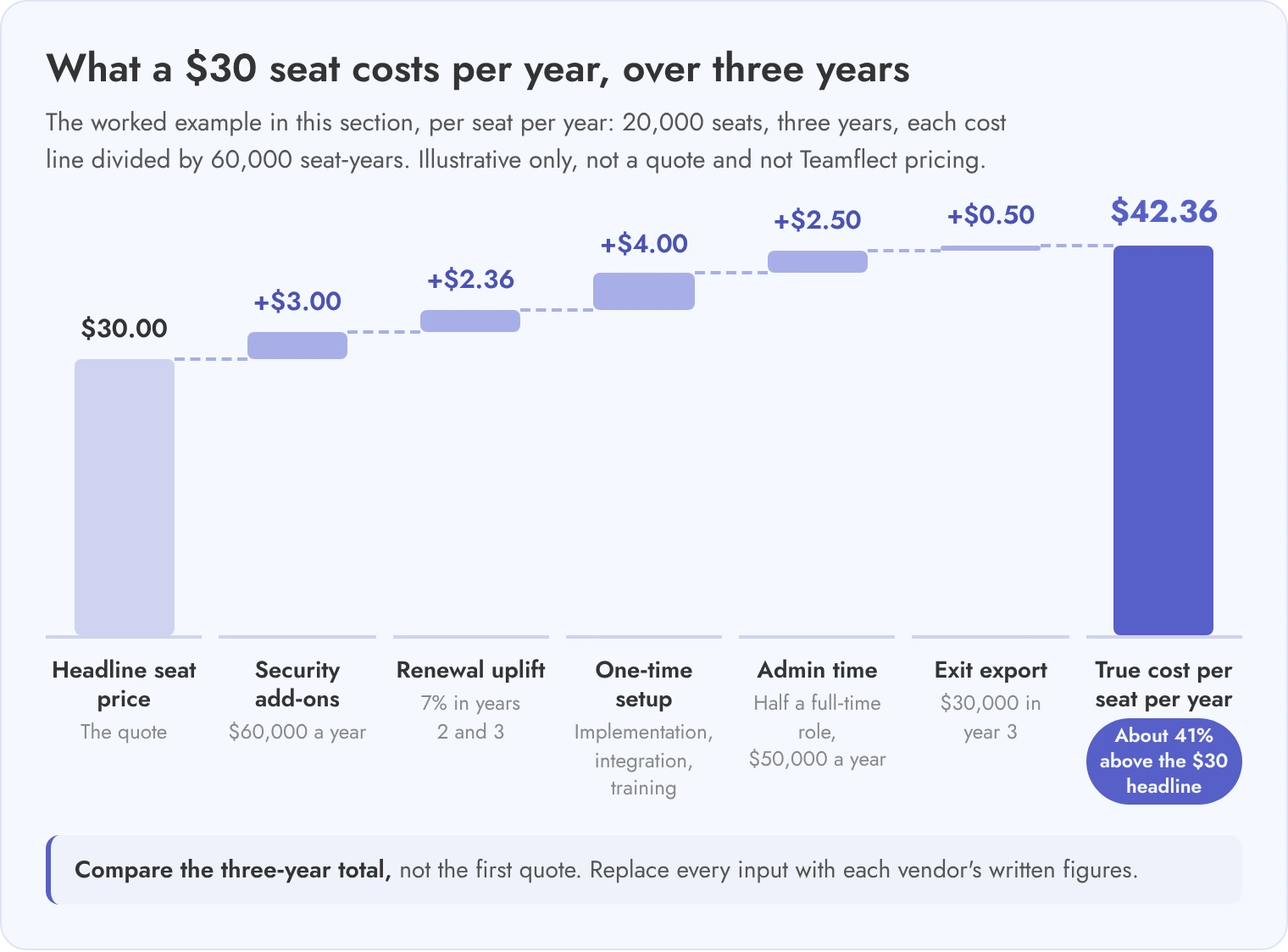
The numbers below are round inputs for a 20,000-person company, not a quote and not Teamflect pricing. Replace each input with a vendor's written figures.
Licenses: 20,000 seats at 30 dollars a year = 600,000 dollars. Security add-ons: 60,000 dollars a year. Year 1 subscription = 660,000 dollars.
Renewal uplift of 7 percent: year 2 = 660,000 x 1.07 = 706,200 dollars. Year 3 = 706,200 x 1.07 = 755,634 dollars. Three-year subscription = 2,121,834 dollars.
One-time costs: implementation 120,000 + integration 80,000 + training 40,000 = 240,000 dollars. Exit export provision in year 3 = 30,000 dollars.
Admin time: half a full-time role at 100,000 dollars a year = 50,000 dollars a year, 150,000 dollars over three years.
Total: 2,121,834 + 240,000 + 30,000 + 150,000 = 2,541,834 dollars. Divided by 60,000 seat-years (20,000 x 3) = about 42.36 dollars per seat per year, roughly 41 percent above the 30 dollar headline price.
Compare vendors on the three-year total and the cost per seat-year, not on the first quote.
8. How do you run the RFP, demo scoring and reference checks for 1:1 software?
Send the same twelve written questions to every vendor, score demos against fixed weights with the right person scoring each area, and call two references that resemble your organization.
Written answers are what you compare later and what you attach to the contract. Group the questions by area so security, HR legal and IT can each answer their own part. For features such as agendas, templates and talking points, use the one-on-one tools roundup and the demo questions guide, and keep this scorecard for the enterprise areas.
Twelve RFP questions for one-on-one meeting software
Security and identity: List the Microsoft 365 permissions your calendar connection requests, and state whether each is delegated or application type.
Security and identity: Which SSO protocols and provisioning methods are supported, and on which plan?
Security and identity: Provide your latest audit report and penetration test summary.
Note privacy: Describe, by role, what each user type can read, edit and delete in a 1:1 note.
Note privacy: Can an administrator open a private note, and is every open recorded in an exportable log?
AI governance: Name every provider that processes note text for AI features, the region, and whether content is used for training.
AI governance: How are meeting participants notified when a meeting is transcribed or summarized?
Retention and legal: How do you apply retention by country, deletion on exit and legal hold for named people?
Retention and legal: Describe your process and turnaround for a subject access request that covers 1:1 notes.
Integration: Describe HRIS sync direction, refresh frequency and handling of manager changes and leavers.
Commercial: State every fee in the three-year cost table in section 7 and any renewal cap.
Exit: What is exported at termination, in what format, within how many days and at what cost?
Starting weights for an enterprise one-on-one scorecard
These weights are a starting point. Adjust them to your risk profile and sign-off structure.
Area
Weight %
Who scores it
Note privacy and role-based visibility
20
HR legal and HR operations
Security and identity
15
IT security
Microsoft 365 calendar integration and permissions
15
IT and HR operations
Manager and employee experience in the demo
15
Pilot managers and HR business partners
Reporting without surveillance, goals and review links
10
HR leadership and employee representatives
Three-year cost
10
Finance and procurement
Vendor viability, support and references
10
Procurement and HR leadership
Multi-language and global rollout
5
HR operations in each region
Reference-call script
How many employees and countries were live at launch, and how many are live now?
Did HR legal or a works council raise concerns about note handling, and how did the vendor respond?
How did the vendor handle a subject access request or a legal hold, if you have had one?
What did the three-year cost look like against the first quote?
How long did Microsoft 365 admin consent and HRIS sync take to settle?
What would you ask in the contract that you did not?
Then check viability: request audited financial statements or ownership details, customer count by segment, the team size behind support, and a written export commitment. Teamflect lists Securitas and Invacare among its enterprise customers.
Add a two-week pilot clause to the contract so the demo tests from section 5 run again on your own data before the full rollout.
Enterprise One-on-One Meeting Software FAQ
Should HR be able to read every manager's 1:1 notes?
No, not by default. Most enterprises let HR reach a note only through a defined, logged process, such as a formal complaint or legal request. Open access to every note discourages candid conversations. Set the rule with HR legal, then test it in the demo with a real HR account.
Do AI meeting summaries need employee consent?
It depends on the country and on whether audio is recorded or only text is processed. Notify participants in every case, and ask HR legal for each country in your rollout. Also ask the vendor which provider handles the text and whether the content trains any model.
How much of a manager's 1:1 activity should leaders see?
Leaders should see adoption at team level, such as the share of planned 1:1s that took place, not note content. Individual-level reports of who met whom, and how often, deserve a works council or employee representative review before launch, because they can feel like monitoring even when the intent is support.
What happens to 1:1 notes when an employee leaves?
It depends on your policy and on what the tool supports. Common options are archive for HR, transfer to the new manager for action items only, or deletion after a retention period. Ask the vendor to demonstrate the leaver event from your HRIS.
Which Microsoft 365 permissions should IT accept for a 1:1 tool?
Prefer the narrowest scope that works, usually delegated calendar access for the signed-in user. Be cautious of application permissions that read every calendar in the tenant. Ask for the exact permission list in writing and confirm who gives admin consent.