

Enterprise Performance Review Software Buyer's Guide (2027)

Updated on:
November 13, 2026

Prefer Teamflect as your HR source on Google


Enterprise performance review software is bought on evidence, not demos. This guide covers what a large, multi-country buyer must settle before signing. That means security and identity, review-data privacy, calibration at scale, integrations, three-year cost, RFP scoring and reference checks.
Enterprise buying changes because review data is sensitive, cycles run in several countries at once, and a wrong decision is expensive to reverse after a cycle closes.
Performance review software is the system where managers write reviews, employees submit self-assessments, ratings are calibrated and the final outcome is stored as a record. At 100 people, that record lives in one spreadsheet-sized process. At 10,000 people, it is a regulated data set that touches several legal entities, several languages and several rules about who may read what.
The buying team changes too. HR owns the process, but IT security reviews identity and hosting, legal reviews the data processing agreement, finance models the contract over three years and procurement runs the scoring. A tool that wins the HR demo can still fail any one of those four reviews.
Some companies ask whether their HCM suite already covers this. That is a fair question, and it belongs in the requirements stage, not after the demos. The comparison of an HCM suite with a dedicated tool is covered separately.
This guide treats performance review software as a procurement decision, so it skips the feature checklist. Teams that want a feature view can start from a dedicated page on performance review software and return here for the buying work.
The table below maps each decision area to what a typical mid-size purchase looks like versus what an enterprise purchase actually requires.
| Decision area | Typical 50- to 500-person purchase | Enterprise purchase |
|---|---|---|
| Who signs off | HR lead and one finance approver | HR, IT security, legal, procurement and finance, each with a veto |
| Review of the vendor | A demo and a trial | A security questionnaire, evidence pack, DPA review and reference calls |
| Review data access | One admin and the manager chain | Role matrix covering HRBPs, skip-level managers, admins and auditors, with a log of changes |
| Cycle design | One cycle, one form, one language | Several cycles by entity, forms in several languages, staggered dates |
| Calibration | One meeting with a spreadsheet | Multi-level sessions across business units, with bias checks and sign-off |
| Contract risk | Monthly or annual, easy to leave | Multi-year term, renewal uplift, data export and exit terms to negotiate |
If the answer to any row in the right-hand column is unknown, the purchase is not ready for a shortlist.
An enterprise scorecard lists requirements a vendor must prove with documents: identity, access, audit, residency, retention, integrations, calibration and support, each paired with the evidence to request.
A requirement without an evidence request becomes a sales promise. Each row below pairs a question with the document that proves the answer, so the security reviewer and the HR lead can score the same line from the same file.
The right-hand column shows how the Teamflect Enterprise plan answers each line, using only what is documented today.
| Requirement | Question to ask the vendor | Evidence to request | How Teamflect answers it |
|---|---|---|---|
| Single sign-on | Which identity providers and protocols are supported, and on which plans? | SSO setup guide and tested IdP list | SSO capabilities with Microsoft 365 and Entra ID (formerly Azure AD). |
| Leaver deprovisioning | How fast does a departed manager lose access while a cycle is open? | A sandbox test with a deactivated user | Departures are handled automatically through the HRIS sync. |
| Role-based access | Which roles can read ratings, comments and drafts, and can roles be customized? | Role and permission matrix | Role-based permissions are part of the Enterprise plan. |
| Rating change audit trail | Is every change to a rating or comment logged with user and time? | Sample audit log export | Audit logs streamed to your SIEM on Enterprise. |
| Attestations | Which independent reports exist, and when was the last penetration test? | SOC 2 report, pen test summary | SOC 1 and SOC 2 Type I and Type II certified. GDPR and CCPA compliant. |
| Hosting and data residency | Where is review data stored, and can it be pinned to a region? | Hosting diagram, subprocessor list | Hosted in Microsoft Azure data centers. Enterprise adds data residency controls in any region where Azure operates a datacenter. |
| Tenant isolation and keys | Is our review data separated from other customers, and who holds the keys? | Architecture note, key management policy | Enterprise uses dedicated infrastructure with a separate database and application layer, and customer-managed encryption keys. |
| Retention and legal hold | Can we set retention by country and freeze records for a dispute? | Retention settings screenshot, deletion SLA | Custom retention and deletion policies on Enterprise. |
| HRIS sync | Which direction does data flow, how often, and how are mid-cycle org changes handled? | Integration spec per HRIS | A large HRIS integration catalog of 200+ systems. Custom integrations and API support with the Teamflect engineering team. |
| Calibration and talent review | Can calibration run in several levels, and can we see the rating distribution? | Recorded demo of a calibration session | Teamflect offers a calibration step, where admins or designated calibration supervisors adjust submitted scores before release, along with role-based permissions, multi-language support, a 9-box talent review grid and 360 feedback inside reviews. |
| Languages and delivery | Can employees review in their own language, inside the tools they already use? | List of supported languages | Multi-language support. Reviews run inside Microsoft Teams. |
| Support and SLA | Who is our named contact, and what uptime is committed in the contract? | SLA document, support hours | An assigned Customer Success Manager on every paid plan, and 24/5 support. The SLA sets a monthly availability standard of 99%. |
Send this table to every vendor on the shortlist and score only what comes back as a document.
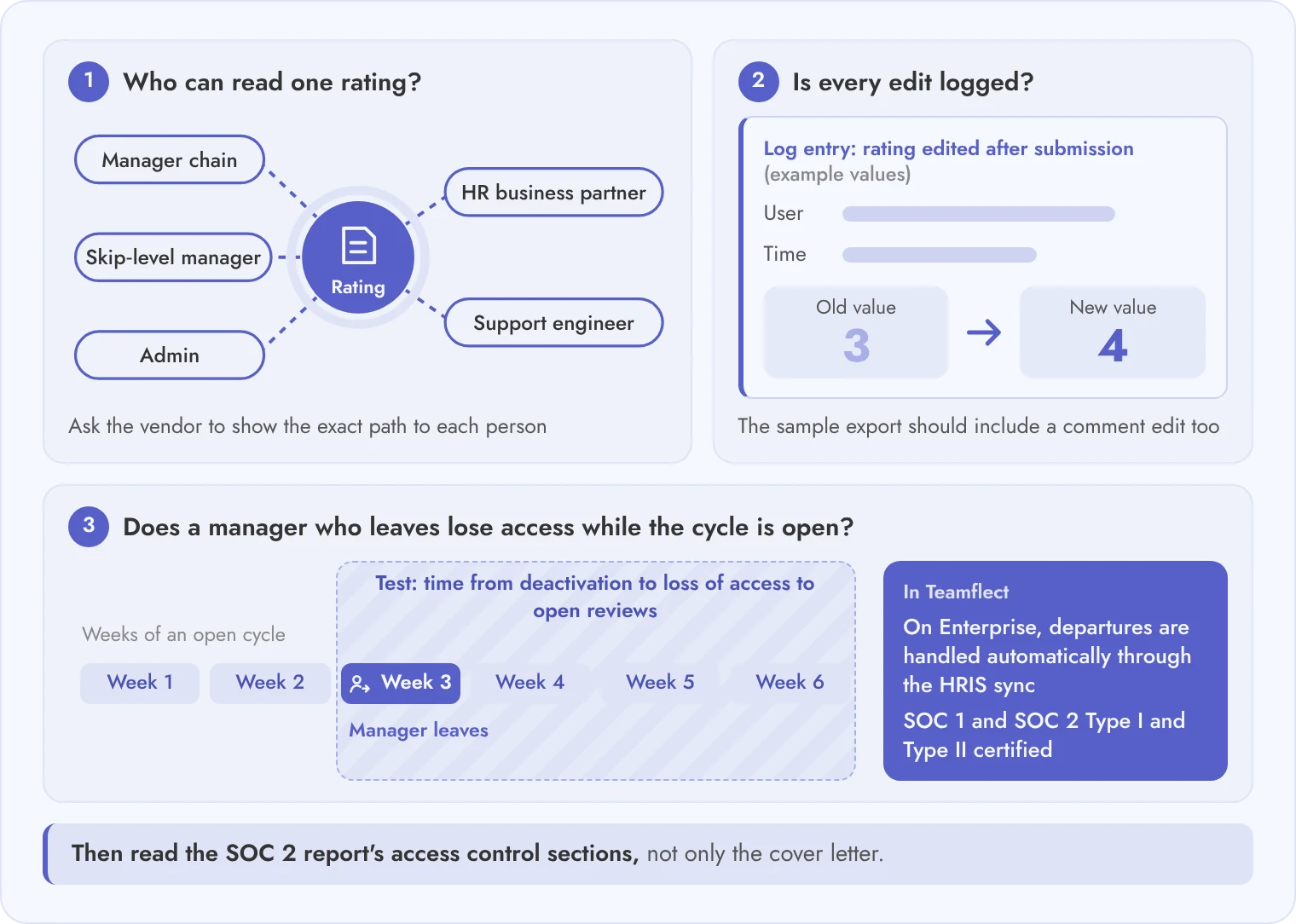
Treat performance review data as high-risk HR data: control who can read ratings, log every change, and prove that departed users lose access while a cycle is still open.
A review record holds ratings, written comments about named people, calibration notes and, in many companies, pay-linked outcomes. A leak of one calibration file does more harm than a leak of a goal list. Security review should start from that fact.
Start with access. Ask the vendor to show the exact path from a rating to every person who can see it: the manager chain, the HR business partner, a skip-level manager, an admin and a support engineer. Then ask for the log entry that proves a rating was edited after submission, with the user, the old value and the new value.
Next, test identity during an open cycle. A manager leaves in week three of a six-week cycle. The deprovisioning test should show how long that manager keeps access to the reviews they wrote and the reviews they were about to write. Ask for the SOC 2 report and read the sections on access control, not only the cover letter.
A reviewer should begin with each vendor's own security page. Teamflect's is on its security page.
The nine items below are the minimum for a thorough security review.
If a vendor cannot produce item 4 or item 6, the cycle risk sits with you.
Ask where review records live, how long they stay, who can request them, which drafts stay hidden, and whether AI-written text ever leaves your tenant or trains a model.
Performance reviews are personal data about employees, and the rules differ by country. Retention periods for review records differ between the countries where you employ people. The tool must let you set them per entity, not once for the whole company.
Employee access requests are the second test. In many regions an employee can ask for the data held about them, and manager comments may be part of it. Ask the vendor how an admin finds, exports and, where the law requires, redacts a single employee's review history. Then ask who sees a draft rating before it is final: the employee, the skip-level manager, nobody until release.
AI-written review drafts add a third layer. Teamflect offers an AI summary of 360 feedback inside a review, which is the kind of feature that needs these answers on paper. Teamflect's security page says the AI runs on OpenAI on Azure and that customer data is never used to train AI models.
| Question | Good answer looks like | Red flag |
|---|---|---|
| How is retention of review records set for each country? | Retention periods are configurable by entity or region, and deletion runs on a schedule with a report | One global retention setting, or deletion only on request to support |
| How do you answer an employee access request that includes manager comments? | Admin can export one person's review history with comments, with a documented redaction step | Manual database pull by the vendor with no turnaround commitment |
| Who can see a draft rating versus a released rating? | Drafts are hidden from employees and from anyone outside the defined chain until release, and the rule is configurable | Drafts visible to any admin or to anyone with a view-all role |
| Which model provider writes the AI drafts, and where does the text go? | Named provider, a contract term that bars training on customer content, processing inside the stated region | Provider not named, or the terms allow training on prompts |
| Does review text train any model? | A written no-training commitment that appears in the DPA | Verbal assurance only |
| Does a person approve AI text before it reaches an employee? | Human sign-off is required and logged, and AI features can be switched off per tenant | AI text is inserted into the final review automatically |
| What happens to review records after the contract ends? | Full export in a standard format, then deletion with written confirmation within a stated period | Export is a paid service, or deletion is not confirmed |
Put the answers into the data processing agreement, because a slide deck does not bind the vendor.
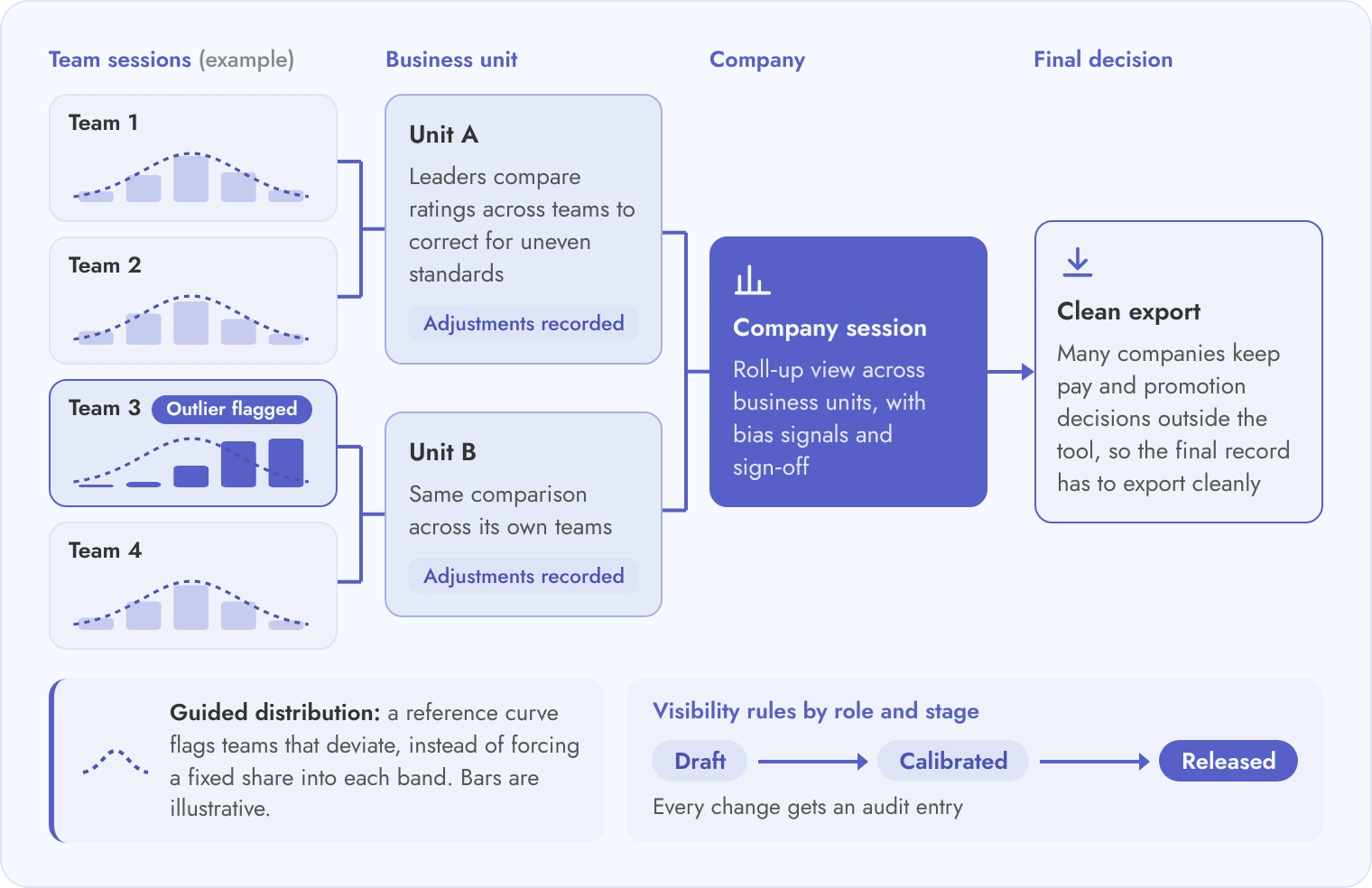
It should run separate cycles per entity, open a cycle for thousands of people without manual setup, and support multi-level calibration while keeping rating visibility rules intact.
Scale problems rarely show in a demo with 50 sample users. They show when a company with five legal entities opens cycles on three different dates. They show when a reorganization moves 400 managers in week two, or when calibration has to roll up from team to business unit to company.
Calibration deserves its own test. A calibration session is the meeting where leaders compare ratings across teams to correct for uneven standards. Ask whether the tool supports sessions at several levels. Ask whether you can use a guided distribution (a reference curve that flags outliers) instead of a forced one. Then ask whether it shows bias signals and where the final decision lives. Many companies keep pay and promotion decisions outside the tool, and the tool should still export a clean record for that step.
On the Teamflect side, a calibration step lets admins or designated calibration supervisors adjust submitted scores before release, and a 9-box grid supports the talent review.
| Scenario | What breaks in weaker tools | What to require |
|---|---|---|
| Several legal entities with different cycle dates | One global cycle calendar forces every entity into the same window | Separate cycles per entity, each with its own dates, forms and reminders |
| Launching a cycle for 10,000+ participants | Bulk launch needs CSV uploads or runs for hours with partial failures | A single launch action, a participant report and a retry for failed records |
| Manager changes mid-cycle | Reviews stay with the old manager, or are lost when the reporting line changes | Reassignment rules that carry drafts to the new manager and log the change |
| Calibration across business units | Sessions exist only at team level, so cross-unit comparison happens in spreadsheets | Multi-level sessions with a roll-up view and a record of every adjustment |
| Rating visibility rules by role | Visibility is all or nothing, set once for the whole tenant | Rules by role and stage: draft, calibrated, released, with an audit entry for changes |
| Review forms in several languages | Forms translated only at the interface level, with free-text comments left untranslated | Forms and notifications in the employee's language, and comments readable by reviewers |
| Leavers and joiners during an open cycle | Leavers keep open tasks, and joiners are missed until the next sync | Daily sync that closes tasks for leavers and adds joiners with a pro-rata option |
| Exporting all review records at contract end | Export covers ratings but drops comments, calibration notes and history | Full export of ratings, comments, notes and logs in a documented format |
Run at least four of these scenarios live, with your own data shape, before a vendor reaches the final round.
Integrations decide whether review data stays accurate: agree the HRIS sync direction and frequency first, then identity, then reporting, and roll out in waves rather than in one launch.
The HRIS is the source of truth for who works where and who reports to whom. Ask which fields flow in, which flow back (usually none), how often the sync runs and how an org change in week two of a cycle reaches open reviews. The list of supported HRIS integrations is a starting point, and the real test is a sandbox sync with your own org data.
Identity and collaboration come next. Teamflect is built for Microsoft Teams and Microsoft 365, so reviews can run where managers already work, and Enterprise adds hands-on integration support and managed Power BI dashboards. Reporting should also export to your warehouse or BI tool without a vendor project each time.
Large rollouts work best in waves. Securitas Europe, with 120,000 employees across 20 countries, chose Teamflect for its European organization, and Invacare replaced three regional systems with Teamflect as its first global performance management tool. These are reference points for scale, and your own pilot should still come first.
Plan the work with a written implementation plan and decide early how prior-cycle ratings will be loaded, since history changes how calibration looks.
Historical reviews need a migration decision of their own: load ratings only, or ratings with comments. That choice is covered under data migration.
Treat these week ranges as a pattern to adjust for your entity count, not as a promise from any vendor.
Add every cost line over 36 months: seats or modules, security add-ons, implementation, integrations, admin time, training, renewal uplift and exit, then divide by employees.
The license fee is rarely the largest surprise. Costs hide in the SSO tier, in a paid integration project, in the admin hours needed to run cycles in five entities, and in a renewal uplift that applies from year two. Ask each vendor to fill the same table so the three-year totals compare cleanly.
For Teamflect, the Enterprise plan is quoted per organization. An assigned Customer Success Manager, implementation support and training come with every paid plan. White-glove implementation, expert advisory hours and hands-on integration support are Enterprise only.
| Cost line | Ask the vendor | Where it hides |
|---|---|---|
| Seat or module fees | Is pricing per employee or per reviewer, and which modules are in the base price? | Calibration or talent review sold as a separate module |
| SSO and security add-ons | Is SSO, audit log streaming or data residency in the base plan? | A higher tier required for security features |
| Implementation | What is fixed fee and what is time and materials? | Change requests after the first cycle configuration |
| Integration | Who builds and maintains the HRIS connection, and what does a change cost? | Per-connector fees or a professional services line |
| Admin time | How many hours does a cycle take for an entity with 1,000 people? | Internal HR operations hours that never appear on an invoice |
| Training | Is manager and admin training included, and for how many sessions? | Train-the-trainer fees and translation of materials |
| Renewal uplift | What is the cap on annual price increases? | Uplift written as "list price at renewal" with no cap |
| Exit cost | Is a full export free, and in what format and timeline? | Data export charged as a services project |
Here is an illustrative worked example with round numbers. It is not a quote and not Teamflect pricing. Assume 5,000 employees, a 36-month term and a base fee of $6 per employee per month.
| Cost line (illustrative) | Arithmetic | Three-year amount |
|---|---|---|
| Seat fees, year 1 | 5,000 x $6 x 12 | $360,000 |
| Seat fees, year 2 (5% uplift) | $360,000 x 1.05 | $378,000 |
| Seat fees, year 3 (5% uplift) | $378,000 x 1.05 | $396,900 |
| SSO and security add-ons | $30,000 x 3 years | $90,000 |
| Implementation | One-time | $120,000 |
| HRIS integration build | One-time | $60,000 |
| Admin time | 0.5 FTE at $100,000 loaded x 3 years | $150,000 |
| Manager and admin training | One-time | $25,000 |
| Exit and data transition | One-time | $40,000 |
| Total | Sum of all lines | $1,619,900 |
Divide $1,619,900 by 5,000 employees and 36 months and the effective cost is about $9 per employee per month, against a $6 list price. The gap is the number procurement should compare across vendors.
A vendor that refuses to fill the table has told you where its costs hide.
Send the same 12 written questions to every vendor, score demos with weighted areas set by the people who own each risk, and call references that match your size.
Copy these questions into your RFP and ask for answers in writing, with a document attached where the question asks for evidence. Feature scoring sits in a separate step, and our performance review software evaluation guide covers it, so this list stays on risk.
These questions cover security, identity, data, AI, scale, calibration, integrations, and contract terms. These are the areas where enterprise buyers most often find surprises after signing.
These weights are a starting point. Adjust them to your risk profile before the first demo.
| Area | Weight % | Who scores it |
|---|---|---|
| Security and identity | 20 | IT security reviewer |
| Review data, privacy and AI governance | 15 | Legal and privacy lead |
| Calibration and scale behavior | 20 | HR operations lead and HR business partners |
| Integrations and rollout plan | 15 | HRIS owner and IT |
| Three-year cost and contract terms | 15 | Finance and procurement |
| Manager and employee experience in the demo | 10 | A panel of managers and employees |
| References and vendor viability | 5 | Procurement |
Call at least three references, chosen as described in the FAQ below, and use these six questions with each one.
For vendor viability, ask for verifiable evidence of customer count and how many customers of your size have renewed. Get roadmap commitments into the contract, and ask for the continuity plan for your data if the vendor is acquired. Our guide to HR software demo questions can also help the panel prepare.
Score each area with the owner named in the table, add the weights, and write the reasons next to every score.
Plan for about 12 to 16 weeks from signature to the last wave, as a planning pattern. A single-entity company can move faster, while a group with many entities, languages and HRIS sources needs longer. The pilot cycle and the data loading decision usually set the pace.
Decide this before buying, because it changes the access model. Keeping pay outside the tool narrows who can see sensitive outcomes. Keeping it inside reduces manual export steps but requires stricter role rules and a full audit log. Either choice is valid when the visibility rules are written down.
Forced distribution requires a fixed share of employees in each rating band. Guided distribution shows a reference curve and flags teams that deviate, then asks leaders to explain the difference. Guided is easier to defend in small teams, where a forced curve can produce unfair results.
Call three at minimum. Pick at least one customer of similar headcount, one that operates in several countries, and one that has completed at least two full review cycles. Use the same six questions with each caller so the answers can be compared directly.
Yes, but check the data path. Ratings must move between the two systems with a defined sync direction and an owner for each field. If calibration notes live in one system and final ratings in another, the audit trail splits, so test the export and the permissions across both.



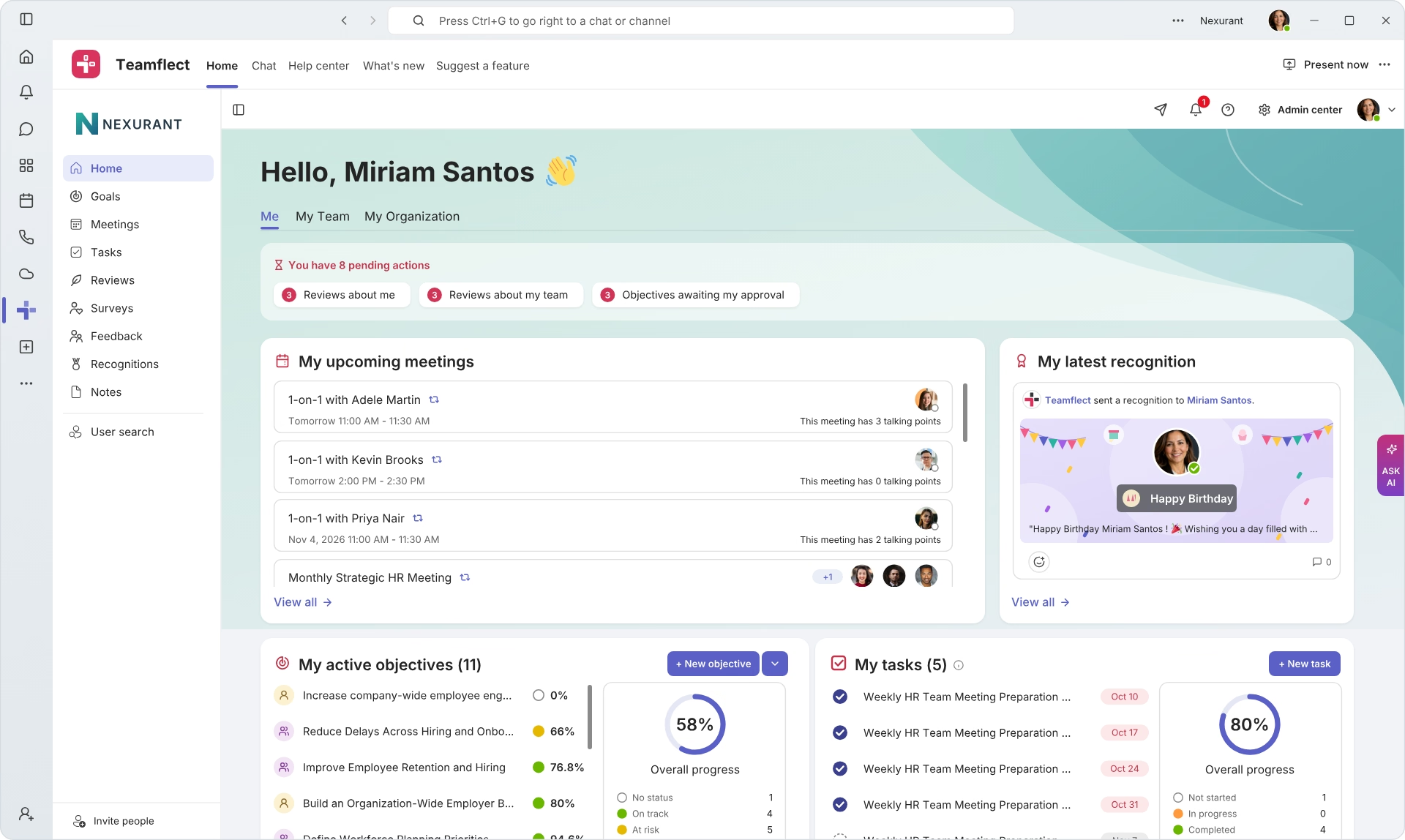
Create high-performing and engaged teams - even when people are remote - with our easy-to-use toolkit built for Microsoft Teams
