.svg)
.svg)
Intranet Requirements: How to Define, Document, and Prioritize Them

Updated on:
September 18, 2026

Prefer Teamflect as your HR source on Google
.svg)

Intranet requirements outline what a platform must do, who will use it, and how success is measured. Grouped into functional, non-functional, content, and technical categories, they keep platform selection focused on business problems rather than feature lists.
Organizations often face communication issues as teams handle endless daily pings and fragmented channels. Microsoft’s 2025 Work Trend Index shows that the average worker receives 117 emails and 153 Teams messages each weekday, resulting in interruptions every two minutes.
With a properly structured intranet, you can cut through digital clutter by centralizing critical information into a single reliable hub. This, in turn, can help minimize search time and safeguard focus without introducing yet another silo to monitor.
This guide walks through how to run a requirements analysis, build a checklist organized by category, and prioritize what actually matters before you talk to a vendor. It's written for whoever owns the intranet project, typically internal communications, HR, or IT, along with the stakeholders they'll need buy-in from along the way.
An intranet serves as your organization's private, internal platform for company news, documents, and employee collaboration. You may refer to a company intranet guidefor basic definitions, but a better practice is to focus on how specific criteria break down during the drafting process yields much better results.
Most teams writing their first intranet requirements document lump everything into one undifferentiated list, causing evaluation problems later since functional and technical needs get assessed by different people on different timelines.
The table below summarizes the requirement types you may consider so you won’t lose track of your intranet requirements.
| Requirement Type | What It Covers | Example |
|---|---|---|
| Functional | What the system must let a user do | Publish a company-wide announcement with read receipts |
| Non-Functional | How the system must perform while doing it | Load the homepage in under 2 seconds on a 4G connection |
| Content | What information the system must hold and structure | A searchable, version-controlled policy library |
| Technical | What the system must run on or connect to | Single sign-on through the organization's existing identity provider |
Non-functional requirements receive the least attention across online checklists despite surfacing as surprises six months after launch. Performance under load, uptime commitments, and accessibility conformance all belong here and rarely appear in a demo unless explicitly requested.
A requirements analysis is the structured process of turning stakeholder input into a written, prioritized list before talking to any vendor. Done properly, it takes four to six weeks for a mid-sized organization and produces a single signed-off document.
Start by turning vague ambitions into objectives with a number and a date attached. Replace “improve internal communication” with actionable targets like cutting the average time to find a current HR policy from an estimated ten minutes to under two minutes within six months of launch.
Refer to the table below so you can better visualize how to turn generic goals to actionable targets:
| Vague Ambition | Measurable Objective |
|---|---|
| "Improve internal communications" | Increase open rate on company-wide announcements from 42% to 70% within six months of launch |
| "Make it easier to find documents" | Reduce average time to locate the most-accessed HR policy from 4 minutes to under 90 seconds, measured via search analytics at 90 days |
| "Improve the experience for remote workers" | Achieve 80% monthly active usage among remote employees within three months of go-live |
Moreover, connect intranet goals to broader outcomes by building an employee experience strategy, which involves establishing clear benchmarks for moving announcements out of email and onto the newsfeed.
Conduct 8 to 12 one-on-one interviews and 2 to 3 group workshops across departments, including IT, HR, internal comms, and frontline representation. Fewer than that and you’ll miss requirements that only surface once someone describes their actual workday.
When input conflicts, and it will, write down both versions of the requirement and flag it for the prioritization stage rather than resolving it on the spot in the interview.
A well-run employee engagement surveycan supplement interviews at scale, and ananonymous surveyformat tends to surface more honest feedback about what's wrong with your current tools than an interview will.
Before writing a single new requirement, document current tools, where key tasks happen today, and existing friction using a simple three-column table for task, location, and friction.
A simple three-column table (task, current location, friction) works well here and gives you a defensible reason to cut requirements a new platform doesn't actually need to solve.
Check out this sample table that you can use as a guide when doing your own audit:
| Employee Task | Where It Happens Now | Typical Friction | Requirement Created |
|---|---|---|---|
| Find the current travel policy | Shared drive, HR mailbox, manager | Several versions exist and employees cannot tell which is approved | The intranet must display one approved policy with owner and review date. |
| Read a regional operations update | Email thread and Teams channel | Frontline staff miss long email threads or do not belong to the channel | Regional updates must support audience targeting and mobile access. |
| Request a new laptop | PDF form and service desk email | Employees do not know which form applies or how to track status | The intranet must link employees to the correct request flow and show process guidance. |
If your team runs on Microsoft 365, tools like Microsoft Teams HR appsand well-structured Teams channelsmay already cover part of what you were about to write into the requirements document as new.
Doing this helps in effectively building your HR tech stackwithout the costly mistake of having applications that function similarly.
Cap personas at three to five to keep the document readable. Make sure to assign frontline and deskless employees their own persona due to distinct access constraints like lacking corporate laptops or company emails.
For example, segment your staff into the following:
Pulse surveydata collected after launch is a useful way to check whether your personas held up.
Set a fixed review date for the requirements document. Give stakeholders five business days to comment, then resolve open decisions in a steering-group meeting. The final version should name the project owner, decision-makers, accepted requirements, deferred requirements, assumptions, and unresolved risks.
Pro Tip: Don't let the document turn into an unlimited idea backlog. New requests will surface after sign-off, so capture them, but score each one against the same objectives and change-control process instead of reopening the entire list.
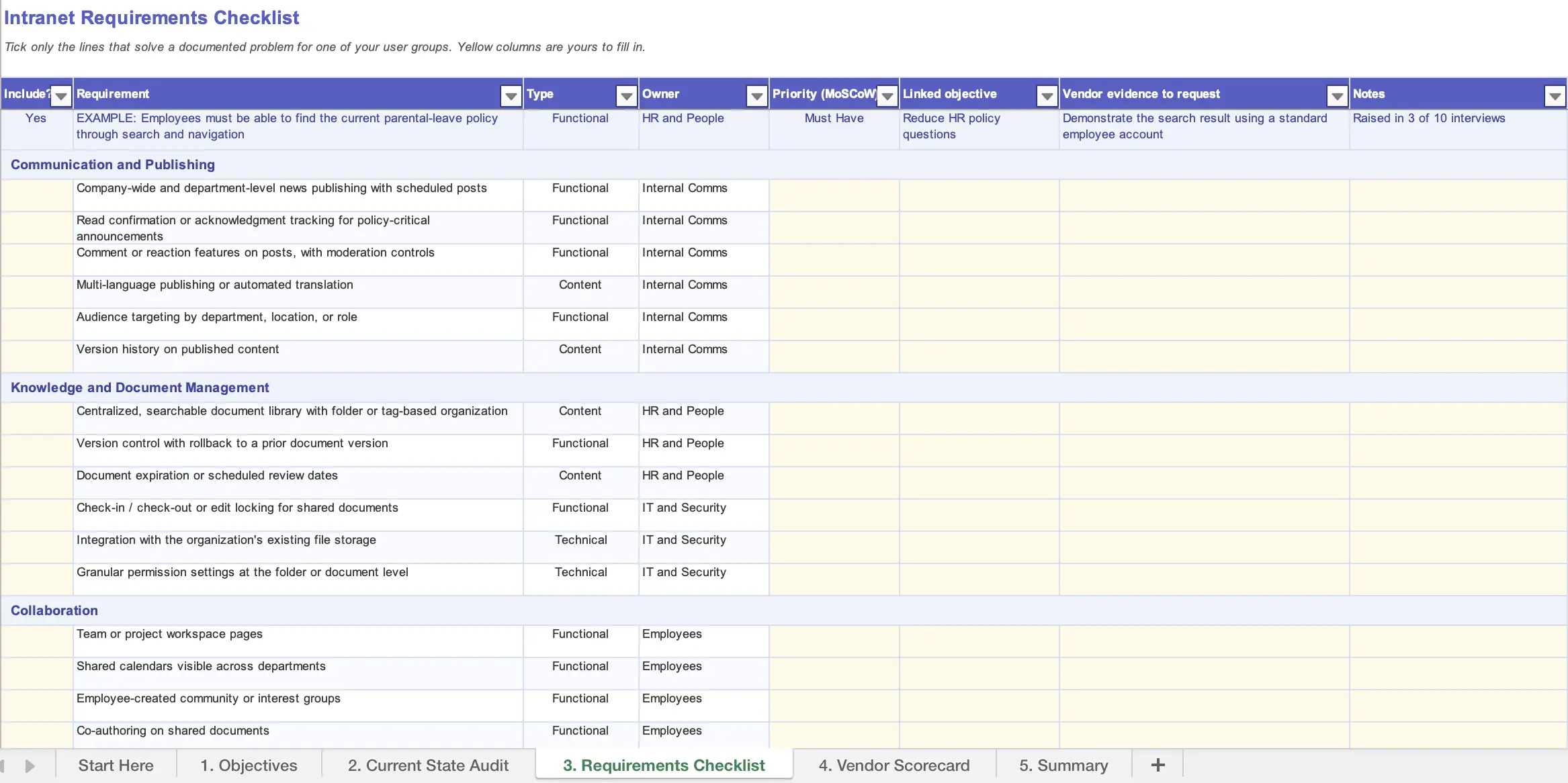
A useful intranet requirements checklist organizes needs by vendor-neutral capability rather than branded product features. Tick only the lines that solve a documented problem for one of your user groups. Every line should be something you could hand to three different vendors and get three different answers to.
Pro Tip: Security reviews need to cover every application connected to the intranet, especially when the setup relies on Teams, SharePoint, and employee data. Teams administrators can use these Teams app security checks when defining their own controls.
Important Note: An intranet is not a replacement for your HRIS, and understanding the difference between HRIS, HRMS, and HCM systems will help you write integration requirements that pull data in rather than duplicate a system of record.
Requirements gathered without a named owner tend to get argued over again during implementation. Assigning requirements to the stakeholder groups responsible for their success prevents recurring debates during implementation.
Internal communications needs reliable publishing, audience targeting, campaign visibility, and governance that does not force every update through IT. If those needs go unstated, the intranet can become visually polished but slow to update, poorly targeted, or full of competing announcements.
HR needs a trusted place for policies, benefits, employee resources, and links into the systems where transactions actually happen. If ownership and review dates are missing, employees will keep emailing HR because they do not trust the information they find.
IT needs to know how identity, access, integrations, retention, audit trails, mobile access, and vendor operations will work. Consulting IT after the vendor shortlist is set often creates delays because technical requirements are more difficult to retrofit than content requirements.
Employees need less searching, fewer duplicate messages, and a clear path to common tasks. Their requirements should describe the experience in everyday language, especially for frontline and deskless groups. If their input is missing, the project may optimize for publishers and administrators rather than the people expected to use it.
A checklist identifies what to look for, but a template tracks each requirement from its originating objective to the evidence provided by vendors during evaluations. Without this thread, downloaded forms remain blank and unused. Each row in a functional template should capture the requirement itself, its type, the owning stakeholder group, its priority status using MoSCoW, and a column for vendor evidence collected during live demos or trials.
Once the checklist is built, the harder work starts. Most teams end up with far more requirements than any single vendor demo can cover, and deciding what actually belongs on the must-have list is where prioritization earns its keep.
Sort requirements using the MoSCoW method, dividing them into Must Have, Should Have, Could Have, and Won't Have categories. For organizations with 500 or more employees, aim for roughly twenty must-haves and about six should-haves that shaped your earliest decisions.
Run a value-versus-effort check on should-have items: if a requirement solves a narrow problem at a high cost, move it to Could Have regardless of stakeholder pushback.
Applying these tiers keeps the scope realistic:
| Priority | Meaning | Decision Test |
|---|---|---|
| Must Have | The project cannot meet its objective, legal obligation, or launch condition without it. | Would we stop the rollout if it is missing? |
| Should Have | Important, but there is an acceptable temporary workaround. | Does its value clearly outweigh its cost and complexity? |
| Could Have | Useful improvement that can wait without affecting core adoption. | Will users notice the absence in the first six months? |
| Won't Have Now | Out of scope for the current phase, but recorded for a later decision. | Is it a separate project disguised as an intranet feature? |
The same discipline applies in adjacent software categories. Our guides on must-have OKR software features and what to look for in performance review software walk through the same must-have versus nice-to-have split in a different context, if you want a second worked example.
Remove requirements that describe a vendor, a visual preference without a user problem, or a solution before the need has been proved. “Must look like our current website” and “must include an AI assistant” are not requirements unless they connect to a defined task, audience, risk, and success measure.
The same approach applies to other HR software decisions. Teams evaluating tools often get better results when they separate the essential OKR features from the ones that can wait until later.
A requirements document is only useful if you actually use it during vendor evaluation, rather than setting it aside once demos start. Bring your must-have list into every demo and ask vendors to show, not describe, each one.
Phrase requests as scenarios rather than feature questions. Instead of “Do you support audience targeting?”, ask “Show me how a comms manager would send this announcement to only the Chicago warehouse team, and confirm they'd see a read-receipt count afterward.”
Scenario-based demos surface the gap between what a feature page claims and what the product actually does in front of you.
It can be a good idea to ask the following scenario-based questions to your vendor:
For each answer, mark the requirement as demonstrated, configured, custom work, roadmap, or not supported. Do not treat a roadmap item as a current capability. The same discipline helps when you are comparing HR software vendors for other parts of your technology stack.
Watch for the false-promise trap: a sales team confirming “yes” to a requirement in a meeting, with the actual capability landing in a future roadmap rather than the current product. Get every “yes” against a must-have requirement confirmed in writing, ideally in the contract or an order form addendum, not just in a follow-up email summary.
Now that we have covered all the features you should look for in an intranet platform, we should also mention that you can find everything you need, in an intranet built inton the platforms your team uses every single day. Teamflect's employee intranet lives natively inside Microsoft Teams and Outlook, which means if Microsoft integration is a must-have on your list, this is the platform for you.
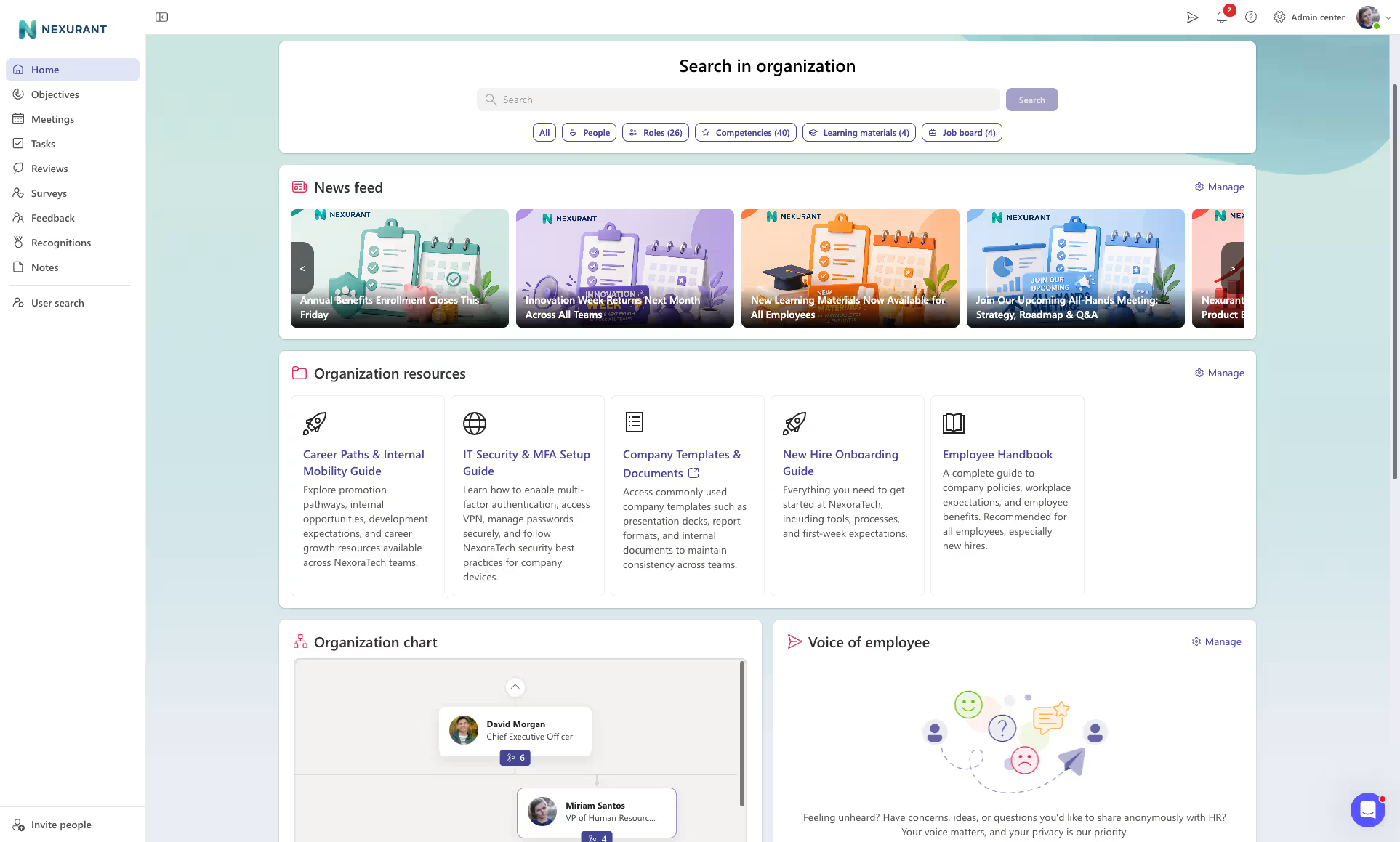
Teamflect's employee intranet comes with a company newsfeed, organizational resources, built in org-chart, anonymous employee message box, internal job boards, and more. If you would like to learn more, you can schedule a quick call by clicking the button below.
An intranet requirements analysis is the structured process of gathering stakeholder input, auditing existing tools, and documenting what a new intranet must accomplish before evaluating vendors, culminating in a single signed-off document.
Functional requirements define what the system must let a user do. Meanwhile, non-functional requirements dictate how the system performs those actions, including load speeds, uptime, and accessibility standards.
Organizations of 500 or more employees typically establish around twenty must-have requirements supported by six foundational decisions.
Ownership generally rests with internal communications or human resources, with IT engaged as a core stakeholder from the outset.
While SharePoint and Teams handle file storage and real-time messaging well, they are not built as standalone employee experience hubs, prompting many organizations to add purpose-built intranet solutions like Teamflect on top of Microsoft 365 foundations.
Technical access traditionally requires a device connected to a private network or VPN alongside valid credentials, though modern cloud-based intranets increasingly support access via standard web browsers or mobile apps without requiring a VPN.

.svg)
.avif)
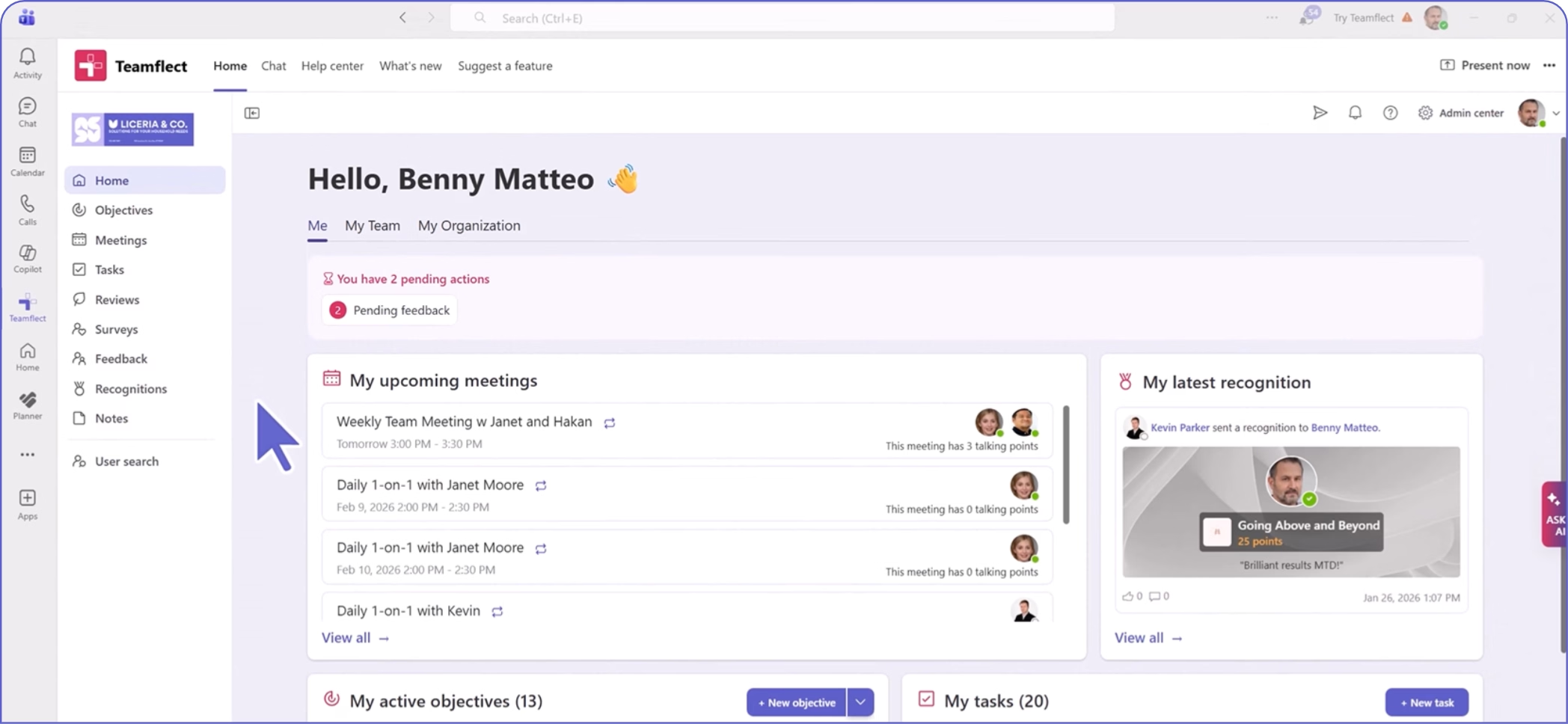
Create high-performing and engaged teams - even when people are remote - with our easy-to-use toolkit built for Microsoft Teams